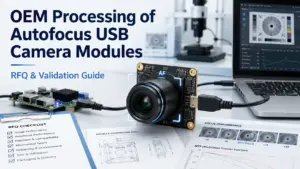
Choosing an autofocus USB camera module for an OEM project is not only a product-search task. A product title may mention autofocus, USB, UVC, 4K, 5MP, 8MP, or a sensor model, but that does not prove the module will fit your enclosure, host software, working distance, lighting, cable route, or validation method.
For OEM processing, the useful question is not simply “Which autofocus USB camera module is available?” A better question is: What must be confirmed before quotation, sample testing, and production discussion?
This guide helps OEM/R&D engineers, sourcing teams, and procurement buyers prepare a clearer RFQ for an autofocus USB camera module project. It focuses on application conditions, autofocus behavior, optical fit, USB/UVC host checks, mechanical details, document requests, and sample-validation planning.
What Should You Confirm Before OEM Processing?
Before requesting OEM processing of an autofocus USB camera module, confirm the application, working-distance range, focus behavior, lighting, FOV, resolution needs, USB/UVC expectations, host operating system, software stack, board-space limits, cable and connector requirements, quantity estimate, destination, sample-validation method, and required documents. Treat “autofocus,” “UVC,” and “plug-and-play” as items to verify for the selected module and host setup, not as universal guarantees.
What OEM Processing Means for an Autofocus USB Camera Module
In this article, OEM processing means a project-review path for adapting or selecting an autofocus USB camera module around a buyer’s application. It may involve checking whether an existing module fits, whether small modifications are needed, or whether deeper customization should be discussed.
The exact process depends on the supplier, the module platform, and the application. A safe RFQ process usually starts with requirements, not with a product title.
| OEM Processing Stage | Buyer Input Needed | Supplier Review Focus | Validation Output | Claim Boundary |
|---|---|---|---|---|
| Requirement collection | Application, object type, working distance, lighting, host system, size limits | Whether the request is clear enough for module review | A more complete technical inquiry | Does not imply every request is feasible |
| Module platform review | Resolution target, FOV, USB version, board size, cable, connector | Whether an existing platform may fit the project | Candidate module direction | No product specs should be claimed without datasheet review |
| Modification review | Lens/FOV, cable, connector, mounting, image settings, mechanical limits | Whether limited changes may be possible | Modified-module discussion points | No cost, lead time, or feasibility guarantee |
| Sample validation | Test scene, host device, software, lighting, distance range | Whether the sample behaves acceptably under target conditions | Test feedback and adjustment notes | No universal performance claim |
| Document and production-readiness discussion | Quantity estimate, destination, required documents | What documents and commercial details need confirmation | Next-step discussion | No certificate, MOQ, lead time, or capacity claim unless confirmed |
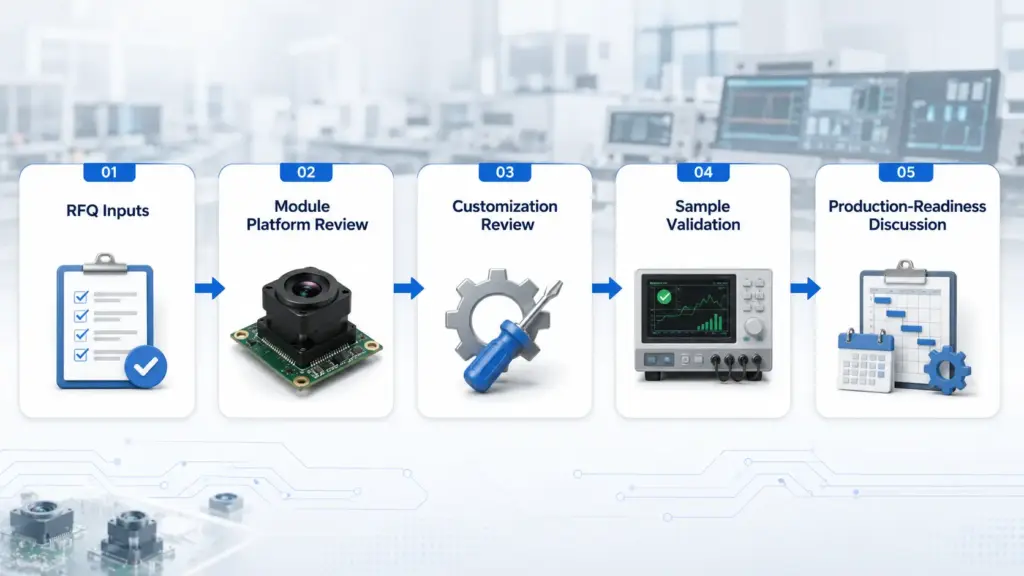
This workflow is useful because autofocus behavior is application-sensitive. A module that looks suitable on paper may still need testing with the actual object distance, lighting, host software, and mechanical layout.
For a related article on a specific 4K USB camera module RFQ path, see OEM Processing of 4K USB Camera Modules.
Standard Module vs Modified Module vs Full Custom Development
Not every OEM project needs full custom development. Some projects can begin with a standard autofocus USB camera module. Others need limited changes, such as cable, connector, lens/FOV, or mounting review. More complex projects may need deeper custom development.
The right path depends on the application, validation risk, and what the supplier can actually support for the chosen platform. You can also review related USB2.0 camera module options while keeping product-specific claims separate from this RFQ guide.
| Path | Best Fit | Typical Buyer Input | Validation Focus | Risk to Avoid |
|---|---|---|---|---|
| Standard module | The module already matches the main optical, USB, size, and host requirements | Application, target resolution, working distance, host system, quantity estimate | Confirm image quality, autofocus behavior, and host compatibility in the real setup | Assuming the product title proves fit |
| Modified module | The base module is close, but details need adjustment | Lens/FOV target, cable length, connector, mounting, image-setting needs | Confirm that the modified details still work in the target enclosure and host system | Assuming every modification is available |
| Full custom development | Existing modules do not fit key optical, electrical, mechanical, or software constraints | Drawings, interface requirements, test conditions, validation criteria, project timeline expectations | Confirm feasibility, samples, documents, and engineering review scope | Starting custom work before requirements are clear |
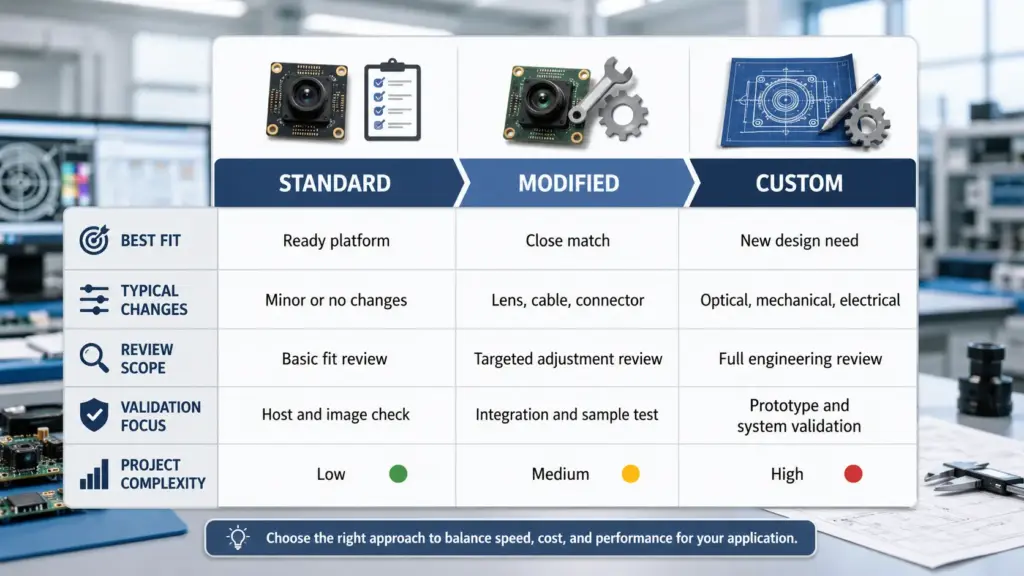
A practical RFQ should not force a custom path too early. First, define the application and test conditions. Then the supplier can review whether a standard or modified module is a reasonable starting point.
Autofocus Details to Confirm Before Sample Testing
“Autofocus” is not a complete requirement. For an OEM project, autofocus should be described as a behavior to validate.
A buyer should explain what the camera needs to focus on, how far the target is from the lens, whether the target moves, what the lighting looks like, and whether the host software needs any focus control. Linux V4L2 documentation includes focus-related controls such as focus absolute, focus relative, continuous autofocus, autofocus start, autofocus stop, and autofocus status; this supports the need to ask whether the selected module exposes the controls required by the host/software stack. See the Linux V4L2 camera control reference for general context.
| Autofocus Condition | Why It Matters | What to Send in RFQ | What to Test | Evidence Needed Before Claiming |
|---|---|---|---|---|
| Working-distance range | Autofocus behavior can change when object distance changes | Minimum and maximum expected distance from lens to target | Focus behavior across the expected range | Product-specific focus range or distance data |
| Static vs moving target | Moving objects may need different validation than stationary objects | Whether the object moves, pauses, rotates, or passes through the scene | Focus response in the target motion condition | Product-specific autofocus performance data |
| Lighting | Low, uneven, or reflective lighting can affect image evaluation | Lighting type, brightness condition, reflection risk | Sample image under real lighting | Test images or sample report |
| Object texture and contrast | Smooth, shiny, or low-contrast objects may be harder to evaluate | Object material, surface texture, contrast level | Focus behavior on real target samples | Test results under target condition |
| Startup behavior | Some applications need stable focus soon after device start | Whether startup focus behavior matters | Power-on and software-start tests | Product-specific behavior record |
| Manual focus / focus lock need | Some inspection or embedded use cases need stable focus after adjustment | Whether software control, focus lock, or manual focus is required | Host/software control test | Module control documentation |
| Host software | Autofocus controls may depend on what the module exposes and what the software can access | Operating system, application software, SDK or library expectation | Test in the target host/software environment | Module and software compatibility evidence |
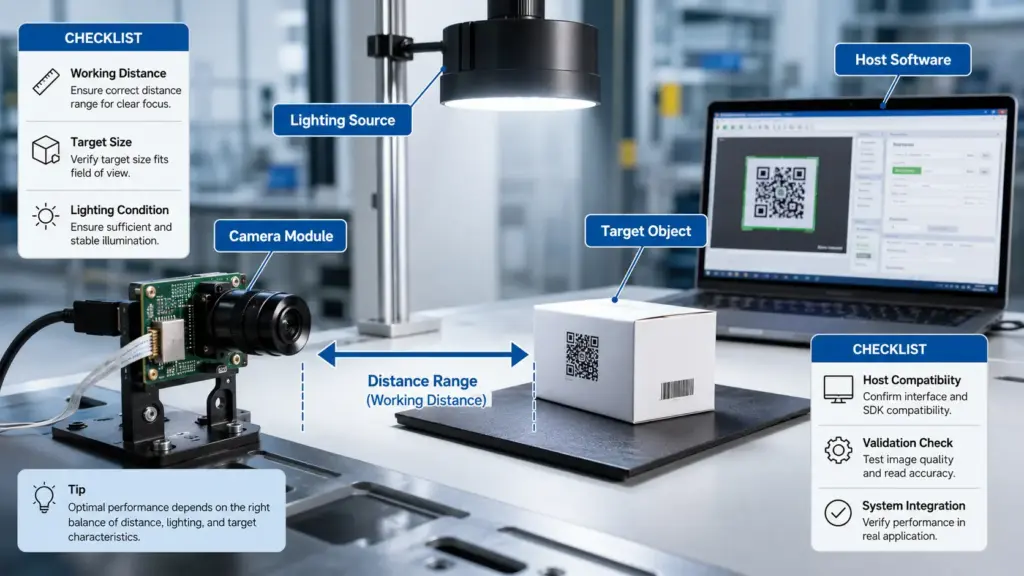
Avoid asking only, “Is it autofocus?” A better RFQ asks, “Can the selected module be tested under this working-distance range, lighting condition, target movement, and host software setup?”
Optical and Application Fit Factors: Working Distance, FOV, Resolution, and Lighting
Autofocus does not replace optical selection. The camera still needs the right field of view, working distance, resolution, sensor/lens fit, lighting condition, and depth-of-field behavior for the application.
For imaging lens selection, working distance, field of view, and resolution are core constraints before proper lens selection can happen. Edmund Optics also defines field of view as the viewable object area captured by the imaging system, and defines working distance as the distance from the lens surface to the object under inspection. See Edmund Optics basic lens selection and imaging fundamentals for general optical context.
Use this checklist before selecting or modifying an autofocus USB camera module:
| Factor | What to Confirm | Why It Matters |
|---|---|---|
| Working distance | Distance from lens to object in normal use | Affects lens choice, focus behavior, and physical layout |
| Field of view | Object area that must fit in the image | Helps match lens and sensor to the actual scene |
| Resolution need | Detail that must be visible or measured | Higher resolution may not improve the result if optics, lighting, or host bandwidth are not suitable |
| Lighting | Brightness, direction, flicker, reflection, low-light condition | Affects image evaluation and autofocus testing |
| Depth of field | Range that should remain acceptably sharp | Important when objects vary in height or distance |
| Target material | Texture, contrast, reflectivity, transparency | Affects focus evaluation and image stability |
| Test target | Real object, sample part, barcode, face, label, machine part, or other target | Helps avoid testing only with ideal scenes |
For OEM processing, the buyer should describe the actual scene. A sample tested on a desktop may not behave the same way when installed inside a kiosk, scanner, robot, inspection device, or industrial enclosure.
USB, UVC, Host System, and Software Checks
USB and UVC labels are useful, but they should be validated for the selected module and host environment.
UVC refers to the USB Video Class specification family. USB-IF publishes the Video Class v1.5 document set, including the UVC v1.5 class specification and related payload documents. Microsoft states that Windows provides an inbox USB Video Class driver for devices compliant with UVC versions 1.0 to 1.5, starting in Windows 10; see the Microsoft UVC implementation guide.
That does not mean every module will behave the same way on every host, software stack, cable setup, or operating system. A compliant device may use a standard class driver in supported conditions, but the actual project still needs confirmation of device behavior, exposed controls, bandwidth, frame format, and software access.
| Check Item | What to Ask | Why It Matters | Safe Wording |
|---|---|---|---|
| USB version | Is the target setup USB 2.0, USB 3.x, or another interface path? | Bandwidth and host support can affect output choices | Confirm USB version for the selected module and host |
| UVC expectation | Is UVC behavior required? Which host will be used? | UVC assumptions affect driver and software planning | Confirm UVC behavior for the actual module |
| Operating system | Windows, Linux, Android, embedded Linux, or another platform? | Driver and application behavior can differ | Test with the target OS |
| Software stack | OpenCV, DirectShow, V4L2, browser, custom app, SDK, or other software? | Focus controls and camera parameters may not be exposed the same way everywhere | Confirm exposed controls before design lock |
| Output format | MJPEG, YUY2, H.264, or another format? | Output format affects bandwidth, image processing, and software support | Confirm format from module documentation |
| Frame rate target | What frame rate is actually needed in the application? | Higher frame rate may increase bandwidth and processing load | Confirm under target resolution and host setup |
| Cable and connector | Cable length, connector type, routing, shielding, and host location | Physical routing may affect reliability and integration | Test with the planned cable path |
| Sample test method | Which host and software will be used for sample approval? | A sample should be tested in the real target environment | Validate before production discussion |
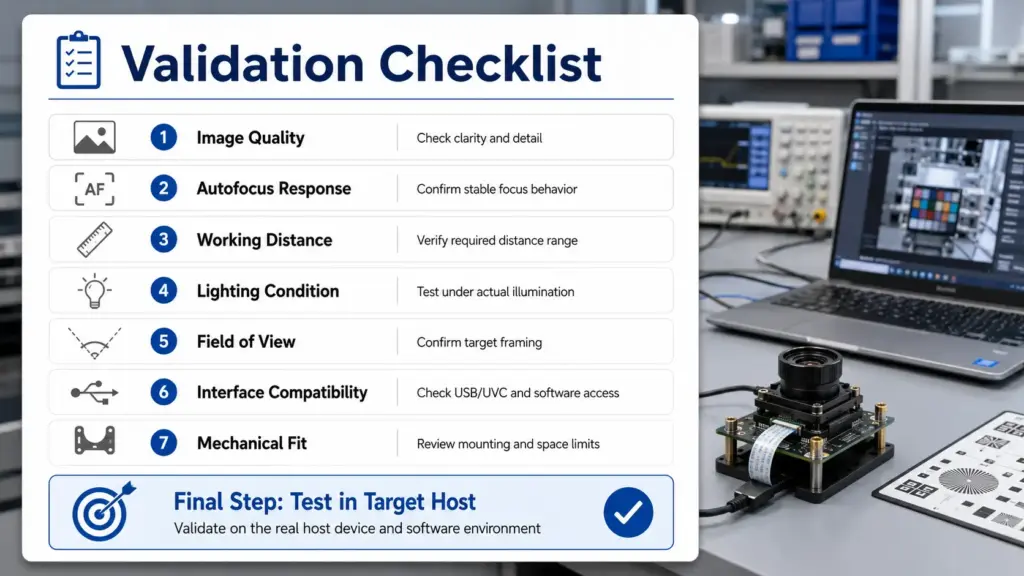
The safest approach is to write the RFQ around the target system: host device, OS, application software, USB path, output format, cable length, and focus-control needs.
Mechanical and Integration Details to Include in the RFQ
An autofocus USB camera module must fit the physical product, not only the electrical interface. Mechanical details often decide whether a module can move from sample testing into a real OEM design.
Include these details when available:
| Mechanical Detail | What to Provide | Why It Helps |
|---|---|---|
| Board size limit | Maximum PCB length, width, and height | Helps review whether a standard board can fit |
| Mounting space | Hole position, bracket needs, enclosure drawings | Helps avoid late-stage mechanical conflicts |
| Lens height | Available depth from lens front to enclosure window | Helps check lens clearance and focus geometry |
| Cable length | Required length and routing path | Helps review integration and testing needs |
| Connector type | Host-side and module-side connector preference | Helps avoid mismatch during sample testing |
| Enclosure window | Glass/plastic window, thickness, coating, and distance from lens | Can affect focus and image quality |
| Operating layout | Module angle, target direction, vibration, movement, or heat source nearby | Helps design a realistic validation setup |
Do not assume that every cable, connector, PCB, or lens change is available for every module. Treat mechanical details as review inputs. The supplier can then confirm what is possible for the selected platform.
RFQ Checklist for Autofocus USB Camera Module OEM Processing
A complete RFQ reduces back-and-forth and helps the supplier review the project more accurately.
Use this checklist before requesting quotation, samples, or custom review.
| RFQ Item | What to Send | Notes |
|---|---|---|
| Application | Product type, use case, target object, environment | Example: kiosk, scanner, inspection device, robot, or other embedded system |
| Working-distance range | Minimum and maximum lens-to-object distance | Include real installation distance if known |
| Focus behavior | Continuous autofocus, one-time focus, focus lock, manual focus need, or “to be reviewed” | Do not assume control support; ask for confirmation |
| Field of view | Object size and viewing area | Send drawing or sketch if possible |
| Resolution need | Required image detail, not only megapixel target | Explain what must be recognized, inspected, or captured |
| Lighting condition | Indoor/outdoor, low light, reflective target, LED lighting, flicker risk | Include sample images if available |
| Host system | OS, processor platform, USB port, software stack | Include target hardware when possible |
| Output expectation | Image/video format, frame rate target, still capture or streaming | Confirm against selected module documentation |
| Mechanical limits | PCB size, mounting, lens height, enclosure window, cable path | Share drawings when available |
| Cable and connector | Length, connector type, orientation, routing | Test with planned cable if possible |
| Quantity and project stage | Prototype, sample, pilot, or production discussion | Use estimates; avoid forcing final volume too early |
| Destination | Country/region for shipping or project location | Helps quotation and logistics discussion |
| Documents needed | Datasheet, drawings, sample notes, test records, compliance documents if applicable | Ask what is available for the selected module/project |
A useful RFQ does not need to be perfect. It should be clear enough for technical review. Missing details can be marked as “to be confirmed,” but high-impact details such as working distance, host platform, mechanical space, and focus behavior should be discussed early.
Documents to Request Before Samples or Production Discussion
Documentation needs vary by module, supplier, and project stage. For a safe procurement workflow, ask what documents are available instead of assuming every document exists.
| Document Type | Why Ask | Safe Request Wording |
|---|---|---|
| Datasheet | Confirms main electrical, optical, and mechanical parameters | “Please confirm whether a datasheet is available for the selected module.” |
| Mechanical drawing | Helps enclosure and mounting review | “Please share available drawing files or outline dimensions if available.” |
| Cable/connector details | Helps host integration | “Please confirm cable and connector options for review.” |
| Sample test notes | Helps compare sample behavior against requirements | “Please advise what sample-validation notes can be provided.” |
| Image-setting notes | Helps software and image tuning discussion | “Please confirm what image controls or settings can be reviewed.” |
| Compliance or certificate documents | May be needed for customer-specific procurement | “Please confirm whether any relevant documents are available for this module/project.” |
| Packaging or shipping information | Helps procurement planning | “Please confirm available packaging and shipping details during quotation.” |
Do not treat document requests as proof. A certificate, test report, or compliance document should be used only after it has been provided and reviewed.
FAQ: OEM Processing of Autofocus USB Camera Modules
What is OEM processing for an autofocus USB camera module?
OEM processing means reviewing or adapting an autofocus USB camera module around a specific product application. It may include checking optical fit, focus behavior, USB/UVC expectations, host software, mechanical space, cable/connector needs, sample validation, and document requirements. The exact scope depends on the selected module and supplier review.
What should I prepare before requesting an OEM autofocus USB camera module?
Prepare the application, working-distance range, object size, field of view, resolution need, lighting condition, target host, software stack, USB/UVC expectation, board-space limits, cable and connector needs, quantity estimate, destination, and required documents. Add drawings, sample images, or test conditions when available.
When is a standard module enough, and when do I need customization?
A standard module may be enough if it already matches the optical, electrical, mechanical, and software requirements. A modified module may be needed when the base platform is close but details such as lens/FOV, cable, connector, or mounting need review. A deeper custom path should be discussed when existing platforms do not fit key application constraints.
What autofocus details should I confirm before sample testing?
Confirm the working-distance range, whether the target is static or moving, lighting conditions, target texture, startup behavior, and whether the host software needs focus lock, manual focus, or focus-control access. Do not rely only on the word “autofocus.” Test the selected sample under the target application conditions.
Does UVC mean the camera module is plug-and-play on every host?
No universal assumption should be made. UVC can support standard class-driver behavior for compliant devices in supported host conditions, but the selected module’s UVC behavior, exposed controls, output format, host OS, software stack, USB bandwidth, and cable setup still need confirmation.
Can autofocus be controlled, locked, or disabled through software?
It depends on the selected module, firmware, exposed controls, operating system, and software stack. Some host environments define focus-related controls, but that does not prove every module exposes them or that every application can access them. Ask whether the selected module supports the focus behavior required by your software.
What working distance or minimum focus distance should I specify?
Specify the minimum and maximum expected distance from the lens to the target object. Also describe whether the object moves, whether the distance changes, and what target must appear sharp. Avoid using another product’s minimum focus distance as proof for the selected module unless it is confirmed by the module’s own documentation.
What documents should I request before samples or production?
Ask what is available for the selected module and project. Common requests include datasheet, mechanical drawing, cable/connector details, sample notes, image-setting notes, test records, and compliance or certificate documents if applicable. Do not claim a document exists until it has been provided and reviewed.
CTA: Send Project Conditions for Technical Review
For an autofocus USB camera module OEM-processing inquiry, send the project conditions before asking for final quotation or samples.
Include:
- Application and target object
- Working-distance range
- FOV and resolution target
- Lighting condition
- Host operating system and software stack
- USB/UVC expectations
- Board-space and mounting limits
- Cable and connector needs
- Quantity estimate and destination
- Required documents or customer review requirements
A clear RFQ helps the technical review start with the right questions. It also reduces the risk of choosing a module based only on a product title instead of the real application conditions.