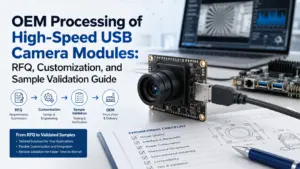
Choosing a custom autofocus USB camera module is not only a camera-spec decision. For an OEM project, the real question is whether the module can match the application, focus behavior, host system, mechanical space, validation plan, and procurement requirements.
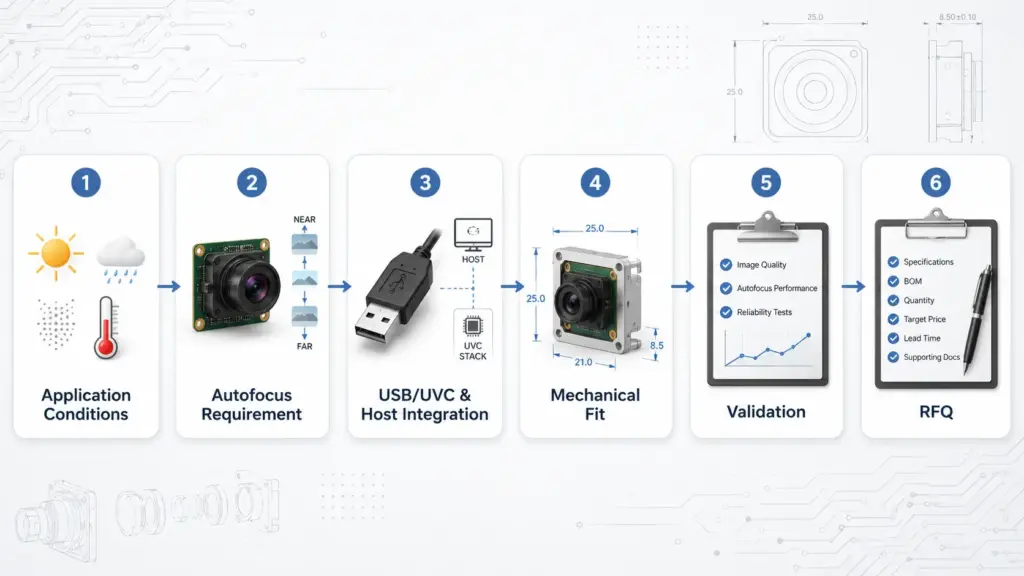
A resolution number or sensor name may be useful later, but it is not enough at the start. Before you ask for a quote, define how the camera will be used, what it must focus on, how it connects to the host, and what information the supplier needs to review technical fit.
What Should You Confirm Before RFQ?
Before requesting a quote for a custom autofocus USB camera module, confirm the application, working distance, focus range, object movement, lighting, lens/FOV target, USB/UVC and host requirements, board-size limits, cable and connector needs, quantity stage, validation method, and required documents. Treat MOQ, lead time, warranty, compliance documents, and sample timing as supplier-confirmed items, not assumptions.
Define the Autofocus Requirement First
“Autofocus” can mean different things in different projects. A camera used for a fixed-distance kiosk, a moving inspection target, a handheld device, or a compact device accessory may all need different focus behavior.
Autofocus may be useful when the target distance changes or when the user cannot manually adjust the lens. Fixed focus may be simpler when the object distance is stable and the camera position is controlled. The right choice depends on the actual working conditions.
Before comparing camera modules, define the autofocus requirement as a testable condition.
| Requirement | Why It Matters | What to Prepare Before RFQ | Supplier Confirmation Needed |
|---|---|---|---|
| Working distance | Focus behavior depends on the distance between lens and target. | Minimum, maximum, and normal working distance. | Whether the focus range can support the application. |
| Object movement | Moving objects may affect focus timing and image consistency. | Stationary, slow-moving, fast-moving, or user-handled target. | How the module should be tested under motion conditions. |
| Lighting | Low light, backlight, glare, or uneven light can affect image review. | Typical lighting condition and worst-case lighting condition. | Whether image tuning or lens changes should be reviewed. |
| Target size and detail | Small details may require different optical and image-output choices. | Target size, detail size, and required inspection or recognition task. | Whether the lens, resolution, and focus behavior fit the task. |
| Mounting position | Angle and distance may change during installation. | Mounting distance, angle, space limits, and enclosure design. | Whether the module can be evaluated in the final position. |
| Validation method | “Looks good” is not enough for OEM approval. | Sample test scene, target distance, host device, and acceptance criteria. | How sample testing should be performed before approval. |
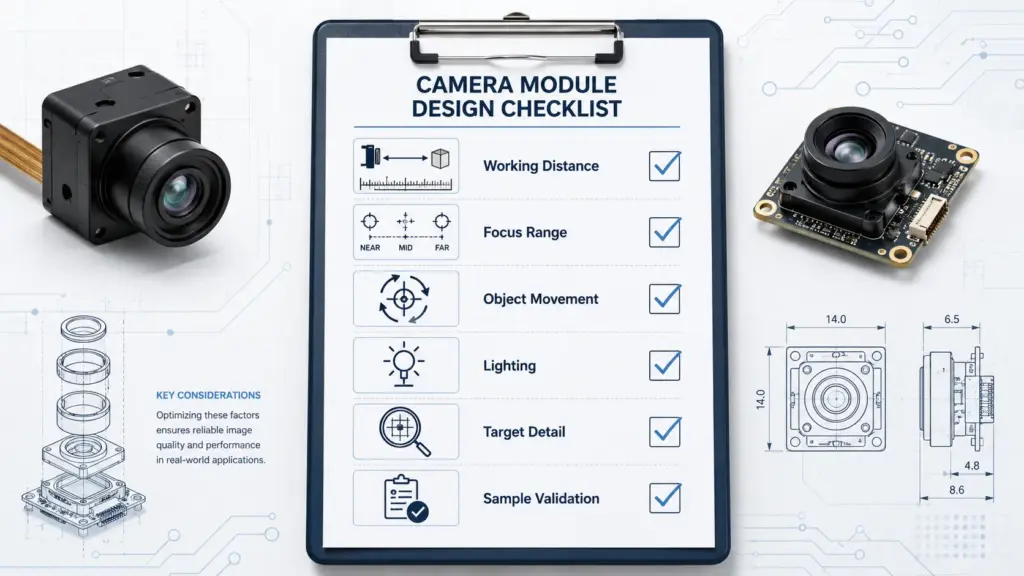
Do not treat “fast autofocus” as a guaranteed result from a product title. Treat it as a requirement to test under defined working distance, lighting, motion, host, and image-output conditions.
Build a Specification Matrix Before Supplier Review
A useful RFQ should help the supplier understand the whole camera system, not just the camera module. The clearer your specification matrix is, the easier it is to identify whether a standard module, a modified module, or a deeper custom design should be reviewed.
| Requirement Area | Details to Prepare | Why It Matters | Needs Supplier Confirmation |
|---|---|---|---|
| Application | Device type, use scenario, indoor/outdoor condition, target object. | Application context affects optical, mechanical, and validation decisions. | Yes |
| Image requirement | Resolution target, frame rate target, image format need, image quality concern. | Image output affects bandwidth, host processing, storage, and software. | Yes |
| Autofocus requirement | Working distance, focus range, movement, lighting, focus-control expectation. | Focus behavior must match real use conditions. | Yes |
| Lens and FOV | Field of view, viewing angle, depth need, distortion concern. | Lens choice affects coverage, detail, and mechanical fit. | Yes |
| USB and host | USB requirement, UVC requirement, host OS, software stack, multi-camera need. | Integration risk often appears at the host/software level. | Yes |
| Mechanical design | Board-size limit, mounting holes, enclosure space, cable routing, connector direction. | Physical fit can decide whether a module is usable. | Yes |
| Validation | Sample test method, approval criteria, test scene, host device. | OEM approval should be based on real test conditions. | Yes |
| Procurement | Quantity stage, target schedule, packaging, documents, commercial questions. | Procurement needs should be separated from technical assumptions. | Yes |
This matrix should not be used to force every requirement into the first version. It is a way to make trade-offs visible before engineering time is spent.
Standard, Modified, or Custom: Choose the Right Project Path
Not every OEM camera project needs a fully custom design. In many cases, the first decision is whether a standard module can support testing, whether a modified version is enough, or whether a custom design should be reviewed.
| Project Path | When It May Fit | Examples to Discuss | Validation Risk | RFQ Note |
|---|---|---|---|---|
| Standard module | Early prototype, stable requirements, acceptable size and lens. | Existing lens, board, cable, connector, and USB behavior. | Lower, but still needs sample testing. | Ask for current datasheet and sample availability. |
| Modified module | The base module is close, but one or more details must change. | Lens/FOV, cable, connector, board layout, image tuning, mounting needs. | Medium; changes may require retesting. | Ask what can be changed and what must be revalidated. |
| Custom design | The application has strict optical, mechanical, firmware, or integration constraints. | Board shape, enclosure fit, special cable routing, host-specific behavior, validation plan. | Higher; review scope and development path carefully. | Ask for engineering review, validation steps, and quotation conditions. |
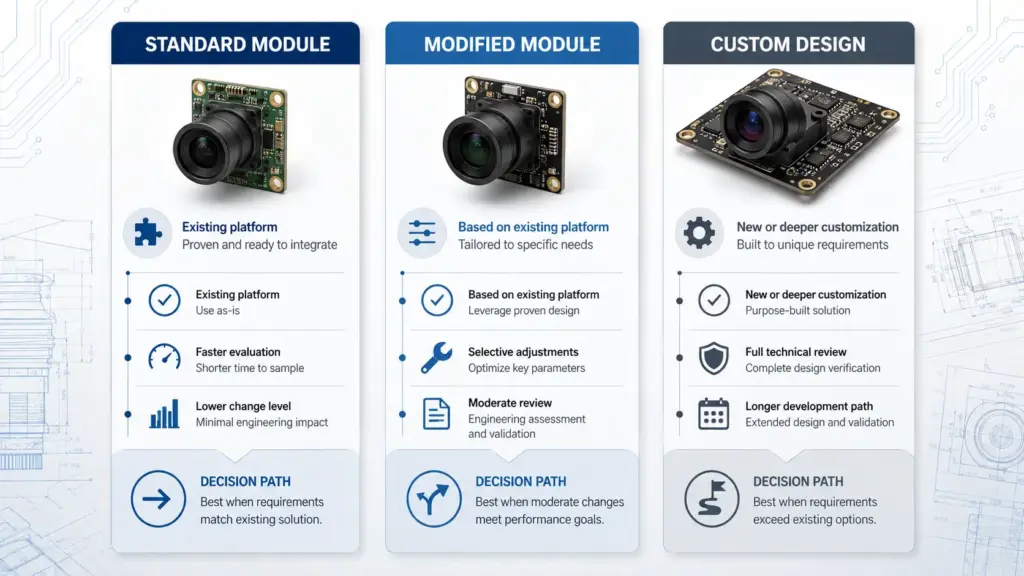
This table is not a promise that every supplier can support every change. Use it as a discussion framework. The selected supplier should confirm what is possible for the specific module, quantity stage, and validation requirement.
Check USB/UVC and Host Integration Early
USB camera modules are often selected because they can simplify connection to a host device, but “USB” alone does not answer the full integration question. You still need to confirm the host OS, USB bandwidth, stream format, camera controls, software stack, cable, power, and sample behavior.
UVC is a formal USB video device class with specification documents published by USB-IF, including the UVC v1.5 class specification and related payload documents. USB-IF provides the UVC v1.5 document set. Microsoft also documents that Windows 10 and later provide an inbox UVC driver for devices compliant with UVC specification versions 1.0 to 1.5. See Microsoft’s UVC camera implementation guide.
That does not mean every USB camera module will work exactly as expected in every host environment. The exact module, firmware, stream format, cable, power design, software controls, and target device still need testing.
| USB/UVC Check | What to Ask | Why It Matters |
|---|---|---|
| Host OS | Which operating system and version will run the camera? | Driver behavior and camera control access can vary by host environment. |
| UVC requirement | Is UVC required for this project? | UVC may reduce driver work in supported environments, but implementation still matters. |
| Stream format | What format does the software need? | Format affects bandwidth, CPU load, latency, and compatibility. |
| Frame rate and bandwidth | What frame rate is needed at the target resolution? | USB bandwidth and host processing must be reviewed together. |
| Camera controls | Does the application need focus control, exposure control, or other camera controls? | Control exposure through software must be confirmed for the selected module. |
| Cable and power | What cable length, connector orientation, and power condition are expected? | Cable and power choices can affect stability. |
| Multi-camera use | Will the host run more than one camera? | Bandwidth and software handling may become more complex. |
| Sample testing | What host and software will be used for approval? | Testing on the final or near-final host reduces integration surprises. |
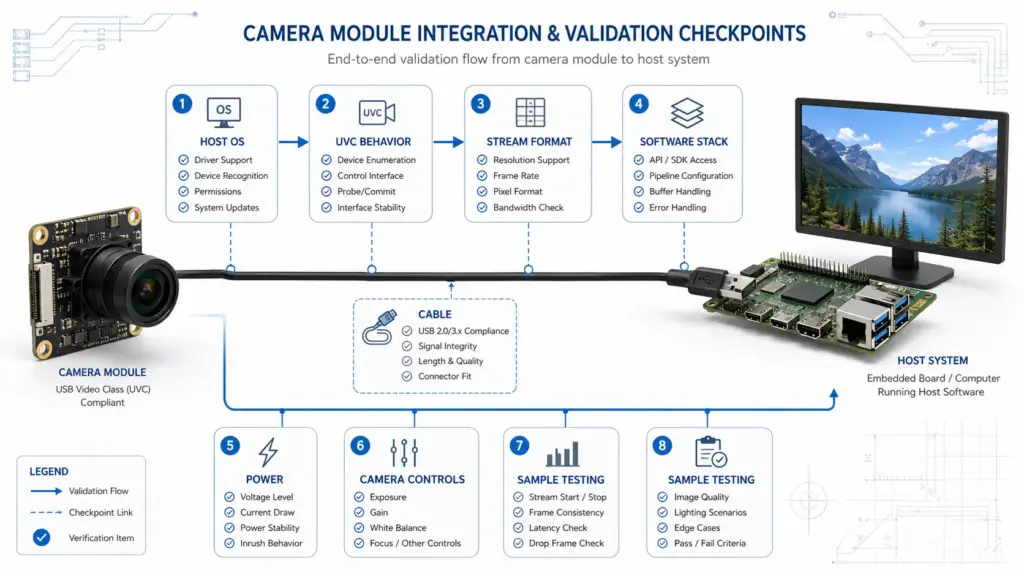
Avoid saying “plug-and-play with all systems.” A better requirement is: “Confirm UVC behavior and test the exact module with the target host, OS, cable, stream format, and software.”
Mechanical and Optical Fit Can Change the RFQ
Mechanical and optical details can change the project path as much as image specs do. A module that looks suitable on paper may still create problems if it does not fit the enclosure, lens position, cable route, or mounting method.
Before RFQ, prepare these details:
- Board size limit and available space.
- Mounting position and mounting method.
- Lens height and enclosure opening.
- Required field of view.
- Working distance and focus range.
- Cable direction and cable length target.
- Connector type or connector direction, if constrained.
- Host location and cable routing.
- Thermal or environmental limits, if relevant.
- Whether the camera will be installed once or handled by the end user.
For custom projects, ask which changes affect validation. A lens change, cable change, board change, or firmware/image setting change may require the sample to be tested again under real application conditions.
Ask for Validation and Documents Before Approval
A camera module should not move from sample review to approval only because the image looks acceptable in one quick test. OEM projects usually need a clearer validation process.
Ask the supplier what documents and test information are available for the selected module. Do not assume certificates, test reports, or compliance documents exist for every product or every market.
| Document or Validation Item | Why to Ask | Safe RFQ Wording |
|---|---|---|
| Datasheet | Confirms key electrical, optical, and mechanical information. | “Please provide the current datasheet for the proposed module.” |
| Drawing or mechanical file | Helps enclosure and mounting review. | “Please provide a drawing or mechanical information for fit review.” |
| Sample test notes | Helps compare sample behavior with project conditions. | “Please advise how the sample should be tested for our working distance and lighting.” |
| Software or driver notes | Helps host integration review. | “Please confirm UVC, OS, stream format, and camera-control behavior for our host.” |
| Image tuning notes | Helps clarify whether image output can be adjusted. | “Please advise whether image tuning needs supplier review for our scene.” |
| Compliance documents | Needed for regulated or market-specific projects. | “Please confirm which documents are available for this product and target market.” |
| Packaging or labeling details | Relevant for procurement and downstream handling. | “Please confirm available packaging and labeling options if required.” |
Keep document requests specific. “Do you have all certificates?” is less useful than asking which documents are available for the exact module, configuration, target market, and application stage.
RFQ Checklist for a Custom Autofocus USB Camera Module
Use the following checklist when preparing an RFQ or technical inquiry.
Application and Use Conditions
- What device or system will use the camera?
- What object or scene will the camera capture?
- Is the target stationary, moving, handheld, or user-positioned?
- What are the normal and worst-case lighting conditions?
- What is the working distance range?
- What detail must be visible or measured?
Autofocus and Optical Requirements
- Is autofocus required, or could fixed focus work?
- What focus range is needed?
- How quickly does focus need to respond in the real application?
- What field of view is required?
- Is distortion a concern?
- Are there enclosure or lens-height limits?
Image Output Requirements
- What resolution target is needed?
- What frame rate target is needed?
- What image format does the software expect?
- Are there latency, bandwidth, or storage limits?
- Does the application require image tuning?
USB, UVC, and Host Integration
- What USB interface is required?
- Is UVC required?
- What host OS and version will be used?
- What software stack will access the camera?
- Does the application need camera controls such as focus or exposure?
- Will one camera or multiple cameras run on the same host?
- What cable length and connector direction are required?
Mechanical Requirements
- What board size limit exists?
- Where will the module be mounted?
- What enclosure space is available?
- Is there a preferred cable path?
- Is a special connector needed?
- Are there vibration, handling, or environmental constraints?
Validation Requirements
- What sample test scene will be used?
- What host device will be used for sample approval?
- What image or focus result will count as acceptable?
- Who will approve the sample: engineering, product, quality, or procurement?
- Will the sample be tested in the final enclosure?
Procurement and Commercial Questions
- What is the prototype quantity?
- What is the expected production quantity stage?
- What target schedule should the supplier know?
- What documents are required?
- What packaging or labeling requirements apply?
- What MOQ, lead time, sample timing, warranty, and quotation terms should be confirmed?
Commercial items should be written as questions, not assumptions. This protects both engineering and procurement from planning around unconfirmed terms.
Common Mistakes to Avoid
1. Choosing by Resolution Alone
Higher resolution does not automatically solve focus, lens, lighting, bandwidth, host, or mechanical problems. Start from the application and work back to the camera requirements.
2. Assuming Autofocus Means the Same Thing in Every Scene
Autofocus behavior depends on distance, lighting, target detail, movement, and software expectations. Define the test conditions before judging whether a module fits.
3. Treating UVC as a Universal Compatibility Guarantee
UVC can help with driver planning in supported environments, but the final host, OS, stream format, camera controls, cable, and software still need validation.
4. Requesting Customization Without a Validation Plan
Changing the lens, cable, connector, board, firmware, or image settings may affect testing. Ask what must be revalidated before production approval.
5. Asking for “All Certificates” Instead of Project-Specific Documents
Document needs depend on the selected module, configuration, application, and market. Ask what documents are available for the exact project.
6. Mixing Technical Approval and Commercial Assumptions
MOQ, lead time, warranty, sample schedule, packaging, and quotation terms should be confirmed separately. Do not publish or plan around them until they are confirmed in writing.
FAQ
What should I confirm before buying a custom autofocus USB camera module?
Confirm the application, working distance, focus range, lighting, object movement, lens/FOV target, image output, USB/UVC requirement, host OS, board size, cable, connector, validation method, quantity stage, and required documents. Keep commercial terms such as MOQ, lead time, warranty, and sample timing as supplier-confirmed questions.
When should I choose autofocus instead of fixed focus?
Autofocus may be useful when the target distance changes, the end user handles the device, or the camera must capture objects at different positions. Fixed focus may be simpler when the working distance is stable and the camera is mounted in a controlled position. The right choice should be tested in the real application.
Does a USB camera module always work plug-and-play?
No. USB and UVC can simplify integration in some environments, but they do not remove the need for testing. Confirm the exact module, host OS, UVC behavior, stream format, camera controls, cable, power, and software stack before approval.
What can be customized in a USB camera module?
Customization discussions may include lens/FOV, board size, cable, connector, mounting design, firmware or image settings, and validation needs. The supplier must confirm what can be changed for the selected module and what must be retested.
What should an RFQ include?
A useful RFQ should include the application, working distance, focus behavior, lighting, image requirements, lens/FOV target, USB/UVC and host details, mechanical limits, cable and connector needs, validation method, quantity stage, document requirements, and commercial questions.
Are certificates or compliance documents available?
Do not assume they are available for every module or market. Ask the supplier which datasheets, drawings, test notes, software notes, and compliance documents are available for the selected product, configuration, and target market.
Send Project Conditions for Technical Review
To prepare a clearer inquiry, send the application conditions, working distance, focus requirements, lens/FOV target, USB/UVC and host details, board-size limits, cable and connector needs, quantity stage, validation plan, and document requirements.
A complete RFQ helps engineering review technical fit before cost, schedule, and commercial terms are discussed. It also reduces the risk of choosing a camera module that looks suitable by title but does not match the final device.