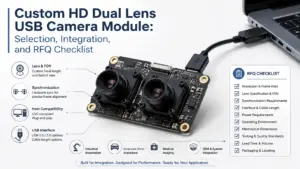
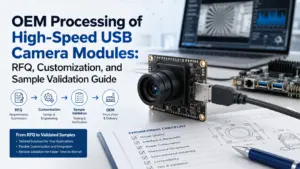
Choosing a custom HD dual lens USB camera module is not only a resolution decision. A module that looks suitable on paper may still create problems if the lens angle, working distance, synchronization behavior, board size, cable, connector, UVC implementation, host operating system, or software workflow is not checked before sampling.
For OEM buyers, engineers, and procurement teams, the better question is not “Is this camera HD?” The better question is: Will this dual lens USB camera module fit the application, integrate with the host system, and provide enough information for a qualified RFQ or sample review?
Before choosing a custom HD dual lens USB camera module, compare the application conditions, resolution, frame rate, lens angle, field of view, working distance, board size, USB/UVC behavior, host OS, software workflow, cable, connector, quantity, and document requirements. For dual lens projects, also confirm how the two image streams are exposed, synchronized, and validated before sampling.
What Is a Custom HD Dual Lens USB Camera Module?
A dual lens USB camera module is a compact imaging board with two lens/sensor paths and a USB interface for connection to a host device. In sourcing discussions, “HD” usually points to high-definition image output, but the final result depends on more than the resolution value.
A custom HD dual lens USB camera module may involve lens selection, field of view, board layout, cable length, connector type, firmware behavior, enclosure constraints, or host-system requirements. The exact customization scope needs supplier review because different changes affect validation, cost, and timing.
The public Supertek dual lens USB camera module page lists a USB2.0 dual lens product with 2MP 1920 × 1080 image details, MJPEG/YUV2 output formats, UVC connection language, and mechanical/electrical specifications. Treat that page as a source-bound product reference, not as a blanket claim for every custom project.
Common use cases may include paired imaging, access devices, kiosk systems, inspection equipment, robotics, or embedded vision projects. Suitability still depends on lighting, working distance, lens choice, enclosure design, host platform, software, and validation requirements.
Key Specs to Compare Before RFQ
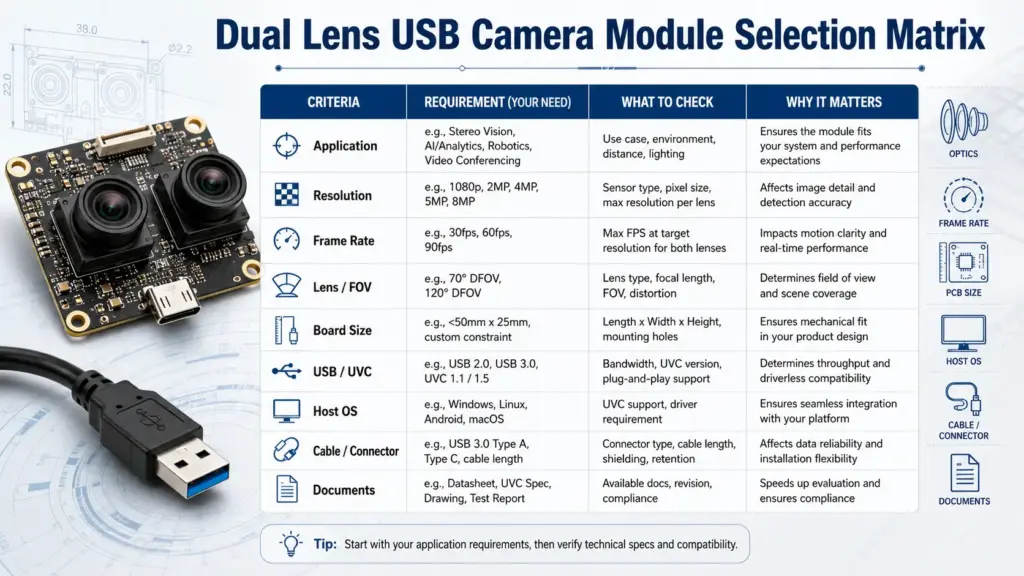
The best RFQ discussions start with decision fields, not only a product name. Use the table below to organize the first technical review.
| Requirement | Why It Matters | What to Confirm Before RFQ |
|---|---|---|
| Application | Defines the image target, environment, and success criteria | What the camera needs to detect, capture, compare, or stream |
| Resolution | Affects image detail, bandwidth, processing load, and storage | Whether HD/1080P is enough for the working distance and algorithm |
| Frame rate | Affects motion capture and host processing demand | Required frame rate at the target resolution and output format |
| Lens / FOV | Determines scene coverage and image geometry | Lens angle, field of view, distortion tolerance, and target distance |
| Dual lens baseline | Affects paired-image geometry | Distance between optical centers and mounting constraints |
| Board size | Determines whether the module fits the device | Maximum PCB size, component height, and mounting holes |
| Cable / connector | Affects assembly and reliability | Cable length, connector type, routing, and bend limits |
| USB interface | Affects bandwidth and host connection | USB interface requirement, power supply, and connector |
| UVC behavior | Affects driver and software integration | Whether the device exposes the required streams and controls |
| Host OS / software | Determines integration effort | Windows, Linux, Android, or embedded host requirements |
| Documents | Supports engineering and procurement review | Datasheet, drawing, pin definition, test notes, and available compliance documents |
Resolution, frame rate, and image format
Resolution is important, but it should not be treated as the only selection factor. A 1080P image may be suitable for one project and insufficient for another, depending on working distance, target size, lens angle, compression, lighting, and software processing.
Frame rate also depends on the output format and host pipeline. When reviewing a product page or datasheet, check whether frame-rate values differ by resolution and image format, such as MJPEG or YUY2. That kind of difference is why buyers should confirm the required resolution, frame rate, and format before sampling.
Lens angle, FOV, working distance, and baseline
For many dual lens projects, lens selection matters as much as sensor resolution. A wider field of view may cover more of the scene, but it may also introduce distortion or reduce target detail. A narrower field of view may improve target detail but require more careful alignment and working-distance planning.
For paired imaging, also ask about the baseline between the two optical paths. If the application depends on stereo vision, depth estimation, comparison, alignment, or dual-view capture, the baseline and mounting geometry should be reviewed early.
Board size, cable, connector, and mounting
A camera module can meet the image requirement and still fail the mechanical review. Before RFQ, confirm the available board space, mounting-hole position, component-height limits, cable route, connector direction, and enclosure conditions.
For custom projects, send drawings or mechanical constraints early. Even small changes to board size, lens position, cable direction, or connector type can affect feasibility and validation.
Synchronization and Host Compatibility Checks
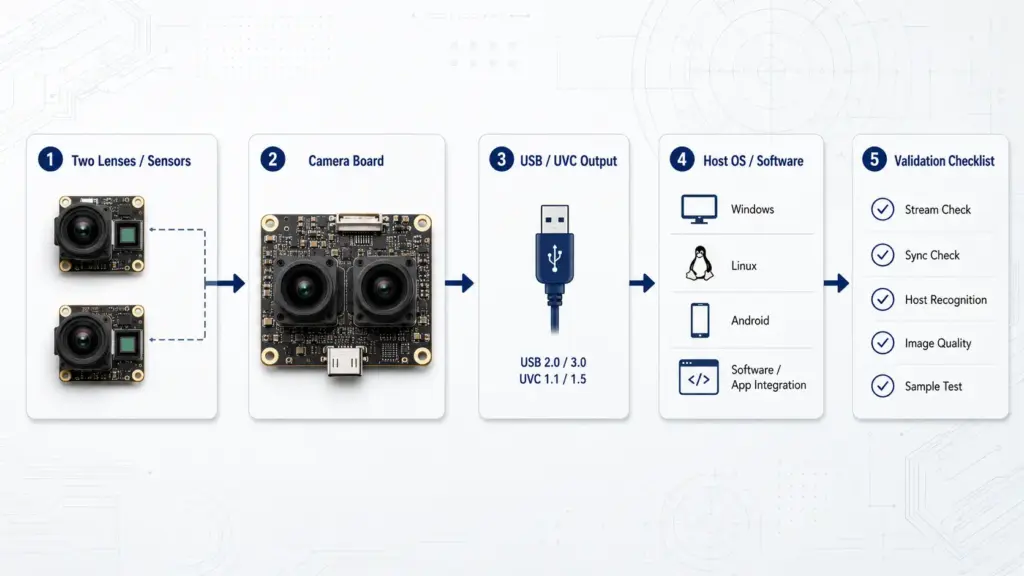
Dual lens projects create one extra question that single-lens modules do not: how are the two image streams handled?
Do not assume that two lenses automatically mean synchronized output. Ask the supplier and engineering team how the image streams are exposed to the host, whether synchronization is hardware-based or software-managed, and how timing is validated in the target workflow.
- Are both image streams exposed as one combined stream or as separate streams?
- Is frame timing synchronized, and how is it validated?
- Does the host software need to capture both streams at the same time?
- Does the application require stereo matching, side-by-side display, face comparison, depth estimation, or independent views?
- What resolution and frame rate are required from each lens path?
- Does the host system recognize the camera as expected?
- Are the required controls exposed to the application?
- What sample test should confirm that the module works in the real device?
What to confirm about synchronization
For dual-lens use, synchronization should be tested in the target environment. A supplier page may describe a module as dual lens, stereo, synchronized, or binocular, but the practical question is whether the output behavior matches the software and application.
For example, a project may need two images captured at the same moment. Another project may only need two views from one board. These are different requirements. The RFQ should state the expected stream behavior clearly.
UVC, operating system, and software workflow
UVC refers to USB Video Class. USB-IF publishes the UVC v1.5 document set, which makes UVC a formal USB video-device topic rather than a vague marketing phrase.
For Windows projects, Microsoft describes the USB Video Class driver as a system-supplied driver that supports USB Video Class devices. Microsoft also documents stream format and implementation behavior in its UVC camera implementation guidance.
This does not mean every camera module will work in every software environment without review. Before sampling, confirm the UVC implementation, stream format, operating system, software framework, required controls, and any custom application behavior.
Standard Module, Modified Module, or Custom Design?
Not every project needs the same level of customization. A standard module may be enough for early evaluation. A modified module may be suitable when the main image architecture works but mechanical or optical details need adjustment. A custom design may be needed when the device has strict space, optical, electrical, or software constraints.
| Project Path | When It May Fit | What to Confirm |
|---|---|---|
| Standard module | Early proof-of-concept, low mechanical restriction, basic USB camera evaluation | Existing specs, sample availability, host recognition, test setup |
| Modified module | Similar image architecture, but different lens, cable, connector, or bracket needs | Change scope, drawing, validation requirements, sample plan |
| Custom module | Strict enclosure, specific dual-lens geometry, special firmware behavior, or application-specific integration | Technical requirements, feasibility review, validation scope, documentation needs |
A standard module can reduce early evaluation friction, but it may not match final mechanical or optical needs. A modified or custom module may improve fit, but it requires clearer requirements and more validation.
RFQ Checklist for Custom HD Dual Lens USB Camera Module Projects
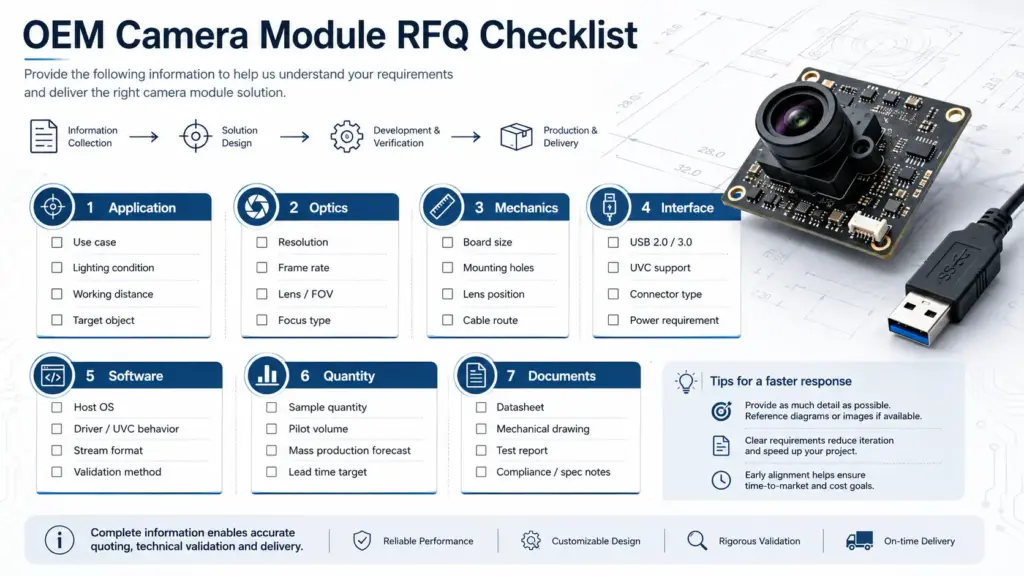
A good RFQ makes the engineering review faster and more accurate. Before contacting a supplier, prepare the information below.
Application information
- Target product or device type
- What the camera needs to capture or detect
- Indoor or outdoor use
- Lighting conditions
- Working distance
- Target object size
- Required viewing area
- Expected operating environment
Image and optical requirements
- Resolution target
- Frame rate target
- Output format preference, if known
- Lens angle or field of view
- Distortion tolerance
- Focus type
- Dual-lens baseline requirement, if any
- Need for matched lenses or paired image behavior
Mechanical requirements
- Maximum board size
- Mounting-hole requirements
- Lens position constraints
- Component-height limits
- Enclosure drawings
- Cable route
- Connector direction
- Assembly constraints
Interface and software requirements
- USB interface requirement
- UVC expectation
- Host operating system
- Software framework
- Required camera controls
- Stream behavior for dual lenses
- Test application or validation method
Commercial and project information
- Estimated quantity
- Sample purpose
- Target production stage
- Required documents
- Packaging or labeling needs
- Destination country or region, if relevant
- Any compliance documents that procurement must review
Do not rely on a short phrase such as “custom HD dual lens USB camera module” as the whole RFQ. That phrase is useful for search, but it is not enough for engineering review.
Documents and Commercial Items to Confirm
Procurement teams should separate confirmed facts from quote-dependent items. This reduces misunderstanding before sampling or mass production review.
Ask what can be provided for your project:
- Product datasheet
- Mechanical drawing
- Pin definition
- Lens information
- Output format and frame-rate table
- Sample test notes
- Firmware or control notes, if applicable
- Compliance or certification documents, if required
- Packaging information
- MOQ
- Lead time
- Sample schedule
- Warranty terms
- Change-control process for custom versions
This checklist is intentionally written as “ask what can be provided.” Unless a supplier has provided evidence for a specific project, do not assume certifications, reports, MOQ, lead time, warranty, or production capacity.
Common Selection Mistakes to Avoid
Mistake 1: Choosing only by resolution
A higher resolution does not automatically solve application fit. Lens angle, working distance, lighting, image format, compression, software processing, and bandwidth also matter.
Mistake 2: Treating UVC as a universal plug-and-play guarantee
UVC can simplify driver planning, but the actual project still needs OS, stream format, software, and control validation.
Mistake 3: Ignoring synchronization behavior
For dual lens projects, ask whether the streams are synchronized, how the host sees them, and how the timing is tested. This is especially important for applications that depend on paired image analysis.
Mistake 4: Sending an incomplete RFQ
If the supplier does not know the working distance, field of view, host platform, board-size limit, cable requirement, or validation method, the first answer may be too general to support real decision-making.
Mistake 5: Assuming application suitability from a product title
Terms such as machine vision, face recognition, kiosk, robotics, or 3D imaging can describe possible directions, but the actual fit depends on project conditions and validation.
FAQ
What should I compare before choosing an HD dual lens USB camera module?
Compare application needs, resolution, frame rate, lens angle, field of view, working distance, board size, cable, connector, USB interface, UVC behavior, host OS, software workflow, documents, and sample-validation requirements. For dual lens projects, also confirm how both image streams are exposed and synchronized.
Does UVC mean the camera will work without a custom driver?
Not always. UVC can reduce driver-development needs when the camera is implemented and supported correctly, but you still need to confirm the device implementation, stream format, operating system, software framework, and required controls.
Why does synchronization matter in a dual lens USB camera module?
Synchronization matters when the application depends on paired images, timing alignment, stereo analysis, or simultaneous capture. Ask whether the streams are synchronized, how they are exposed to the host, and how the behavior can be validated during sample testing.
Should I choose a standard module or request customization?
Choose a standard module when it fits early test requirements and mechanical constraints are flexible. Request modification when lens, cable, connector, or mounting details need adjustment. Consider a custom design when the device has strict optical, mechanical, electrical, or software requirements.
What information should I send for a custom camera module RFQ?
Send the application, working distance, required field of view, resolution, frame rate, host OS, USB/UVC expectations, software workflow, board-size limit, cable and connector needs, quantity, drawings if available, and document requirements.
Can a dual lens USB camera module be used for face recognition, robotics, kiosk, or inspection projects?
It may be considered for those types of projects, but suitability depends on lighting, working distance, lens selection, image format, host platform, software algorithm, enclosure design, and validation. Do not assume a product title alone confirms application fit.
Send Your Application Requirements for Technical Review
For a custom HD dual lens USB camera module project, prepare the details that affect engineering review before asking for a quotation.
Send your application conditions, target resolution and frame rate, lens/FOV needs, working distance, board-size limit, USB/UVC and host OS requirements, cable and connector needs, quantity, drawings if available, and document requirements.
If Supertek is the intended supplier or reference site for this article, use the dual lens USB camera module product page as a reference point and submit project details through the Supertek contact page. Keep final specs, customization scope, documents, MOQ, lead time, and validation steps project-specific until confirmed.