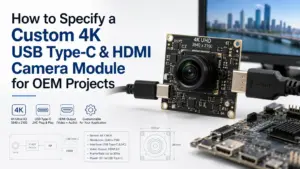
Choosing a custom 4K USB Type-C & HDMI camera module is not only a resolution decision. A buyer may start with “4K,” but the real engineering questions usually involve output path, frame rate, host system, display method, lens, field of view, board size, firmware needs, and how the module will be validated before production.
For OEM buyers, engineers, and procurement teams, the safest starting point is to define how the camera module will be used before asking for a quote. A clear RFQ helps the supplier review whether a standard module, modified module, or deeper customization path is realistic.
What should you confirm before requesting a custom 4K USB Type-C & HDMI camera module?
Before requesting a custom 4K USB Type-C & HDMI camera module, confirm the required output path, resolution and frame-rate target, lens and field of view, host or display setup, software control needs, PCB size, connector and cable limits, quantity stage, and required documents. If USB+HDMI dual output is needed, confirm whether the selected model supports both outputs and whether simultaneous output is required.
USB Type-C, HDMI, or USB+HDMI: choose the output path first
The output path affects the rest of the project. A module used with a host computer may need different behavior than a module connected directly to a display or capture device. A module described as Type-C, HDMI, or dual-output should still be reviewed at the model level.
| Output path | Best-fit use | Must confirm | Common mistake |
|---|---|---|---|
| USB Type-C | Host-connected systems, embedded devices, inspection software, or computer-based capture | Actual USB protocol, UVC support, driver/software needs, cable length, host OS behavior | Assuming Type-C automatically means a specific USB speed or plug-and-play behavior |
| HDMI | Direct display, monitor preview, or video capture workflows | HDMI output resolution, frame rate, display compatibility, control method, power requirements | Assuming HDMI output gives the same control options as USB |
| USB+HDMI | Systems that may need both host capture and display output | Whether both outputs are supported on the selected model, and whether simultaneous output is available | Assuming every dual-interface module supports both outputs at the same time |
| Custom output configuration | OEM projects with special integration requirements | Feasibility, board layout, firmware/software needs, validation scope | Treating customization as automatic without engineering review |
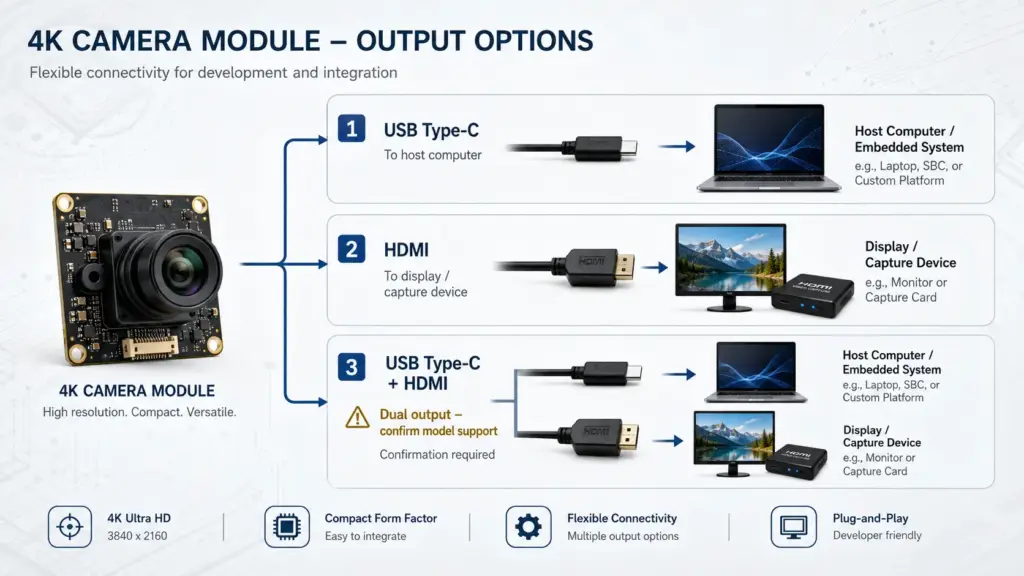
USB Type-C describes the connector form factor, but buyers still need to confirm the actual USB protocol and data behavior in the selected module documentation. For USB video use, UVC support may matter because it can affect host-side integration and driver expectations. For HDMI use, confirm the expected display or capture workflow instead of assuming it behaves like a USB camera.
4K specs to confirm before sampling
“4K” is a useful starting point, but it does not answer all integration questions. A 4K label should be checked together with frame rate, image format, compression, optics, and output behavior.
| Spec | Why it matters | What to confirm |
|---|---|---|
| Resolution | Defines image size, but not complete image performance | Required output resolution and whether it matches the host/display workflow |
| Frame rate | Affects motion capture, latency expectations, and bandwidth | Required fps at the needed resolution and output mode |
| Sensor | Influences image behavior, low-light response, rolling/global shutter considerations, and cost | Sensor model or sensor class if the project requires it |
| Lens and FOV | Determines how much of the scene is captured and at what working distance | Fixed focus, autofocus, focal length, field of view, distortion tolerance |
| Output format | Affects host processing, storage, latency, and software support | MJPEG, YUY2, H.264, H.265, or other required formats if relevant |
| Interface bandwidth | Can limit resolution/frame-rate combinations | USB mode, HDMI behavior, cable and host limitations |
| PCB size and connector | Determines mechanical fit inside the device | Board dimensions, connector direction, cable type, mounting holes |
| Firmware/software needs | Affects control and integration | Exposure, focus, white balance, camera control, SDK or UVC behavior if required |
For sampling, do not approve the module based only on a product title. Ask for the datasheet or model-level specification, then validate the module in the actual host, display, enclosure, lighting condition, and software environment.
Customization details that affect engineering review
A custom camera module request is easier to evaluate when the buyer explains the application conditions. “Can you customize it?” is too broad. A better request shows what needs to change and why.
- Application scenario and working distance.
- Required resolution and frame-rate target.
- USB Type-C, HDMI, or dual-output requirement.
- Whether simultaneous USB+HDMI output is needed.
- Lens type, focal length, field of view, and focus method.
- Lighting condition and low-light expectations.
- PCB size, mounting holes, connector position, and cable direction.
- Firmware or software control requirements.
- Housing, bracket, or enclosure constraints.
- Sample quantity, pilot stage, or production discussion stage.
- Required documents, drawings, or compliance evidence if applicable.
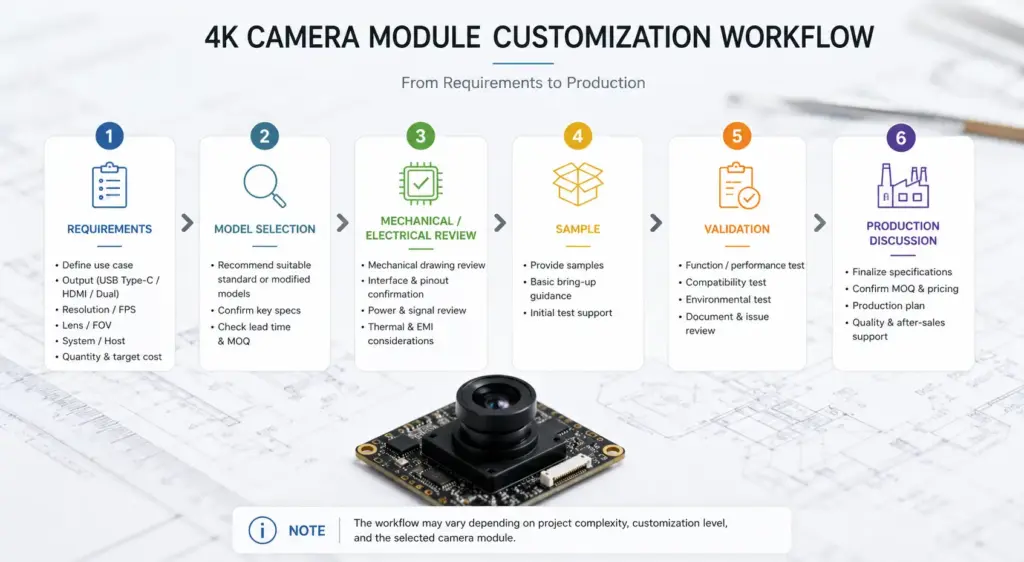
Customization feasibility depends on the selected base model, component availability, board layout, firmware needs, validation scope, and order stage. Treat customization as an engineering review process, not a guaranteed feature list.
Integration checks for host, display, software, and mechanics
Many camera module problems appear after a buyer chooses a module that looks correct on paper. The module may have the right resolution, but the host platform, cable, display, software, or enclosure may create problems.
Host and software checks
Confirm the operating system, processor platform, capture software, and driver expectations. If the system expects USB video behavior, confirm whether the module documentation supports that integration path. If the project requires camera controls such as exposure, gain, white balance, focus, or image orientation, list those needs before RFQ.
Display and HDMI checks
For HDMI use, confirm whether the output goes to a monitor, encoder, capture card, embedded display, or another device. The required resolution and frame rate should be checked against the display or capture workflow.
Cable and connector checks
Cable length, connector orientation, shielding, bending space, and assembly process can affect integration. For compact OEM devices, connector position may be as important as the electrical interface.
Mechanical checks
Confirm the board dimensions, mounting holes, lens height, enclosure clearance, and heat or airflow constraints if relevant. A module that works on the bench may still fail to fit inside the final product.
Validation checks
Test the sample in the real operating condition. Use the actual lighting, working distance, host system, display, enclosure, software, and power setup. If the project has compliance or safety requirements, ask early which documents are available and which must be handled by the buyer’s own validation process.
RFQ checklist for a custom 4K USB Type-C & HDMI camera module
A complete RFQ reduces back-and-forth and helps the supplier decide whether to recommend a standard module, a modified option, or a deeper custom project.
| RFQ item | What to provide |
|---|---|
| Application | What device or system will use the camera module? |
| Output path | USB Type-C, HDMI, or USB+HDMI |
| Dual-output need | Whether both outputs are required, and whether simultaneous output is needed |
| Resolution and frame rate | Required 4K output target and acceptable alternatives |
| Host or display setup | Computer, embedded host, display, capture card, monitor, or other device |
| Software/control needs | UVC, SDK, exposure/focus control, image settings, or software environment |
| Lens and FOV | Working distance, target field of view, focus method, and lens constraints |
| Mechanical limits | PCB size, mounting holes, lens height, connector direction, cable length |
| Environment | Lighting, indoor/outdoor use, temperature or enclosure constraints if relevant |
| Quantity stage | Prototype, sample evaluation, pilot run, or production planning |
| Documents needed | Datasheet, drawing, test report, compliance document, QC process, packaging details |
| Timeline expectation | Project schedule for review only; avoid assuming fixed lead time before supplier confirmation |
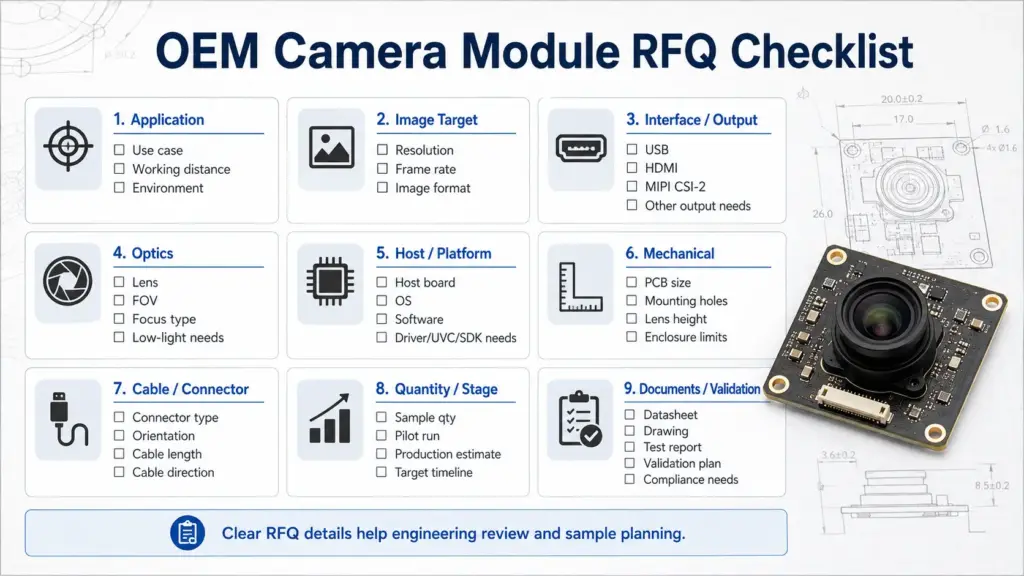
The goal is not to overload the inquiry. The goal is to give the engineering or sales team enough information to review fit and ask the right follow-up questions.
Documents and validation questions to ask before purchasing
For B2B and OEM purchasing, documentation can be as important as the product listing. Ask what documents are available for the selected model and what must be confirmed during sample testing.
- Product datasheet.
- Mechanical drawing.
- Lens or optical specification.
- Interface and output format details.
- Software or UVC notes if applicable.
- Test report if available.
- Compliance or certificate documents if required for the project.
- Packaging, labeling, and traceability information if relevant.
- Sample validation notes or recommended test conditions.
Use careful wording here. Do not assume every document is available for every model. Ask whether the document exists, whether it applies to the selected model, and whether it is suitable for your procurement or engineering review.
Related Supertek resources to review after clarifying specs
After you clarify the output path, frame-rate target, lens/FOV, mechanical limits, and host or display setup, review the relevant Supertek product or category page that matches your project direction.
For a better inquiry, compare your requirements with the available 4K camera module options, then send the application details for engineering review. If a specific Type-C camera module or HDMI-related model is being considered, confirm the model-level datasheet before treating it as suitable for the final device.
FAQ
What should I check before choosing a custom 4K USB Type-C & HDMI camera module?
Start with the output path, then confirm resolution, frame rate, image format, lens and field of view, host or display setup, software control needs, board size, connector position, cable limits, documents, and validation plan. The module should be reviewed against the real application, not only the product title.
Is USB Type-C, HDMI, or USB+HDMI better for my application?
It depends on the system. USB Type-C is often relevant for host-connected capture and software workflows. HDMI is often relevant for display or video capture workflows. USB+HDMI may be useful when both paths are needed, but the selected model must be checked for exact output behavior.
Does a 4K camera module always mean the frame rate I need?
No. A 4K label does not automatically confirm the required frame rate, format, compression, host compatibility, or output behavior. Confirm the resolution and frame rate together with the selected interface, cable, host, display, and software setup.
What does UVC mean for a USB camera module?
UVC refers to USB video class behavior used in many USB camera integrations. If your system depends on host-side USB video support, confirm whether the selected module supports UVC and whether your software environment can access the required camera controls.
Can one camera module output USB and HDMI at the same time?
That is model-specific. Some projects may require USB, HDMI, or both, but simultaneous output should not be assumed. If dual output is important, state whether you need both outputs at the same time and ask the supplier to confirm the selected model’s behavior.
What RFQ information should I send for a custom camera module?
Send the application, output path, resolution and frame-rate target, host/display setup, lens and field-of-view needs, board size, connector/cable limits, software control needs, quantity stage, sample expectations, and required documents. This helps the supplier review the request more accurately.
What documents should I request before purchasing?
Ask whether the selected model has a datasheet, mechanical drawing, interface details, lens information, test report, compliance documents if required, QC notes, and packaging or labeling information. Document availability should be confirmed for the specific model and project requirement.
Send your camera module requirements for review
For a custom 4K USB Type-C & HDMI camera module project, prepare your application conditions before requesting a quote. Share the output path, host or display setup, resolution and frame-rate target, lens/FOV needs, mechanical limits, software requirements, quantity stage, and required documents.
With those details, the team can review whether a standard model, modified option, or custom development path may fit your project.