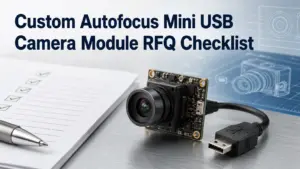
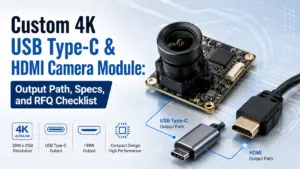
Mini USB camera modules are often considered when a device needs a compact image-capture unit, a short USB connection path, or a board-level camera that can fit into a tight mechanical space. But for OEM processing, a product title or a megapixel number is not enough.
Before a supplier can review feasibility, you need to describe how the camera will be used, where it will fit, what the host platform expects, and how the sample will be validated. A clearer inquiry reduces the risk of choosing a module that looks acceptable on paper but creates problems during enclosure design, driver testing, optical alignment, or procurement approval.
Before mini USB camera module OEM processing, define the application, host platform, optical target, mechanical limits, USB/UVC behavior, validation plan, required documents, and estimated quantity. These details help the supplier judge whether the project fits a standard module, a modified module, or deeper custom development. Avoid choosing only by megapixels or price; test the actual module in the target device.
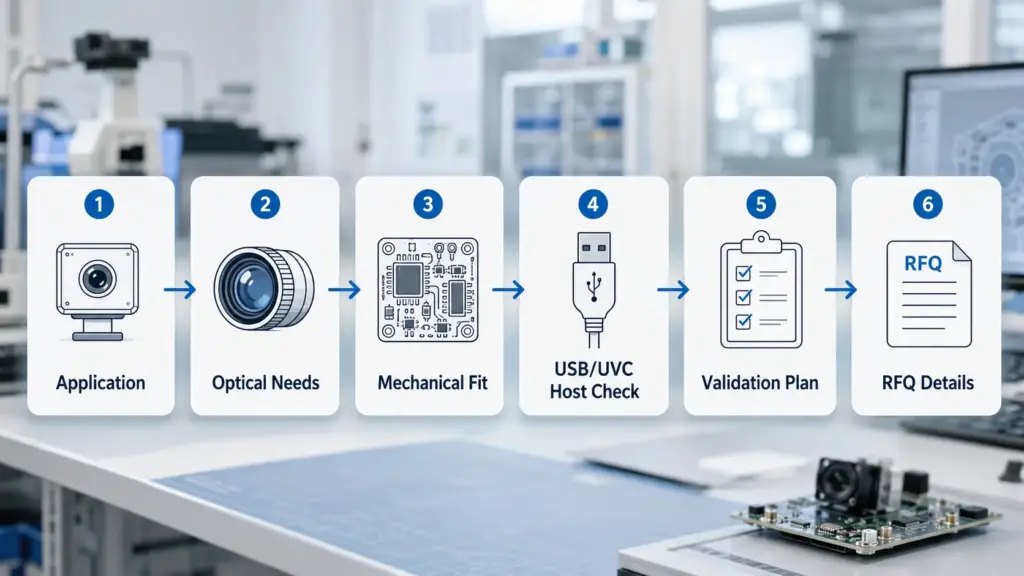
Why OEM Processing Starts With the Application, Not Only the Camera Spec
A mini USB camera module is not selected in isolation. The same resolution can behave differently depending on lighting, working distance, field of view, cable route, host platform, enclosure space, and software workflow.
Start with the application question: what does the camera need to capture, inspect, scan, recognize, monitor, or record?
From there, define the surrounding conditions. A compact enclosure may limit board size and lens height. A close-range scanning application may need a different focus distance than a wide-view monitoring device. A host system may support a USB camera in principle, but the actual driver path, bandwidth, image format, and application stack still need validation.
For product browsing, a USB camera module category page can help identify available module families and interface directions, but the OEM review should still begin with the project conditions, not only the catalog title.
Standard Module, Modified Module, or Custom Development?
Not every OEM request has the same level of engineering work. A buyer may only need a suitable standard module, or the project may require changes that affect optics, mechanics, cable routing, housing, firmware behavior, or validation scope.
Use this table to separate the request before asking for a quote.
| Request Type | Typical Buyer Need | What May Need Confirmation | Risk If Skipped |
|---|---|---|---|
| Standard module selection | Find an existing mini USB camera module that fits the application closely enough | Resolution, frame rate, lens/FOV, board size, USB interface, host platform, sample availability | Buyer may request customization when a standard module could be reviewed first |
| Modified module request | Adjust a known module around project constraints | Lens, focus distance, cable length, connector, board fit, mounting direction, basic validation needs | Mechanical or optical changes may affect fit, testing, timing, and cost |
| Deeper custom development | Build around stricter product, enclosure, host, or performance requirements | Sensor choice, PCB layout, firmware/software behavior, lighting, documents, validation plan | Quote may be inaccurate if the supplier receives only a general product idea |
| Regulated or high-risk application review | Use the module in a safety, medical, automotive, waterproof, or compliance-sensitive project | Required standards, target market, documents, testing, traceability, approval path | Unsupported compliance or suitability assumptions may create project risk |
This table is a planning tool, not a guarantee that every change is available. Exact feasibility should be reviewed against the selected base module, application conditions, components, and validation requirements.
Mini USB Camera Module Selection Matrix
The most suitable module for an OEM project is usually the one that fits the application, host system, enclosure, optical target, and validation plan. A higher number on one specification does not automatically mean a better project fit.
| Factor | Why It Matters | What to Prepare | Evidence or Confirmation Needed |
|---|---|---|---|
| Application | The camera target affects resolution, FOV, focus, lighting, and validation | Device type, image target, use environment, expected workflow | Application description, sample images if available |
| Working distance | Focus and lens selection depend on distance from camera to target | Minimum, typical, and maximum working distance | Target-distance range and test condition |
| Field of view | Too narrow may miss the target; too wide may add distortion or unnecessary background | Target size, viewing angle, enclosure opening | FOV requirement or reference image |
| Resolution | Must match image-detail needs, but may increase bandwidth or processing load | Target resolution and image-detail requirement | Host bandwidth and processing check |
| Frame rate | Important for moving targets, scanning, or real-time display | Target FPS and motion condition | Host and software validation |
| Sensor and image format | Affects image behavior, output format, and integration path | Preferred format if known, image quality needs, lighting condition | Datasheet or supplier confirmation |
| Lens and focus type | Lens choice affects FOV, working distance, depth of field, and module height | Fixed focus, autofocus, FOV, lens height limit | Optical review and sample test |
| Board size and lens height | Compact products may fail mechanically even when the electrical spec looks correct | Board outline, lens clearance, mounting space | Drawing, 3D space, enclosure limits |
| Cable route and connector | Cable direction and connector position can affect assembly | Cable length, exit direction, connector type | Mechanical drawing or sample review |
| USB interface and UVC expectation | USB behavior affects driver work, bandwidth, and host integration | USB version, host platform, driver expectation | Host test and software check |
| Documents and validation | Procurement and engineering may need proof before approval | Drawings, datasheets, sample reports, compliance needs | Ask which documents are available for the selected module |
Mechanical and Optical Fit Checks
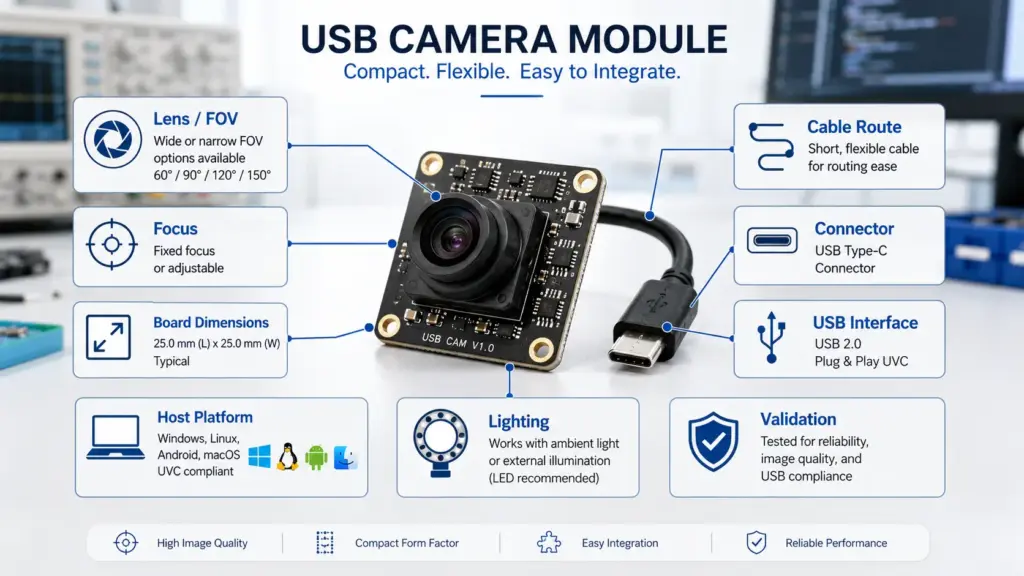
Mechanical fit is one of the most common places where a small camera module can fail in a real device. The board may be small enough, but the lens height, cable exit direction, connector position, screw holes, or enclosure opening may still cause problems.
Before sample review, confirm these items:
- Available board space, including clearance around components.
- Maximum lens height and lens barrel clearance.
- Required mounting method.
- Cable route, bend direction, and strain-relief space.
- Connector type and connector position.
- Enclosure opening size and alignment tolerance.
- Working distance from lens to target.
- Field of view and target size.
- Lighting condition and expected image environment.
- Whether the module will face dust, vibration, heat, humidity, or other project-specific conditions.
For optical review, do not rely only on a camera’s resolution. A module with enough pixels can still be a poor fit if the FOV is wrong, the working distance is not matched, the lighting is weak, or the host system cannot handle the chosen image format smoothly.
USB/UVC and Host-Platform Validation
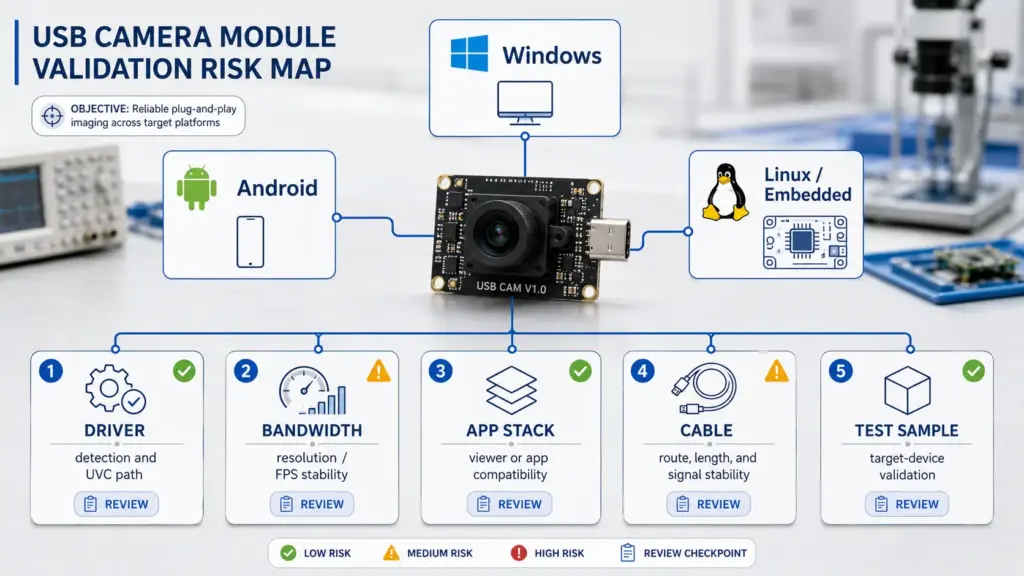
USB/UVC can reduce driver work when the module and host platform are compatible, but it should not be treated as a universal compatibility guarantee. The target host, operating system, driver stack, USB bandwidth, cable design, camera settings, and application workflow still need to be tested.
For Windows projects, Microsoft documents an inbox UVC driver path for devices compliant with USB Video Class specification versions 1.0 to 1.5. That supports a general UVC integration path, but the actual module and software workflow still need validation on the target system. Microsoft UVC camera implementation guide
For Android projects, Android documentation describes support for external USB cameras through the Camera2 API and camera HAL, while also noting limits for performance-intensive and complex use cases. That means Android support should be checked on the actual device, OS build, camera behavior, bandwidth condition, and application workflow. Android external USB cameras documentation
USB-IF publishes the USB Video Class document set, which can be used as technical background for UVC discussions. Do not assume a specific module is UVC-compliant unless the supplier provides the relevant module-level documentation. USB-IF Video Class v1.5 document set
| Risk Area | Example Issue | What to Test | Safe Decision Logic |
|---|---|---|---|
| Host OS | Camera is detected differently across Windows, Android, Linux, or embedded boards | Device detection, driver path, application access | Validate on the actual target host |
| USB bandwidth | Higher resolution or FPS may exceed stable bandwidth | Resolution, FPS, image format, cable length | Match image settings to host and cable limits |
| UVC behavior | Camera may not expose the expected controls or format | Preview, capture, format selection, settings control | Confirm required UVC functions before approval |
| Application software | Camera works in a generic viewer but not in the final app | Final software workflow, capture API, latency | Test with the real app or development environment |
| Cable and connector | Signal or assembly issues appear after enclosure integration | Cable route, connector position, bend radius | Review mechanical and electrical fit together |
| Sample validation | A module passes a desk test but fails in the product environment | Lighting, vibration, temperature, enclosure, user workflow | Test in the target device or closest prototype |
RFQ Checklist for Mini USB Camera Module OEM Processing
A clear RFQ helps the supplier review the project faster and reduces repeated clarification emails. Include technical, mechanical, software, and procurement details where possible.
Prepare these details before sending the inquiry:
- Application and product type.
- What the camera needs to capture, scan, inspect, recognize, or monitor.
- Target working distance.
- Required field of view or target area.
- Resolution and frame-rate expectations.
- Focus type preference, if known.
- Lighting condition and image environment.
- Board-size limit and lens-height limit.
- Enclosure opening or mechanical drawing, if available.
- Cable length, cable route, and connector preference.
- USB interface expectation.
- UVC requirement or driver/software requirement.
- Host platform, operating system, and application software environment.
- Expected quantity range or project stage.
- Sample validation plan.
- Required documents, if any.
- Target market or compliance-sensitive use, if relevant.
- Any existing module reference or sample image.
A useful RFQ does not need to be perfect. It should give the supplier enough context to ask the right engineering questions.
Documents, Validation, and Supplier Confirmation Questions
Procurement teams often need documents before approving a supplier or module, but document availability can vary by module, customization scope, project stage, and target market. Instead of assuming that a document exists, ask what is available for the selected module and project.
Useful confirmation questions include:
- What module options are closest to the application?
- Which parts of the request can use an existing module?
- Which parts require modification or custom development review?
- What drawings, datasheets, or mechanical files are available?
- What sample validation steps are recommended?
- Which image formats, resolutions, and frame rates should be tested on the target host?
- What documents are available for the selected module?
- Are any compliance or market-entry documents required for the target application?
- What project details affect cost, MOQ, lead time, sample review, or tooling?
- What must be confirmed before moving from sample review to production planning?
For regulated, safety-sensitive, medical, automotive, waterproof, or harsh-environment applications, do not rely on general product descriptions. Ask for project-specific evidence, document availability, and validation requirements before making design or procurement decisions.
What Affects Cost, MOQ, Lead Time, and Sample Review?
Cost, MOQ, lead time, and sample review are not safe to treat as fixed numbers before the project is understood. They may depend on the base module, component availability, customization scope, cable or connector changes, lens selection, PCB changes, testing requirements, document needs, order stage, and quantity.
Use this safe planning approach:
| Commercial Item | What Can Affect It | What to Ask |
|---|---|---|
| Cost | Module base, sensor, lens, cable, connector, housing, testing, customization scope | What information do you need to estimate cost? |
| MOQ | Standard-module availability, component sourcing, customization level, production stage | Is the request based on a standard module or custom work? |
| Lead time | Sample stage, engineering review, component availability, validation needs, documents | What factors affect timing for this project? |
| Sample review | Prototype readiness, host platform, software environment, test plan | What should we test before approval? |
| Documents | Selected module, market, application, certification needs, project stage | Which documents are available or required? |
This wording keeps the article useful for buyers without promising exact commercial terms.
FAQ
What should I confirm before mini USB camera module OEM processing?
Confirm the application, working distance, field of view, resolution, frame rate, focus type, mechanical space, lens height, cable route, connector, USB/UVC expectation, host platform, validation plan, required documents, and estimated quantity. These details help the supplier judge whether the project is closer to standard module selection, modification, or deeper custom development.
What is the difference between a standard mini USB camera module and OEM processing?
A standard module is selected from existing options. OEM processing usually means the supplier reviews whether the module, lens, cable, connector, board fit, documents, or validation process needs to match a specific device project. Some requests are simple modifications; others require deeper engineering review.
Which specs matter most when choosing a mini USB camera module?
Important specs include resolution, frame rate, sensor, image format, lens/FOV, focus type, board size, lens height, USB interface, UVC behavior, host platform, cable route, connector, and validation needs. The most suitable choice depends on the application and device constraints, not one specification alone.
How do board size, lens height, cable route, and connector affect integration?
A compact camera module still needs physical clearance inside the device. Lens height, cable direction, connector location, board outline, mounting method, and enclosure opening can all affect whether the module can be assembled and tested reliably. Share drawings or space limits when possible.
Does a USB/UVC camera module work with Windows, Android, Linux, or embedded hosts?
A UVC-compatible camera may simplify integration on compatible hosts, but compatibility should be tested on the actual device, OS build, driver stack, bandwidth condition, cable design, and application software. Do not assume universal plug-and-play behavior without validation.
What information should I include in an RFQ?
Include the application, target image, working distance, FOV, resolution, frame rate, focus type, board-size limit, lens-height limit, cable and connector requirements, host platform, USB/UVC expectation, expected quantity, document needs, and sample validation plan.
What documents or validation should I request before approval?
Ask what drawings, datasheets, sample validation information, image-format details, test records, compliance documents, or quality documents are available for the selected module and target application. Do not assume certification or compliance until the supplier provides project-relevant evidence.
What affects price, MOQ, lead time, and sample review?
These are usually affected by the base module, customization scope, component selection, cable or connector changes, lens requirements, PCB work, validation needs, document requirements, quantity, and project stage. Confirm them after the supplier reviews the technical details.
Is a mini USB camera module suitable for regulated or harsh-environment applications?
It depends on the application, target market, environment, validation plan, and required documents. For medical, automotive, safety-related, waterproof, outdoor, or harsh-environment use, ask for project-specific evidence and confirm testing requirements before approval.
Send Project Details for Technical Review
For a useful technical review, prepare the application, target image, host platform, optical requirements, mechanical limits, USB/UVC expectations, cable and connector needs, expected quantity, document needs, and sample validation plan.
A complete inquiry helps the supplier review whether the project should start from a standard module, a modified configuration, or a deeper custom-development review. Avoid relying only on a product title or megapixel number; the module should be reviewed against the actual device, host system, and validation conditions.