Choosing a 60fps USB camera module is not only about finding a product page with “60fps” in the title.
For an OEM device, the real question is whether the camera module can meet the required frame-rate mode inside the final system. Resolution, output format, USB interface, host software, cable path, lens, field of view, exposure, lighting, mechanical space, and sample validation can all affect the result. Supertek’s public high-speed USB camera module guide uses the same practical selection logic: check the target frame rate together with resolution, output format, USB interface, host/software environment, lens/FOV, cable path, and validation plan rather than choosing only by the highest fps number.
This guide is written for OEM buyers, R&D engineers, product teams, and sourcing teams preparing for a 60fps USB camera module RFQ. It explains what to confirm before requesting OEM processing, what can affect real 60fps performance, what may need customization review, and what should be tested before production planning.
What Should You Confirm Before OEM Processing?
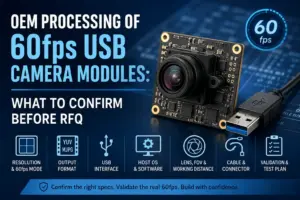
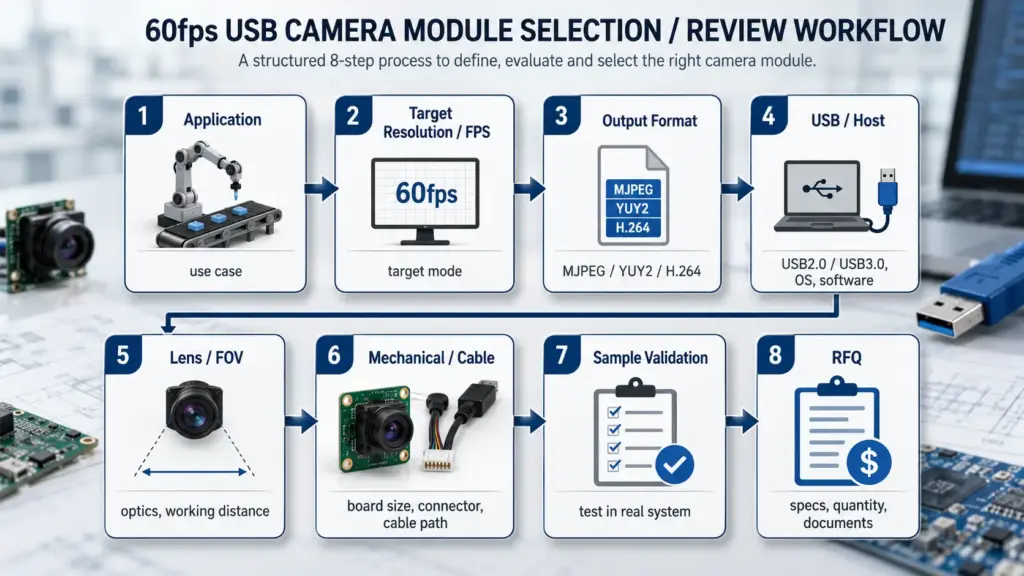
Before requesting OEM processing for a 60fps USB camera module, confirm the target resolution, actual 60fps mode, output format, USB interface, host OS/software, lens/FOV, working distance, board size, cable/connector path, sample validation conditions, quantity range, and document needs. Do not rely on the “60fps” label alone; confirm the mode under realistic system conditions.
What OEM Processing Means for a 60fps USB Camera Module
OEM processing means adapting or selecting a camera module so it can fit a specific device, product design, or application requirement.
For a 60fps USB camera module project, OEM processing may involve a simple standard module review, a limited modification, or a deeper engineering review. The right path depends on the application target and the amount of change required. Supertek’s public 4K USB OEM processing guide uses a similar structure: define the application first, then review whether a standard module, modified module, or deeper custom development is needed.
| OEM path | Best fit when | Buyer inputs needed | Validation needs | Risk to avoid |
|---|---|---|---|---|
| Standard module review | A listed module already appears close to the target resolution, frame rate, interface, and mechanical size. | Application, target mode, host system, lens/FOV, quantity range. | Confirm actual capture mode, image quality, cable fit, and host behavior. | Assuming the listed fps will match the final device without testing. |
| Limited modification | The base module is close, but lens, cable, connector, focus, or mounting details may need adjustment. | Lens/FOV, working distance, cable length, connector type, board size limits. | Test optical fit, mechanical fit, cable routing, and repeated connection stability. | Treating a small mechanical or optical change as risk-free. |
| Firmware or USB identity review | The device needs specific UVC behavior, naming, descriptors, or software recognition. | Host OS, capture software, UVC requirements, device identity needs. | Test on the exact host platform and application software. | Assuming UVC support means every software environment will behave the same way. |
| Mechanical integration review | The camera board must fit inside a compact enclosure, kiosk, scanner, robotics device, or embedded product. | Space limits, mounting points, cable exit direction, enclosure layout. | Test assembly fit, cable bending, heat, vibration or movement conditions where relevant. | Approving the module from an open-bench sample only. |
| Deeper custom development review | Standard or lightly modified modules cannot meet the project conditions. | Full application requirements, drawings, target schedule, validation plan, document needs. | Sample testing and engineering review before production planning. | Moving to batch discussion before feasibility is confirmed. |
The goal is not to force every project into full customization. Many projects should begin by checking whether a standard or near-standard module can meet the target mode. More complex projects need more engineering review before quotation and sample planning.
The 60fps Feasibility Map: Specs That Must Be Checked Together
A 60fps camera module should be reviewed as a target operating mode, not as a single isolated specification.
A product title may say 60fps, but the available mode can depend on the resolution, compression or output format, USB interface, host processor, capture software, cable quality, exposure time, and the way the final device is assembled. Supertek’s public high-speed USB camera module guide notes that a module may perform differently depending on resolution, output format, USB interface, host processor/software, exposure/lighting, cable length, connector design, thermal/mechanical conditions, and driver or UVC behavior.
| Factor | What to confirm | Why it matters | Evidence needed before approval |
|---|---|---|---|
| Target resolution | 720p, 1080p, 2MP, 4K, or another mode. | Higher resolution can increase bandwidth, processing, and storage requirements. | Datasheet mode table and host capture test. |
| Frame-rate mode | Whether 60fps is available at the target resolution and format. | A module may support different frame rates at different modes. | Product spec, sample test, capture software confirmation. |
| Output format | MJPEG, YUY2, H.264, uncompressed, or another format. | Format can affect bandwidth and host-side processing. | Datasheet, UVC mode list, software test. |
| USB interface | USB2.0, USB3.0, USB-C connector with a specific data interface, or another design. | Interface choice affects throughput, cable design, and host compatibility. | Interface spec, cable/connector review, host test. |
| Host system | OS, processor, capture software, SDK, and driver/UVC behavior. | The camera must work in the real software pipeline, not only on a supplier test bench. | Host-side test under the intended software environment. |
| Lens and FOV | Lens type, field of view, focus distance, depth of field, working distance. | The image may meet fps needs but fail optical coverage or focus needs. | Optical sample, real target distance, lighting test. |
| Mechanical fit | PCB size, mounting holes, cable exit, connector direction, enclosure space. | Mechanical mismatch can delay integration even if the image mode is correct. | Drawing review, enclosure check, sample assembly. |
| Validation conditions | Lighting, exposure, motion speed, cable route, temperature, and device layout. | Lab results may not match the final product environment. | Sample validation plan and test records. |
Frame Rate, Resolution, Output Format, and USB Interface
The most common mistake is asking, “Is this a 60fps module?” without also asking, “At what resolution, in which format, through which interface, and on which host?”
Output format matters because USB video systems may support several payload or compressed/uncompressed formats. USB-IF’s UVC v1.5 document set includes payload documents for H.264, uncompressed video, MJPEG, and other video payloads. Microsoft also notes that many UVC-based cameras use MJPEG compression to transfer high-resolution video over USB bandwidth efficiently.
That does not mean MJPEG is always the right choice. It means the buyer should confirm the available format, capture pipeline, image quality, latency needs, host CPU/GPU behavior, and software support for the target application.
| Target mode | Interface consideration | Output format question | Host check | Validation note |
|---|---|---|---|---|
| 720p 60fps | May be possible on different USB designs depending on format and host. | Is the target format MJPEG, YUY2, or another mode? | Can the host capture stable 60fps in the target software? | Test under expected lighting and motion. |
| 1080p 60fps | More careful throughput and host review is usually needed. | Does the module list 1080p 60fps in the required format? | Can the host handle capture, decode, and processing at the same time? | Check both image quality and dropped frames. |
| 2MP 60fps | Similar to 1080p-class planning, but confirm the exact sensor mode and output. | Is 60fps available at the exact resolution, or only at a cropped/lower mode? | Does the application software expose the needed mode? | Validate with the final or near-final host. |
| 4K 60fps | Usually requires stricter bandwidth, format, host, cable, and thermal review. | Which format supports the listed mode, and does image quality meet the application? | Can the host sustain capture and processing under real use? | Do not approve from title/spec wording only. |
| Custom mode | Depends on sensor, firmware, interface, and engineering feasibility. | Is a new mode actually available, or does it require development? | Does the host stack support the mode? | Treat as engineering review, not a standard quote. |
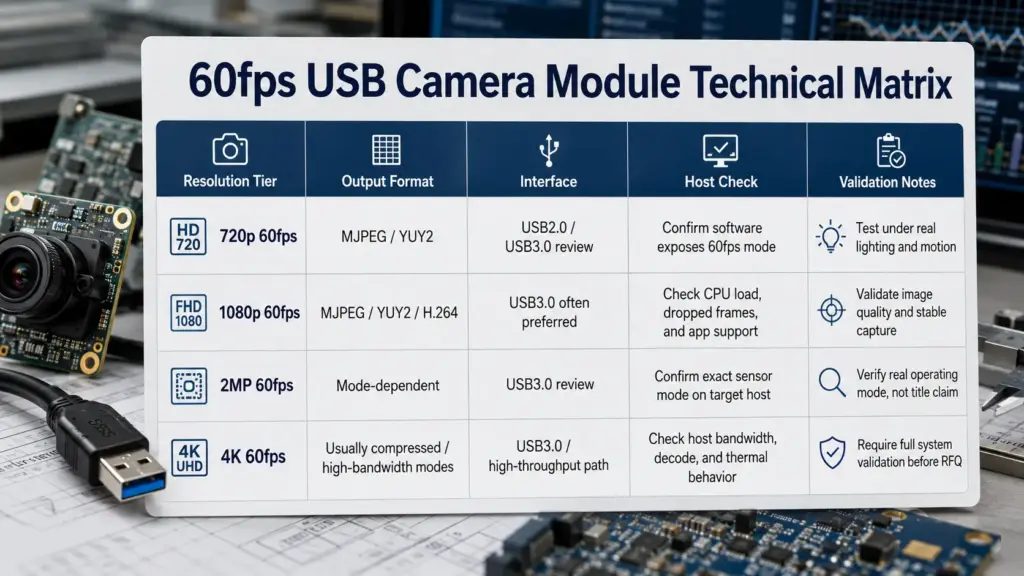
USB3.0 is often considered when higher resolution, higher frame rate, or higher data throughput is needed, but it is not automatically the correct answer for every 60fps project. The final decision should be based on the required mode, output format, cable design, host capability, and sample validation.
Host System, UVC Behavior, and Software Capture
UVC can reduce driver work when the camera device correctly follows the USB Video Class model. Microsoft’s UVC driver overview states that when a device uses UVC, it can work with the system-supplied UVC driver instead of requiring the vendor to supply its own driver; the hardware still needs to implement video streaming according to the UVC specification model.
For OEM buyers, the practical point is simple: do not treat “UVC” as a complete compatibility guarantee.
Before approving a 60fps USB camera module, check:
- the target OS;
- the capture software or SDK;
- whether the software exposes the required resolution and frame-rate mode;
- whether the pipeline uses MJPEG, YUY2, H.264, or another format;
- whether the host can capture and process the stream without unacceptable dropped frames;
- whether firmware or USB identity behavior needs review;
- whether the same behavior appears after restart, reconnection, and repeated sample tests.
A module that works on a supplier demo PC may still need review in the buyer’s embedded host, kiosk, scanner, robotics controller, Linux system, Windows application, Android device, or other product environment.
Customization Areas to Review Before Engineering Work Starts
Customization should be discussed after the target application is clear. For a 60fps USB camera module, the engineering review may include optical, mechanical, electrical, firmware, and documentation items.
Supertek’s public 4K USB OEM processing guide lists review areas such as lens type, field of view, board size, cable length, connector type, USB interface, host compatibility, firmware, USB descriptors, device identity, housing fit, and sample validation. These are useful categories for planning a 60fps project, but the exact capability still needs confirmation for the specific module platform.
Optical review
- lens type;
- field of view;
- focus distance;
- working distance;
- depth of field;
- filter or lighting needs.
Mechanical review
- PCB dimensions;
- mounting holes;
- connector direction;
- cable exit direction;
- enclosure space;
- lens height;
- housing or bracket constraints.
Interface and cable review
- USB2.0 or USB3.0 interface requirement;
- connector type;
- cable length;
- cable flexibility;
- shielding or routing needs;
- host-side connector space.
Firmware and USB behavior review
- UVC mode exposure;
- USB device name or identity;
- supported output formats;
- image orientation;
- default settings;
- software capture behavior.
Documentation review
- datasheet;
- mechanical drawing;
- interface notes;
- lens/FOV information;
- test notes, if available;
- revision information;
- compliance documents, if required and available.
Not every item will apply to every project. The safer approach is to prepare the details first, then let engineering review which changes are practical for the module platform.
Sample Validation Before Production Planning
A sample is not only a product preview. It is a way to test whether the target mode works inside the buyer’s real or near-real system.
Do not approve a 60fps USB camera module based only on a product-page fps number. Supertek’s public high-speed guide similarly recommends testing real performance under the lighting, exposure, cable, host, and mechanical conditions of the final product.
| Validation item | What to test | Why it matters |
|---|---|---|
| Target frame-rate mode | Can the sample capture at the required resolution, format, and fps in the intended software? | Confirms the mode works outside the product listing. |
| Image quality | Sharpness, color, noise, dynamic range, low-light behavior, exposure settings. | A stable fps mode is not useful if image quality is unsuitable. |
| Motion behavior | Moving target, scanning movement, robotics movement, or device vibration where relevant. | 60fps projects often involve motion, not only still images. |
| Host integration | OS, capture software, SDK, processor load, reconnect behavior. | Prevents late-stage software surprises. |
| Cable and connector stability | Cable route, bending, repeated connection, enclosure fit. | Mechanical stress can affect reliability and assembly. |
| Lens and working distance | Field of view, focus, coverage, distortion, depth of field. | Optical mismatch may require lens or position changes. |
| Mechanical fit | PCB size, mounting, lens height, cable exit, heat and enclosure space. | Ensures the camera can be assembled into the final product. |
| Thermal and operating check | Module behavior during longer operation under realistic conditions. | Helps reveal issues that short bench tests may miss. |
| Documentation and revision | Drawing, datasheet, firmware version, sample record, change notes. | Helps control version differences before next-stage review. |
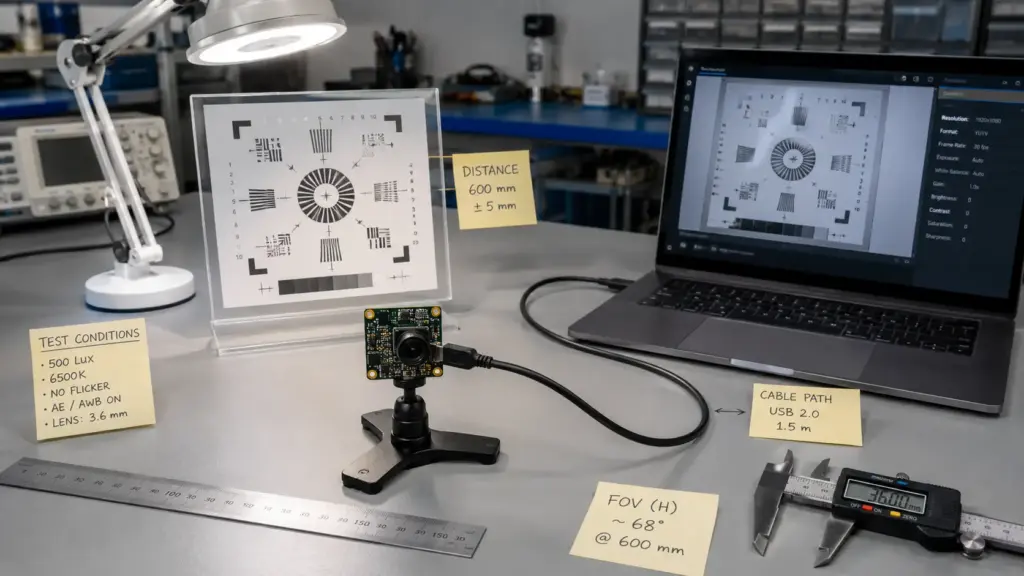
The validation plan should match the application. A barcode scanner, kiosk, robot, inspection tool, conferencing device, and embedded AI vision product may all ask for “60fps,” but the test conditions are not the same.
RFQ Checklist for 60fps USB Camera Module OEM Processing
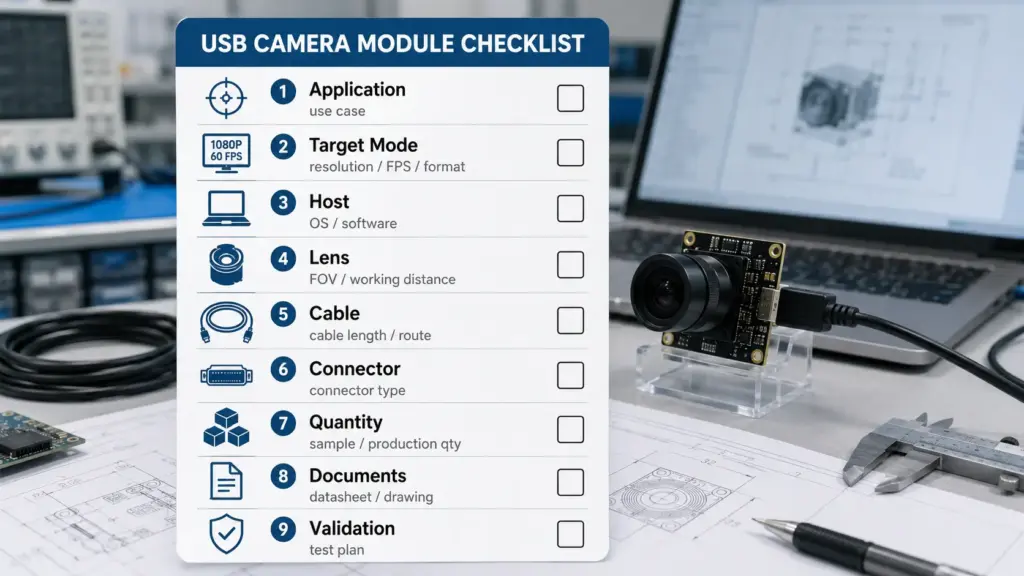
A clear RFQ helps a supplier or engineering team review the right module direction faster. Supertek’s public high-speed USB camera module guide asks buyers to send details such as target application, resolution/frame rate, output format, USB interface, host OS/software, lens/FOV, PCB/mechanical limits, cable/connector type, lighting/filter/enclosure requirements, sample quantity, production direction, and document needs.
| RFQ detail | What to send | Why it helps |
|---|---|---|
| Application | What the camera will do: scanning, inspection, robotics, kiosk, machine vision, video capture, or another use. | Helps define the real imaging requirement. |
| Target mode | Resolution, fps, output format, and whether 60fps is required at full resolution. | Prevents confusion between headline fps and actual mode. |
| Host system | OS, processor/platform, capture software, SDK, and driver/UVC expectations. | Helps check compatibility and test plan. |
| USB interface | USB2.0, USB3.0, USB-C connector needs, cable route, and host port. | Supports bandwidth and mechanical review. |
| Optical needs | Lens type, field of view, working distance, focus range, lighting, filter needs. | Helps avoid image coverage and focus mismatch. |
| Mechanical limits | Board size, mounting holes, lens height, enclosure space, cable exit direction. | Helps check whether the module can fit the device. |
| Cable and connector | Length, connector type, flexibility, shielding, direction, assembly route. | Prevents late assembly and reliability issues. |
| Quantity range | Sample needs and expected project direction. | Helps separate sample review from future planning. |
| Document needs | Datasheet, drawing, lens data, interface notes, test notes, compliance documents if required and available. | Helps procurement and engineering review evidence. |
| Validation plan | How the sample will be tested, by whom, and under what conditions. | Helps align expectations before sample approval. |
Avoid sending only “Need 60fps USB camera module, please quote.” That request leaves too many engineering variables open and usually creates more back-and-forth.
What Documents Should Buyers Ask For?
Procurement teams often need documents before sample approval or project handoff. The right request depends on the exact module, market, application, and customer requirements.
Ask what is available for the specific module and project, such as:
- product datasheet;
- mechanical drawing;
- interface or pinout notes;
- lens and field-of-view information;
- supported resolution/frame-rate/output-format table;
- firmware or UVC behavior notes, if relevant;
- sample test notes, if available;
- revision or change-control information;
- packaging or labeling information;
- compliance documents, if required and available.
Do not assume that a supplier has a certificate, report, or compliance document unless it is provided and matches the exact product or project. If certification or regulated-use documentation matters, ask for the exact document name, scope, model coverage, date, and issuing body before relying on it.
FAQ About OEM Processing of 60fps USB Camera Modules
What does OEM processing of a 60fps USB camera module mean?
It means reviewing or adapting a USB camera module for a specific product or application that needs a 60fps mode. The work may involve selecting a standard module, reviewing lens/FOV, cable, connector, mechanical fit, firmware behavior, host compatibility, sample testing, and documentation needs.
What should I confirm before requesting a 60fps USB camera module?
Confirm the target resolution, required frame rate, output format, USB interface, host OS/software, lens/FOV, working distance, mechanical space, cable/connector path, quantity range, document needs, and sample validation conditions.
Can a USB camera module really maintain 60fps in my device?
It depends on the exact mode and system. Check whether 60fps is available at the target resolution and format, then test it on the intended host, software, cable path, lighting, exposure, and mechanical setup. Do not treat the product title as final proof.
Is USB2.0 or USB3.0 needed for 60fps?
There is no universal answer. Lower-resolution or compressed modes may have different requirements than high-resolution or less-compressed modes. USB3.0 is often considered for higher-throughput needs, but the final choice should be confirmed by the datasheet, output format, cable path, host system, and sample test.
Which output format matters for 60fps?
MJPEG, YUY2, H.264, uncompressed, or other formats can affect bandwidth, image processing, latency, and host workload. Confirm which format supports the required resolution and fps, and test whether the host software can capture and process that mode correctly.
What parts of a USB camera module can be customized?
Customization review may include lens/FOV, focus distance, PCB/mechanical fit, cable length, connector type, cable exit direction, firmware or USB identity behavior, image orientation, filter needs, housing fit, and documentation. Exact options depend on the module platform and engineering review.
What should be tested in samples before production planning?
Test the target resolution/fps/output format, image quality, motion behavior, host integration, cable stability, connector fit, mechanical assembly, thermal behavior, lighting/exposure conditions, software capture, and documentation/revision details.
What documents should I request before sample or project review?
Ask what documents are available for the exact module and project. Common requests include datasheet, drawing, interface notes, lens/FOV data, supported mode table, firmware notes, sample test notes, revision information, packaging details, and compliance documents if required and available. Do not assume certification unless exact proof is provided.
Send Target Mode and Application Details for Technical Review
For a useful technical review, prepare the application conditions, target resolution and 60fps mode, output format, USB interface, host OS/software, lens/FOV, working distance, board-size limits, cable/connector requirements, quantity range, document needs, and sample validation plan.
The more complete the RFQ information is, the easier it is to review whether a standard module, limited modification, or deeper custom development discussion is the right next step.