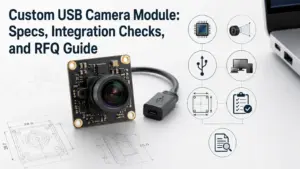
Choosing a low light USB camera module is not only about finding a camera labeled “low light.” For OEM, embedded vision, security, industrial, smart device, or inspection projects, the final image result depends on the sensor, lens, exposure control, ISP tuning, interface, host platform, enclosure, and real lighting condition.
Supertek presents low-light camera module options across interface, pixel, and application categories. This page is for buyers, engineers, and procurement teams who need to evaluate module direction, prepare project requirements, and request a technical review or quotation.
Send your application conditions, lighting environment, interface, resolution, frame rate, field of view, host platform, quantity, and customization needs to discuss a suitable low-light USB camera module direction.
Choosing a Low Light USB Camera Module Manufacturer
To choose a low light USB camera module manufacturer, match the module to your real scene instead of selecting by sensor name alone. Check lighting level, resolution, frame rate, lens and field of view, USB/UVC requirements, host platform, board size, enclosure, customization needs, and validation plan. For quotation, prepare your application details before asking for price, lead time, or samples.
Low-Light USB Camera Module Options for Project Evaluation
Supertek’s low-light camera module page presents options across interface categories, pixel ranges, and application directions. For USB projects, buyers commonly need to confirm whether the project requires USB2.0, USB3.0, UVC behavior, a specific connector, board size limits, or custom lens/cable/housing requirements.
Examples shown across Supertek’s low-light camera module page include directions such as starlight, HDR, NIR, IMX291, and 4K USB3.0 camera module options. The right option should still be confirmed by project conditions, because the same camera module may behave differently under different lens, exposure, lighting, and host-system settings.
Selection Matrix: Match the Module to Your Application
A low-light USB camera module should be selected around the application, not around one isolated specification. Before requesting a quote, define the scene and integration limits clearly.
| Application condition | Main lighting issue | Interface to confirm | Resolution / frame rate question | Lens / FOV question | Host platform question | Customization need | What to confirm |
|---|---|---|---|---|---|---|---|
| Indoor monitoring | Low ambient light, mixed light | USB2.0 or USB3.0 | Is the target resolution enough for recognition? | Wide or narrow field of view? | Windows, Linux, Android, or embedded board? | Cable, housing, lens | Image quality under actual room light |
| Machine vision or inspection | Low contrast, moving object | USB bandwidth and trigger/control needs | Is frame rate enough for motion? | Working distance and focus range | Industrial PC or embedded system? | Lens, PCB size, connector | Exposure, blur, noise, and mounting limits |
| Smart device integration | Compact space and low light | USB/UVC behavior | Does the host support the required mode? | Fixed-focus or custom lens? | Main control board and OS | PCB, cable, housing, firmware tuning | Size, heat, cable routing, and driver behavior |
| Outdoor or night-adjacent scene | Variable lighting, possible glare | USB interface and enclosure design | Is dynamic range important? | Lens aperture and IR/NIR needs | Host platform and power limits | Filter, housing, image tuning | Lighting condition, WDR/HDR need, enclosure constraints |
| Prototype / R&D project | Requirement still changing | Flexible interface review | Which resolution should be tested first? | Trial lens options | Development board or PC | Sample configuration | Test plan before larger quantity |
This table is a selection guide, not a performance guarantee. Final module choice should be reviewed against your lighting condition, mechanical design, electrical interface, and validation plan.
What Affects Real Low-Light Camera Performance?
Low-light performance depends on the whole imaging chain. A sensor name can be important, but it is not enough by itself. The lens, pixel size, exposure settings, noise behavior, ISP tuning, WDR/HDR behavior, and lighting environment all affect the final image.
| Factor | Why it matters | Buyer question to ask | Boundary |
|---|---|---|---|
| Sensor and pixel size | Larger pixels or low-noise sensor designs can help in darker scenes, depending on the sensor and settings. | Which sensor direction is suitable for my lighting condition? | Do not assume all low-light sensors perform the same. |
| Lens aperture | Lens choice affects how much light reaches the sensor. | What lens aperture and field of view are needed? | Lens selection must fit image quality, depth of field, and mechanical limits. |
| Exposure settings | Longer exposure can brighten images but may increase motion blur. | Is the object static or moving? | Exposure must be tested against motion and frame-rate needs. |
| SNR / noise | Noise affects clarity, especially in dark areas. | How much noise is acceptable for the application? | Exact results require test conditions. |
| ISP / image tuning | Image processing affects brightness, contrast, color, and noise reduction. | Is image tuning needed for the final scene? | Tuning scope should be confirmed for the selected project. |
| WDR / HDR | Dynamic range matters when dark and bright areas appear together. | Does the scene include glare, headlights, windows, or strong backlight? | WDR/HDR value depends on scene and module support. |
| NIR / IR filter | Near-infrared behavior may matter for night vision or assisted illumination. | Will the product use visible light, IR light, or both? | Sensor/filter/illumination should be reviewed together. |
| Host system | USB bandwidth, driver behavior, and processing power affect final operation. | Can the host maintain the required resolution and frame rate? | Confirm by selected module and platform. |

For engineering review, provide real scene details whenever possible: lighting level, distance, object movement, target recognition detail, and whether IR/NIR lighting is used. For additional image-quality context, see Basler’s image-quality guide.
USB, UVC, and Host Platform Checks
USB camera modules can simplify integration, but buyers should not assume every USB module behaves the same on every host system. The selected module, firmware, UVC support, OS, driver, resolution, frame rate, and USB bandwidth all matter.
Before choosing a module, confirm:
- USB2.0 or USB3.0 requirement.
- UVC requirement and supported controls.
- Target operating system.
- Host platform, such as PC, embedded board, or development kit.
- Required resolution and frame rate.
- Cable length and connector.
- Board size and mounting method.
- Power and thermal constraints.
- Whether image tuning or firmware adjustment is needed.
- Whether the project requires sample testing before approval.
Useful reference links for technical review include Supertek’s USB2.0 camera module category, the USB-IF UVC document set, and Microsoft’s UVC camera implementation guide. These links support integration review, but the final behavior still needs to be confirmed for the selected module and platform.
Custom Low-Light USB Camera Module Discussion
For OEM and embedded vision projects, a standard module may not match the mechanical, optical, or software-control needs of the final product. Supertek’s FAQ describes OEM/ODM discussion areas such as technical design, integration, packaging, mechanical drawing, schematic, PCB layout, prototyping, manufacturing, and firmware upgrading. Software development should not be assumed as part of the scope.
| Area | Possible discussion point | What the buyer should prepare |
|---|---|---|
| Sensor direction | Low-light, starlight, HDR, NIR, or other sensor direction | Lighting condition, target image requirement, test scene |
| Lens / filter | Field of view, aperture, focus, IR filter, NIR use | Working distance, FOV, enclosure window, lighting type |
| PCB / board size | Board dimensions, layout constraints, mounting holes | Mechanical drawing or space limit |
| Cable / connector | Cable length, connector type, routing direction | Host board connector and assembly layout |
| Housing / enclosure | Bare board, housed module, special mounting | Product structure and environmental condition |
| Firmware / image tuning | Brightness, contrast, exposure, color, noise handling | Sample images, target scene, acceptance criteria |
| Packaging / project support | Packaging or integration discussion | Quantity plan, shipment needs, product stage |

The exact customization scope should be confirmed by project requirements and engineering review.
RFQ Checklist for Low-Light USB Camera Module Projects
A clear RFQ helps the supplier review module fit faster and reduces unnecessary back-and-forth. Before asking for quotation, prepare the following information.
| RFQ item | What to provide |
|---|---|
| Application | Security, industrial inspection, smart device, embedded device, robotics, kiosk, access control, or other use |
| Lighting condition | Indoor, outdoor, low ambient light, mixed light, IR-assisted, glare/backlight, or night-adjacent scene |
| Target image requirement | Object recognition, face image, barcode, inspection detail, color accuracy, low-noise preview, or recording |
| Interface | USB2.0, USB3.0, UVC requirement, connector type |
| Resolution | Required image size, such as 1080p, 4K, or project-specific resolution |
| Frame rate | Target FPS and whether the object is moving |
| Lens and FOV | Viewing angle, working distance, fixed focus or adjustable requirement |
| Host platform | Windows, Linux, Android, embedded board, or other platform |
| Mechanical limits | PCB size, mounting holes, cable direction, housing space |
| Power / thermal constraints | Available power, enclosure condition, long-running operation |
| Quantity | Prototype, sample, pilot run, or production estimate |
| Customization need | Lens, filter, cable, PCB, housing, image tuning, packaging |
| Validation need | Sample images, test scene, approval criteria, documentation requests |
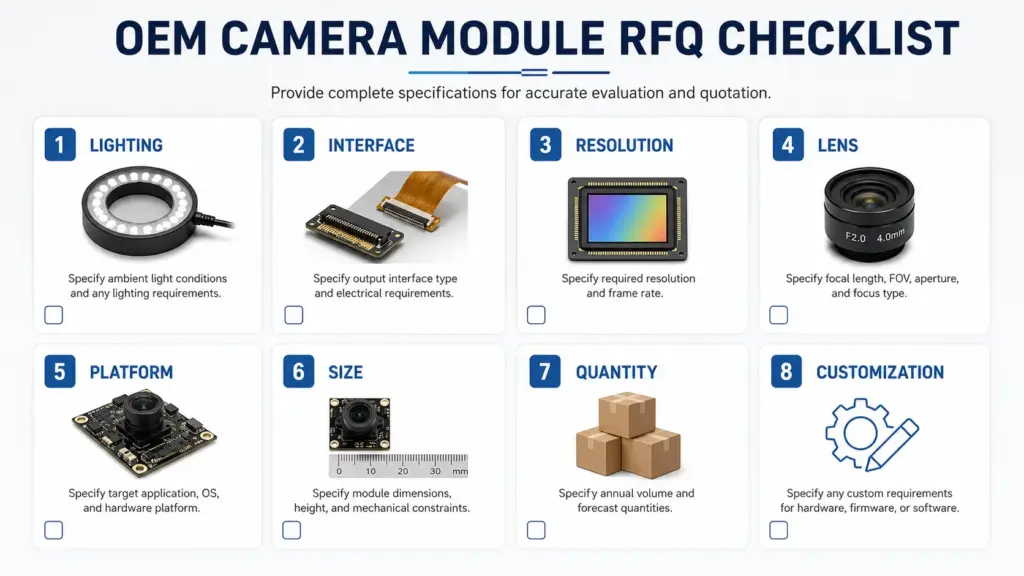
Do not rely only on the keyword “low light.” The more specific the RFQ, the easier it is to review the right module direction.
Supplier Proof Checklist for Procurement Review
For procurement teams, supplier selection should include both technical fit and evidence review. Instead of accepting broad claims, ask what can be provided for the selected module and order context.
Ask about:
- Product specification sheet.
- Sensor and lens information.
- Mechanical drawing.
- Interface and connector details.
- UVC / driver / platform support notes, if needed.
- Sample image or test condition information.
- Inspection or quality-control information.
- Warranty terms for the selected module and order terms.
- Certificate or compliance documents, if applicable to the selected product.
- Sample and production schedule based on specification, customization level, and quantity.
Avoid making purchase decisions based on unsupported phrases such as “best,” “guaranteed,” “certified,” or “fastest.” Request specific evidence for the product and project.
FAQs
How do I choose a low light USB camera module manufacturer?
Start with the application conditions. Confirm lighting level, object movement, resolution, frame rate, field of view, host platform, USB/UVC requirements, mechanical limits, customization needs, and validation plan. A suitable supplier should help you review the module direction against those conditions instead of relying only on a generic “low light” label.
What affects low-light USB camera module performance?
Low-light performance depends on the sensor, pixel size, lens aperture, exposure settings, noise/SNR behavior, ISP tuning, WDR/HDR support, IR/NIR conditions, and the actual scene. The final result should be checked under the project’s lighting and host-system conditions.
Is a USB camera module plug-and-play?
Some USB camera modules may support UVC-style integration, but plug-and-play behavior depends on the selected module, firmware, operating system, driver behavior, resolution, frame rate, and host platform. Confirm the module’s supported modes before design-in.
What resolution and frame rate should I choose?
Choose resolution and frame rate based on what the system must recognize and how fast the object moves. Higher resolution may help detail, but it can also increase bandwidth and processing load. Higher frame rate may help motion, but it should be checked against exposure, lighting, USB bandwidth, and host-system limits.
Can a low-light USB camera module be customized?
Customization may involve sensor direction, lens or filter selection, PCB size, cable, connector, housing, firmware/image tuning, or packaging discussion. The exact scope should be confirmed with the supplier based on your mechanical, electrical, optical, and production requirements.
What information should I provide for an RFQ?
Provide the application, lighting condition, resolution, frame rate, interface, host platform, lens/FOV, working distance, mechanical limits, cable/connector requirements, quantity, customization needs, and sample or testing requirements. This helps the supplier review the right module direction.
What certificates, test reports, or QC documents are available?
Ask what documents are available for the selected module and order context. Do not assume a certificate, test report, or inspection document applies to every product unless the supplier confirms the exact scope.
What is the MOQ or lead time?
MOQ and lead time should be confirmed by model, customization level, quantity, sample requirements, and production schedule. Do not rely on a general number until the selected specification and order context are reviewed.
Request Technical Review or Quotation
Share your project details so Supertek can review the low-light USB camera module direction for your application.
- Application and lighting condition.
- Resolution and frame-rate target.
- USB2.0 / USB3.0 / UVC requirement.
- Host platform and operating system.
- Lens, field of view, and working distance.
- Board size, cable, connector, and housing limits.
- Quantity and project stage.
- Customization or sample testing needs.
Send your requirements for technical review or quotation.