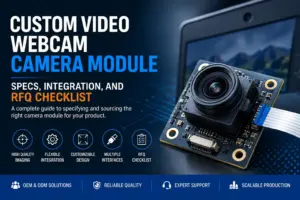
A custom USB camera module project usually starts with a simple request: “We need a camera module for our device.”
That request is not enough for engineering review. A supplier or technical team still needs to know what the camera must see, how it connects to the host, where it fits mechanically, what software environment it must work with, and how the sample will be validated.
This guide explains how OEM buyers, product engineers, and procurement teams can prepare a clearer custom USB camera module RFQ. It focuses on practical selection logic: sensor, resolution, frame rate, lens, field of view, focus, shutter type, USB interface, host compatibility, board size, cable, enclosure, validation, and document requests.
It does not assume that one camera module fits every application. It also does not treat customization as a guarantee. The safest approach is to define the application first, then review the camera module design around real optical, electrical, mechanical, and software constraints. For a commercial USB camera module starting point, editors may link to the Supertek USB Camera Module page without repeating unverified capability claims from that page.
What Should You Prepare Before RFQ?
Before requesting a custom USB camera module, prepare your application, target scene, working distance, field of view, resolution, frame rate, lens and focus needs, shutter preference, USB interface, host platform, board size, cable or connector limits, enclosure conditions, quantity range, validation plan, and document requests. This helps the supplier review feasibility instead of guessing from resolution alone.
Standard USB Camera Module vs Custom USB Camera Module
A standard USB camera module may be enough when your project can accept the existing sensor, lens, board size, cable, connector, firmware behavior, and mechanical layout.
A custom USB camera module may need review when the camera must fit a specific device, match a fixed field of view, work with a host system, meet a mechanical envelope, handle motion, or support a particular cable and connector layout.
The first decision is not “custom or standard?” It is: which requirements are fixed, and which can be adjusted?
| Requirement | Standard USB camera module may fit when… | Custom review may be needed when… | What to confirm |
|---|---|---|---|
| Image requirement | Existing resolution and frame rate are acceptable. | The project needs a specific image size, frame rate, exposure behavior, or sensor type. | Target resolution, frame rate, lighting, motion, and sample acceptance criteria. |
| Lens and field of view | Existing lens angle and focus range work in the device. | Working distance, field of view, distortion, or focus distance is fixed. | Working distance, object size, FOV, focus type, and installation angle. |
| USB interface | Existing USB interface works with the host and data needs. | Higher bandwidth, connector changes, cable limits, or host restrictions matter. | USB version, connector, cable length, host port, and software environment. |
| Mechanical design | Existing PCB size and mounting holes fit. | Board outline, mounting holes, cable exit, or enclosure space is constrained. | Board size, mounting method, lens height, connector direction, and enclosure drawing. |
| Software and host | Existing UVC or driver behavior works. | The host application needs a specific format, control behavior, or OS support. | Host OS, application, UVC needs, video format, and test method. |
| Validation | A standard sample can be tested directly. | The product needs application-specific testing before approval. | Sample test plan, pass/fail criteria, environmental conditions, and document needs. |
A standard module can reduce design effort if it already fits. Customization is more useful when the module must match the product design instead of forcing the product to adapt to the module.
Key Specs to Confirm Before Customization
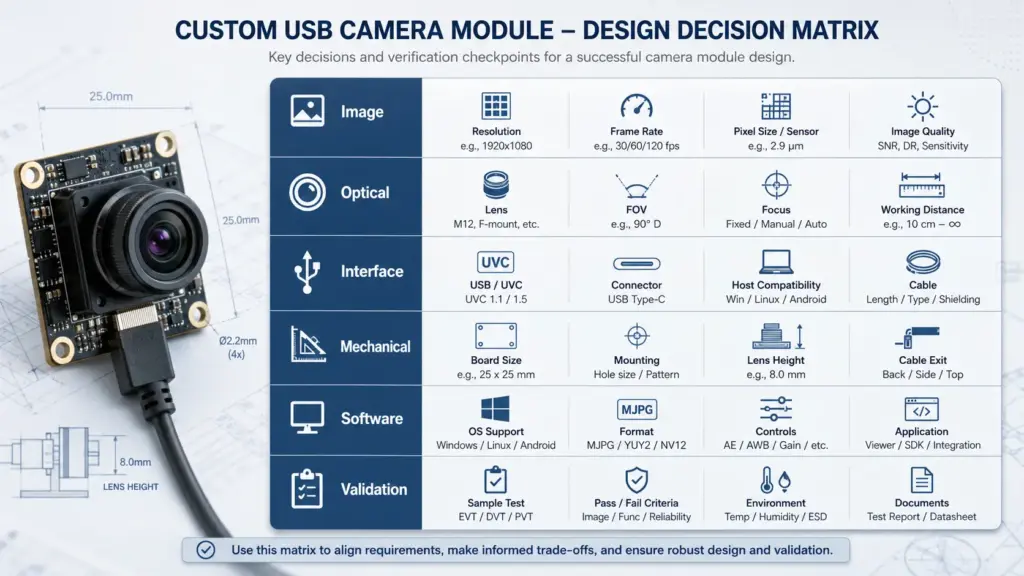
A custom USB camera module should be specified from the application, not from the resolution alone. Two modules with the same megapixel value can behave very differently depending on the sensor, lens, focus, lighting, shutter type, frame rate, interface, cable, and host system.
Use the following matrix before sending an inquiry.
| Requirement | Spec to confirm | Why it matters | What to send in the RFQ |
|---|---|---|---|
| Target scene | Object size, distance, lighting, movement | Defines lens, exposure, shutter, and frame-rate needs. | Photos, drawings, use environment, working distance, sample video if available. |
| Image detail | Resolution and image area | Higher resolution may help detail, but also affects bandwidth, processing, and storage. | Required image size, inspection area, minimum visible detail. |
| Motion | Frame rate and shutter type | Moving objects may need a different shutter or exposure strategy. | Object speed, motion direction, acceptable blur level, test scenario. |
| Optical view | Lens, FOV, focus distance | Determines what the camera can see from the installed position. | FOV target, working distance, lens space, focus type. |
| Interface | USB2.0, USB3.x, Type-C, cable | Affects data path, connector design, host support, and cable planning. | Host port, connector preference, cable length, video format, frame-rate target. |
| Mechanical fit | PCB size, lens height, mounting, cable exit | A module that performs well on a bench may not fit inside the product. | 2D/3D drawings, enclosure limits, mounting position, connector direction. |
| Software behavior | UVC, OS, application control | Host compatibility depends on more than the connector. | OS, application, required controls, format needs, driver restrictions. |
| Validation | Sample test plan and documents | Custom projects need clear acceptance criteria before scale-up. | Test conditions, pass/fail criteria, required datasheet/drawing/test documents. |
Sensor, Resolution, Frame Rate, and Shutter Type
Sensor selection affects more than pixel count. It can influence low-light behavior, color response, exposure control, frame-rate options, and motion handling. These outcomes also depend on the lens, illumination, image processing, host, and test environment, so they should not be promised from a single spec line.
Resolution should match the detail the system needs to capture. A higher resolution may be useful for inspection, measurement, recognition, or wide-scene coverage, but it can also increase bandwidth and processing load. For some applications, a lower resolution with the right lens, lighting, and frame rate may be more practical.
Frame rate should be discussed together with resolution and interface. A target such as “high frame rate” is too vague. The RFQ should state the required resolution at the required frame rate, the expected video format, and the host system that will receive the stream.
Shutter type matters when the scene includes motion. Global shutter and rolling shutter behave differently in moving scenes. If the camera will capture moving objects, conveyor lines, robots, vehicles, handheld movement, or fast position changes, include that condition in the RFQ and validate sample performance under real motion conditions.
Use this checklist before choosing a sensor path:
- What object or scene must be captured?
- Is the object static or moving?
- What detail must be visible?
- What resolution and frame rate are required together?
- What lighting is available?
- Is color accuracy important?
- Is low-light behavior important?
- Is motion distortion a risk?
- What sample test will confirm acceptable image results?
Lens, Field of View, Focus, and Working Distance
The lens is often where a camera project succeeds or fails. The sensor captures the image, but the lens decides what reaches the sensor.
Before asking for a custom USB camera module, define the working distance and field of view. Working distance is the distance between the camera and target. Field of view is the area the camera must see at that distance. If these are not defined, lens selection becomes guesswork.
Focus type also matters. A fixed-focus lens may be suitable when distance is stable. Autofocus may be useful when object distance changes, but it can add complexity and must be tested in the actual application. Manual focus may be acceptable for controlled installation, but it may not fit every production workflow.
Prepare these optical details:
- Working distance range.
- Required horizontal and vertical field of view.
- Target object size.
- Required visible detail.
- Lens height or enclosure limit.
- Focus type preference.
- Lighting condition.
- Any distortion concern.
- Whether the camera is behind glass, plastic, or another cover.
Do not define the lens only by angle. A wide-angle lens can see more area but may introduce distortion. A narrow lens may capture more detail in a smaller area but requires more precise positioning. The right choice depends on the product layout and the task the camera must perform.
USB2.0, USB3.x, or Type-C: What Should You Check?
USB interface choice should be based on bandwidth needs, host support, connector design, cable plan, power needs, and validation conditions. A connector name alone does not guarantee the actual data path.
For context, USB-IF publishes resources for USB Video Class, USB 2.0 Hi-Speed, USB 3.2 transfer-rate generations, and USB Type-C cable and connector specifications. The practical decision still depends on the module, cable, host, and software chain.
For example, USB Type-C describes a connector and cable system. It does not automatically mean the camera module will operate at the highest possible USB data rate. The module, cable, host, and system design must all support the intended mode.
| Interface choice | Useful when… | Check before choosing | Risk if ignored |
|---|---|---|---|
| USB2.0 | Data needs are moderate, system cost and compatibility are priorities, or the host only supports USB2.0. | Required resolution, frame rate, compression format, host processing, cable length. | The camera may not support the desired resolution/frame-rate combination. |
| USB3.x | The project needs higher data throughput for higher resolution, higher frame rate, or less compression. | Host port, cable quality, connector design, thermal behavior, software support. | The interface may be selected but not achieved in the full system. |
| USB Type-C | Reversible connector or modern product design is required. | Actual USB data mode, cable, power needs, mechanical fit, host behavior. | Type-C may be mistaken for automatic high bandwidth. |
| Custom cable/connector | The module must fit a specific enclosure or installation route. | Cable length, shielding, connector orientation, strain relief, signal integrity. | Image stability or connection reliability may suffer. |
| UVC behavior | Plug-and-play style host integration is desired. | Host OS, application support, video format, camera controls, driver restrictions. | The module may connect but not behave as expected in the application. |
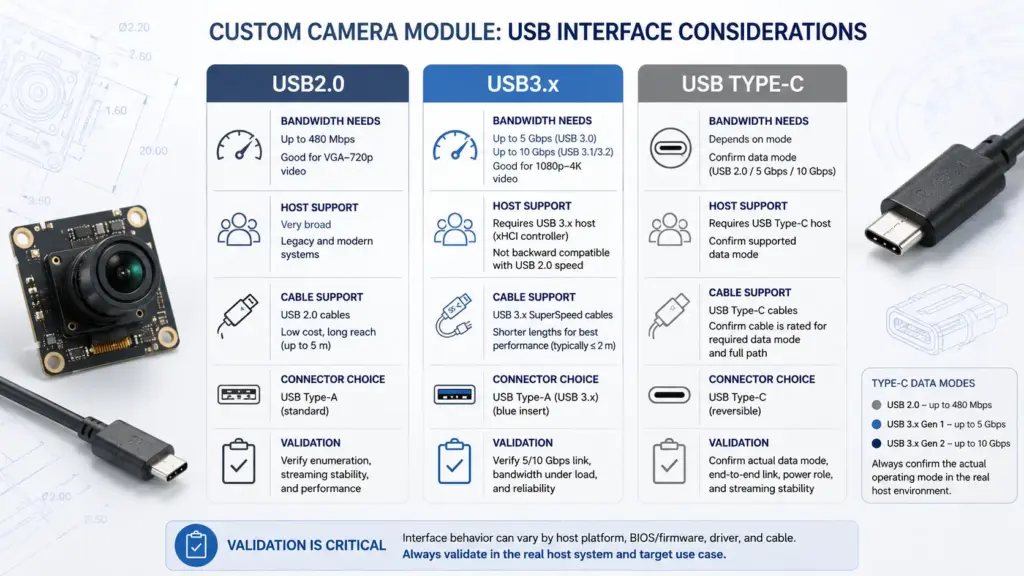
When in doubt, specify the required image output and host environment first. Then review the USB interface around those requirements.
The target output is [resolution] at [frame rate] on [host platform / OS] using [USB interface / connector], with [cable length] and .
That is more useful than asking for “a USB3 camera” without describing the real output and host system.
Host, UVC, Cable, Power, and Enclosure Integration
A USB camera module is not selected in isolation. It works inside a host system. The host can be a computer, embedded board, kiosk, scanner, robot, industrial terminal, smart display, or another product. Each system creates constraints.
Confirm these integration items before sample development:
| Integration item | What to confirm | Why it matters |
|---|---|---|
| Host platform | PC, embedded board, Linux, Windows, Android, or other host | The same module may need different review depending on OS and application. |
| UVC requirement | Whether standard UVC behavior is required | UVC may simplify integration, but required formats and controls still need checking. |
| Video format | MJPEG, YUY2, H.264, raw, or other format if applicable | Format affects bandwidth, processing, latency, and host compatibility. |
| Cable length | Required length and routing | Longer or poorly routed cables can create signal and mechanical issues. |
| Connector | USB-A, Micro USB, Type-C, board connector, or custom cable | Connector choice affects enclosure design and user access. |
| Power | Host power, current limits, startup behavior | Power planning affects reliability and system behavior. |
| Enclosure | Space, heat, lens opening, cover glass, mounting | Mechanical design can change image results and assembly risk. |
| Validation | Bench test, real-device test, environmental test | A sample should be checked in the real system, not only on a desk. |
Host integration is one of the main reasons to prepare a detailed RFQ. A camera that works in a basic test tool may still need review in the final product environment.
What Can Usually Be Customized?
Customization does not mean every parameter can be changed freely. It means the camera module can be reviewed around the project’s fixed requirements, available components, engineering feasibility, and validation plan.
Typical areas to discuss with a supplier may include, depending on feasibility and project scope:
- Sensor selection or image requirement review.
- Lens, field of view, focus distance, and lens holder.
- PCB outline, mounting holes, and board shape.
- USB connector or cable direction.
- Cable length and connector type.
- Firmware behavior or image format needs.
- UVC behavior and host-side requirements.
- LED, microphone, or peripheral requirements if relevant.
- Housing, bracket, or mechanical installation needs.
- Sample validation and document requests.
Each item should be discussed as a feasibility review, not assumed as a guaranteed option. For example, changing a cable may affect signal quality. Changing a lens may affect focus, distortion, and mechanical height. Changing the sensor may affect firmware, image tuning, frame rate, and availability.
Editors may add a bounded internal link to the Supertek camera module customization page, but the article body should not repeat unverified customization, factory, timing, or certification claims.
These are the requirements that are fixed. These are the areas where we can accept alternatives. Please review which module path may be feasible.
That gives the supplier room to recommend a practical approach without over-customizing the project.
What to Prepare Before Requesting a Custom USB Camera Module Quote
A clear RFQ reduces back-and-forth. It also helps the technical team identify whether a standard module, modified standard module, or deeper custom design should be reviewed.
Use this checklist before sending an inquiry.
Custom USB Camera Module RFQ Checklist
| RFQ item | What to include | Notes |
|---|---|---|
| Application | What the camera will do | Example: inspection, access control, scanning, video capture, machine vision, smart terminal, robot vision. Avoid regulated-use claims unless documents are available. |
| Target scene | Object, distance, lighting, motion | Include photos, drawings, or short sample videos if available. |
| Image requirement | Resolution, frame rate, color/mono, image format | State required resolution and frame rate together. |
| Optical requirement | FOV, working distance, focus type | Include enclosure limits and lens height if fixed. |
| Sensor/shutter | Rolling/global shutter preference if known | For moving scenes, describe speed and acceptable blur. |
| Interface | USB2.0, USB3.x, Type-C, cable, connector | Include host port and expected cable length. |
| Host system | OS, embedded board, software, UVC requirement | Mention driver restrictions or required camera controls. |
| Mechanical limits | PCB size, mounting holes, connector direction | Send 2D/3D drawings when possible. |
| Environment | Temperature, lighting, vibration, enclosure cover | Only include conditions that are real for the application. |
| Quantity range | Prototype, pilot, or production estimate | Avoid assuming MOQ before supplier review. |
| Validation plan | How the sample will be tested | Define what “acceptable” means. |
| Documents | Datasheet, drawing, test report, compliance file, or other needs | Ask what is available; do not assume every document exists. |
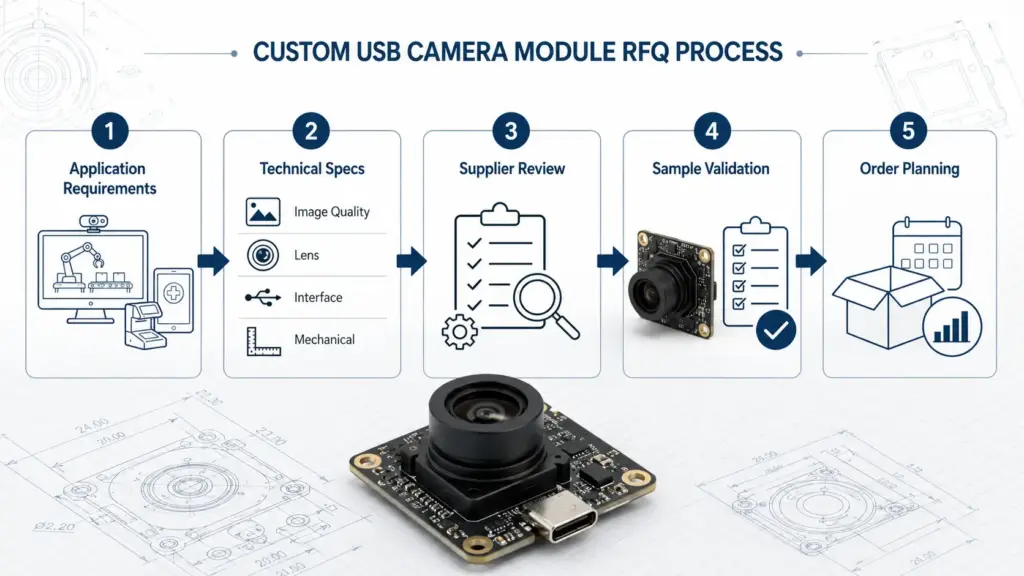
If you only know part of the information, send what you have and mark the rest as pending. A useful inquiry is not necessarily complete, but it should clearly separate fixed requirements from open questions.
Example RFQ Structure
- Application: What product will use the camera?
- Scene: What does the camera need to see?
- Image target: What resolution and frame rate are required?
- Optics: What working distance and field of view are needed?
- Interface: What USB interface, connector, and cable are expected?
- Host: What OS, board, or application will receive the video?
- Mechanics: What board size, mounting, and enclosure limits exist?
- Validation: How will the sample be tested?
- Documents: What files or reports are needed before approval?
- Quantity stage: Is the request for prototype, pilot, or production planning?
This format helps engineering review the request without turning the first conversation into a long clarification cycle.
Questions to Ask Before Sampling or Production
A sample should answer a real project question. Before requesting or approving samples, define what you need to learn from the test.
Useful questions include:
- Does the module fit the mechanical space?
- Does the lens provide the required field of view?
- Is the working distance correct?
- Does the frame rate meet the application need at the target resolution?
- Does the host recognize the module as expected?
- Does the application receive the required format?
- Are exposure, color, focus, and motion behavior acceptable under real lighting?
- Is the cable routing practical inside the product?
- Does the module remain stable during the expected test period?
- What documents are available for procurement, engineering, and quality review?
For procurement, document requests should be phrased carefully. Instead of assuming a certificate, test report, or compliance file exists, ask which documents are available for the specific module or project scope.
A safer document checklist:
- Product datasheet.
- Mechanical drawing.
- Interface or pin definition.
- Lens or optical information.
- Sample test notes.
- Packaging information if needed.
- Compliance or certification documents if available and applicable.
- Change-control or production documentation if required by the project.
Do not treat sample approval as mass-production approval. A sample test may confirm direction, but production planning may still require additional validation, purchasing review, quality checks, and document confirmation.
FAQ
What is a custom USB camera module?
A custom USB camera module is a USB-connected camera module selected or configured around application requirements. These requirements may include sensor, lens, field of view, focus, shutter type, USB interface, board size, cable, connector, host behavior, and validation needs. The exact customization path depends on feasibility and supplier review.
When do I need a custom USB camera module instead of a standard one?
Consider custom review when a standard module does not fit your field of view, working distance, board size, cable, connector, host, enclosure, or validation requirements. If an existing module already meets the image, mechanical, software, and procurement needs, a standard option may be enough.
What information should I prepare before requesting a quote?
Prepare the application, target scene, working distance, field of view, resolution, frame rate, lens and focus needs, shutter preference, USB interface, host platform, board size, cable or connector limits, quantity range, validation plan, and document requests. Include drawings or sample images when available.
Which specs matter most for a USB camera module?
The most important specs depend on the application. Common items include sensor, resolution, frame rate, shutter type, lens, field of view, focus distance, USB interface, connector, cable length, board size, host OS, UVC behavior, video format, and validation conditions.
Should I choose USB2.0 or USB3.x for a camera module?
Choose based on the required resolution, frame rate, video format, host support, cable design, and system constraints. USB3.x may be considered for higher data needs, while USB2.0 may fit more moderate requirements. The full chain, including module, cable, connector, and host, must support the target behavior.
Does USB Type-C mean the camera has the highest bandwidth?
Not automatically. USB Type-C is a connector and cable system. The actual data behavior depends on the module design, USB mode, cable, host, and system implementation. Confirm both the connector requirement and the expected data path.
Can the lens or field of view be customized?
Lens and field of view are common review points in camera module projects, but the available path depends on optical requirements, mechanical space, component availability, and validation results. Send working distance, target view area, object size, and enclosure limits before requesting a lens change.
What documents should I ask for before sampling or production?
Ask what documents are available for the specific module or project. Useful documents may include a datasheet, mechanical drawing, interface definition, optical information, sample test notes, packaging information, and any applicable compliance documents. Do not assume certification or test reports are available unless confirmed.
How long does custom USB camera module development take?
Development time depends on the customization scope, component selection, mechanical changes, firmware needs, sample build, validation plan, and purchasing process. Avoid planning around a fixed timeline until the supplier reviews the exact requirements and confirms the project path.
Prepare Your Custom USB Camera Module RFQ
A useful custom USB camera module inquiry should help the technical team understand the real product, not just the desired resolution.
Before requesting review, prepare:
- Application and target scene.
- Working distance and field of view.
- Resolution and frame-rate target.
- Lens, focus, and shutter needs.
- USB interface, connector, and cable expectations.
- Host platform, OS, software, and UVC requirements.
- Board size, mounting, and enclosure limits.
- Quantity range and project stage.
- Sample validation plan.
- Required documents or procurement checks.
Preparing a custom USB camera module RFQ? Share your application conditions, target resolution and frame rate, lens/FOV needs, USB interface, host platform, board size, cable or connector requirements, quantity range, validation plan, and document requests so the project can be reviewed technically.
Editor note: add final CTA button URL after confirmation. Recommended destination: Supertek quotation/contact page or approved USB camera module commercial page.