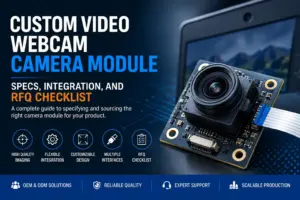
Choosing a custom video webcam camera module is not only a resolution decision. For an OEM device, kiosk, smart terminal, conferencing product, embedded PC, or display system, the module has to fit the host platform, enclosure, lens position, cable route, lighting condition, and software workflow.
A clear requirement brief helps the supplier review the right direction earlier. It also helps engineering and procurement avoid back-and-forth caused by missing details such as interface type, field of view, board size, connector, focus distance, or validation conditions.
What should you prepare before sourcing a custom video/webcam camera module?
Before requesting a custom video/webcam camera module, prepare the application, host platform, target resolution and frame rate, interface preference, lens and field-of-view needs, focus distance, board size limits, cable and connector requirements, lighting conditions, quantity direction, document needs, and validation plan. These details help the supplier review whether an existing module, modified design, or custom direction may fit the project.
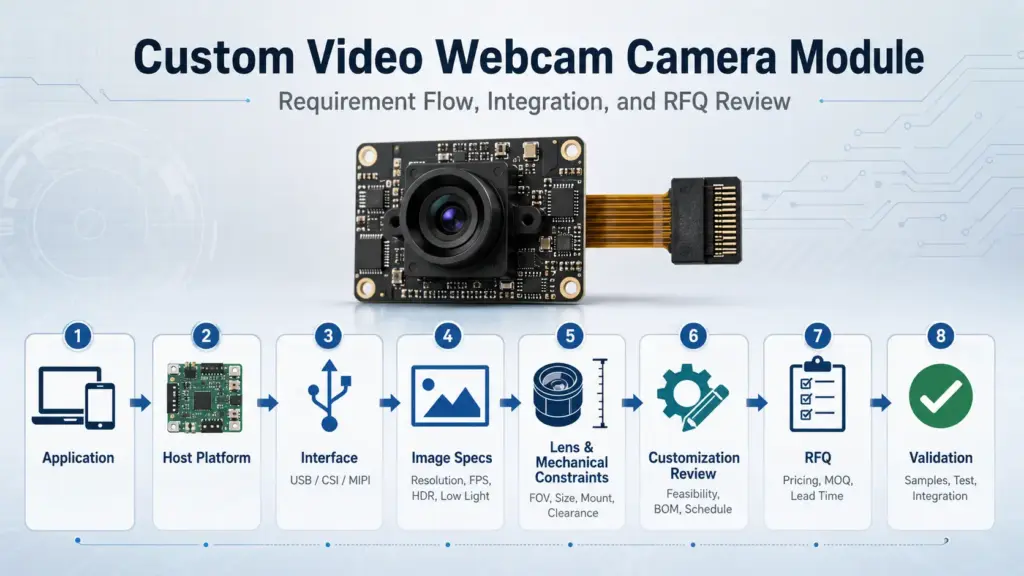
Custom module vs finished webcam vs standard USB camera module
A custom webcam camera module is not the same as a finished consumer webcam. It is usually considered when the camera needs to be built into another product or system, where mechanical fit, image angle, cable routing, host connection, software behavior, or appearance must be controlled.
| Option | Best fit | Typical buyer input | Main risk to avoid |
|---|---|---|---|
| Finished webcam | Plug-and-play external use | Basic resolution, USB connection, mounting preference | May not fit an embedded product design |
| Standard USB camera module | Embedded use with limited customization | Interface, resolution, lens, board size, cable length | Assuming it will fit every host, enclosure, or software environment |
| Custom video/webcam camera module | OEM product integration or special mechanical/optical needs | Application, host, interface, optics, PCB size, connector, validation plan | Starting development before confirming technical constraints |
A finished webcam may be enough for office, education, or simple external video use. A standard USB camera module may fit if the mechanical and software requirements are close to an existing module. A custom module becomes more relevant when the camera must fit a specific enclosure, lens position, field of view, cable path, mounting method, host device, or product design. For related product context, review Supertek’s Web Camera Module page.
Key specifications that affect video quality and integration
A buyer may ask for “1080p,” “4K,” or “high frame rate,” but those labels do not fully define the project. The image result and integration risk also depend on the sensor, lens, field of view, focus type, lighting, output format, interface, host platform, cable, connector, and enclosure.
| Requirement area | What to define | Why it matters |
|---|---|---|
| Application | Video conferencing, kiosk, smart terminal, embedded PC, inspection, access device | The use case affects lens, working distance, lighting, and software needs |
| Resolution and frame rate | Target image size and motion requirement | Higher targets may increase bandwidth, processing, cable, and validation requirements |
| Output format | Video format required by the host or software | The wrong format may create extra integration work |
| Lens and FOV | Field of view, working distance, distortion tolerance | Lens choice affects what the user sees and how the module fits the device |
| Focus type | Fixed focus, autofocus, or other focus requirement | Focus choice should match working distance and use environment |
| Mechanical size | PCB size, mounting holes, height, enclosure limits | A technically suitable module may still fail if it cannot fit the product |
| Cable and connector | Cable length, connector type, route, bend space | Cable design can affect assembly, durability, and signal stability |
| Lighting condition | Indoor, low light, backlight, controlled lighting | Lighting affects sensor and lens selection and validation needs |
For engineering teams, the safest approach is to define the real operating condition first. A higher specification can be useful, but it can also increase cost, complexity, bandwidth, heat, or validation work. Specification alone does not guarantee the final result; the system condition and validation plan also matter.
Resolution, frame rate, output format, and lighting
Resolution describes image size, but it does not describe the whole video experience. Frame rate affects motion smoothness. Output format affects the host pipeline. Lighting affects how the sensor and lens perform in the real application.
Before choosing a module direction, confirm:
- target resolution and acceptable lower fallback, if any;
- expected frame rate under real operating conditions;
- required output format or software compatibility needs;
- typical lighting level and whether backlight or low-light scenes are common;
- whether the host platform can process the expected video stream.
This information helps the supplier avoid recommending a module that looks good on paper but creates bandwidth, processing, or validation issues later.
Lens, FOV, focus type, working distance, and mounting
The lens defines how much of the scene is captured. For a video conferencing product, a wider field of view may be needed. For a kiosk or access device, the working distance and mounting height may be more important. For an embedded camera in a product enclosure, the lens height and position can affect both image framing and mechanical design.
Prepare these details:
- expected distance between camera and subject;
- required horizontal or diagonal field of view, if known;
- whether fixed focus is acceptable;
- whether autofocus or a different focus setup is needed;
- available space above the PCB;
- enclosure opening size and lens position;
- whether the module must be mounted flat, vertical, angled, or behind a cover window.
If these details are not available yet, describe the use scenario and enclosure constraints. The supplier can then review which optical direction may be practical.
Interface choice: USB/UVC, MIPI, or another camera interface
Interface choice is one of the most important integration decisions. It affects host compatibility, software work, cable design, board layout, bandwidth, and validation.
| Interface path | Often considered when | What to confirm |
|---|---|---|
| USB / UVC | The host has USB input and the project needs a camera stream that may work with standard video software paths | Host OS, UVC behavior, bandwidth, cable length, connector, output format, and application software |
| MIPI CSI-2 | The camera connects directly to an embedded processor or SoC camera interface | Processor support, board design, lane configuration, driver, ISP path, and platform resources |
| Other interfaces | The host, processor, or legacy design requires another camera connection | Electrical requirements, driver support, cable/connector limits, and validation scope |
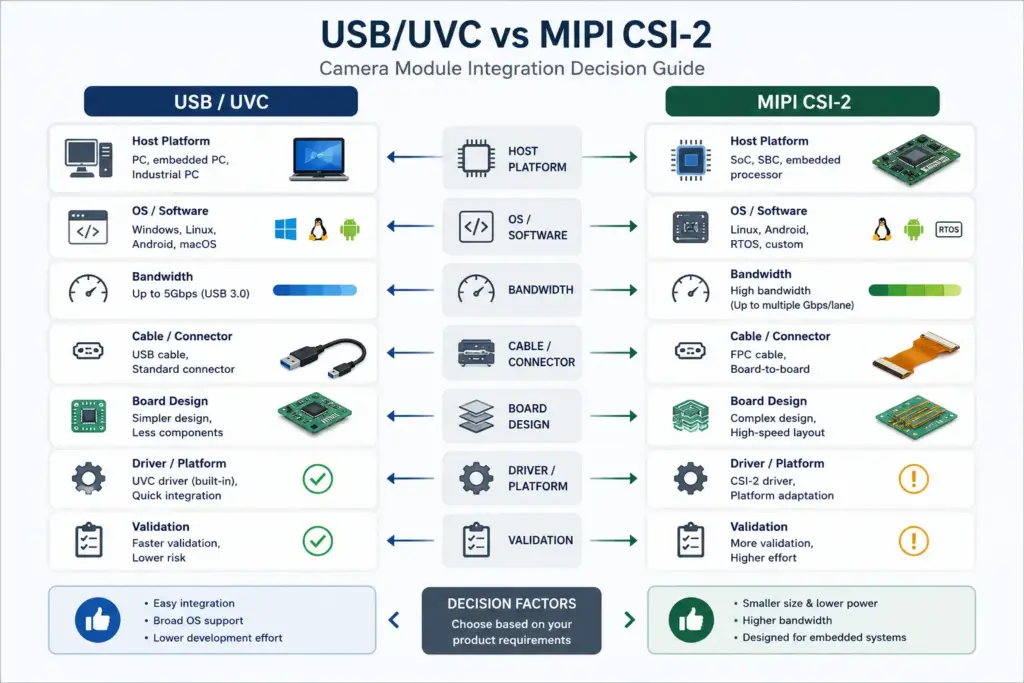
USB/UVC may reduce some host-side development work when the platform and application support the expected UVC behavior. It still needs project-level checking because the exact module, host OS, software, video format, bandwidth, and cable setup can affect the final result. The USB-IF Video Class v1.5 document set is a useful general reference for UVC terminology, and Supertek’s USB Camera Module page can be used as a related internal product context page.
MIPI CSI-2 is often relevant for embedded processor-based designs. It may offer a compact camera-to-processor path, but it usually requires deeper board, driver, processor, and platform review. It should not be treated as a drop-in webcam replacement unless the system is designed for that integration path. The MIPI CSI-2 reference page can be used for general interface context.
Customization items to review before prototype
Customization should start from the application and integration constraints, not from a long list of possible changes. The practical question is: what must change for the module to fit the product and pass validation?
| Customization item | What to prepare | Why it matters |
|---|---|---|
| Sensor direction | Image target, lighting, resolution, frame rate | Sensor choice affects image behavior and platform needs |
| Lens | FOV, working distance, focus type, lens height | Lens choice affects image framing and mechanical fit |
| PCB / board size | Maximum length, width, height, mounting position | Mechanical constraints can decide whether a module can be used |
| Cable | Length, route, shielding or assembly constraints | Cable design affects installation and signal stability |
| Connector | Host connector, orientation, assembly method | Connector mismatch can block integration |
| Housing or bracket | Mounting method, enclosure opening, product appearance | Mechanical design affects production assembly |
| Firmware / USB identity | Host recognition, software behavior, naming needs | Should be reviewed carefully before sample approval |
| Optical filter or cover | Lighting environment, cover glass, IR needs | Optical stack may affect final image result |
Not every project needs deep customization. Some projects may only need a lens, cable, or connector adjustment. Others may need a fuller review of sensor, PCB, mechanical design, and firmware behavior. Supertek’s Camera Module Customization page can be used as a related page for customization review, while final feasibility should be confirmed for the exact project.
RFQ checklist for a custom video/webcam camera module
A useful RFQ should give engineering enough context to review the module direction. It does not need to be perfect, but it should avoid vague requests such as “send a 1080p camera module.”
Prepare the following information before contacting a supplier:
| RFQ item | What to include |
|---|---|
| Application | Device type, use environment, user distance, mounting location |
| Host platform | OS, processor, USB port, MIPI interface, embedded board, software stack |
| Image target | Resolution, frame rate, output format, image quality priority |
| Interface | USB/UVC, MIPI CSI-2, or other preferred connection |
| Lens / FOV | Working distance, field of view, focus type, distortion tolerance |
| Mechanical limits | PCB size, lens height, mounting holes, enclosure opening |
| Cable / connector | Cable length, connector type, orientation, routing limits |
| Lighting | Indoor, low-light, backlight, controlled lighting, day/night use |
| Quantity direction | Prototype, pilot, or production planning stage |
| Documents | Ask what drawings, specifications, test reports, or compliance documents are available |
| Validation plan | What the buyer will test before approval |
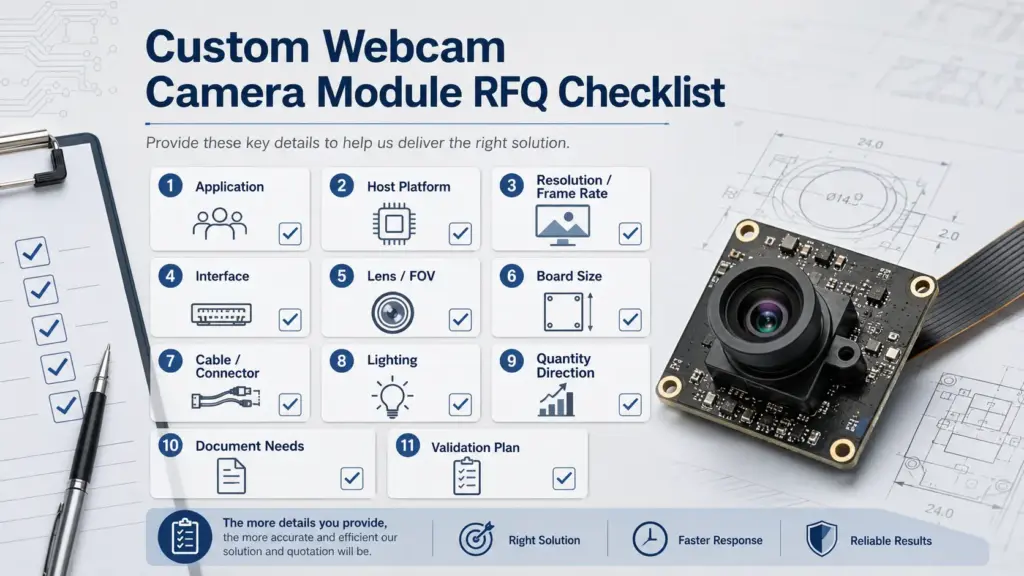
If some details are unknown, state that clearly. A supplier can usually start review with the application, host platform, interface direction, mechanical limits, and image target. Exact commercial terms should be confirmed separately for the specific project. Supertek’s High-Speed USB Camera Module guide and OEM 4K USB Camera Module RFQ guide are useful related reading for requirement preparation.
Validation before moving toward production
A sample that works on a desk is not automatically ready for production. Before moving toward pilot or production planning, the module should be tested under the real or expected product conditions.
| Validation area | What to check |
|---|---|
| Host recognition | Does the host detect the camera as expected? |
| Video stream | Does the selected resolution, frame rate, and format work in the target software? |
| Image scene | Does the image meet the application need under real distance and lighting? |
| Lens and FOV | Is the subject framed correctly after mounting in the enclosure? |
| Cable and connector | Does the cable route fit the product without strain or instability? |
| Mechanical fit | Does the PCB, lens height, and mounting position fit the enclosure? |
| Thermal and stability behavior | Does the camera remain stable during expected operating time? |
| Assembly review | Can the module be installed consistently during production? |
| Documentation | Are the required drawings, specifications, or other documents available for review? |
The validation plan should be agreed before final approval. If the product has strict safety, medical, automotive, or regulated requirements, those requirements need separate expert and supplier review. Do not assume a general camera module is automatically suitable for a regulated use case.
When to ask for technical review
Ask for technical review when any of these conditions apply:
- the module must fit inside a custom enclosure;
- the host platform has a defined USB, MIPI, or processor interface;
- the lens must meet a specific field of view or working distance;
- the cable, connector, or PCB shape is constrained;
- the product needs a stable video stream in a specific software environment;
- the camera will be used in difficult lighting;
- the project is moving from prototype to pilot or production planning.
Send a custom webcam camera module requirement brief
For a Supertek inquiry, share your application, host platform, target resolution and frame rate, interface preference, lens/FOV needs, board size limits, cable and connector requirements, quantity direction, document needs, and validation plan. Ask whether an existing module, modified option, or custom direction may fit. Final feasibility, documents, schedule, and commercial terms should be confirmed for the exact project.
FAQ about custom video/webcam camera modules
What is a custom video/webcam camera module?
A custom video/webcam camera module is a camera module prepared for integration into another product or system. It may involve review of the sensor, lens, interface, PCB size, cable, connector, housing, firmware behavior, or validation requirements. The exact scope depends on the application and host platform.
What should I prepare before requesting a quote?
Prepare the application, host platform, interface, resolution and frame rate target, output format, lens and field-of-view needs, focus distance, board size, cable and connector requirements, lighting condition, quantity direction, document needs, and validation plan.
Is a custom webcam module different from a finished webcam?
Yes. A finished webcam is usually an external plug-and-play product. A custom webcam module is usually built into another device and may need mechanical, optical, electrical, or software review. A standard USB camera module can be a middle option when existing specifications already match the project.
Should I choose USB/UVC or MIPI?
Choose based on the host platform and integration path. USB/UVC may be practical when the host and software support the required video behavior. MIPI CSI-2 may be relevant for embedded processor-based designs, but it usually needs board, driver, and platform review. Confirm the exact requirements before choosing.
Which specifications affect video quality and integration?
Important factors include resolution, frame rate, output format, sensor direction, lens, field of view, focus type, working distance, lighting condition, interface, board size, cable, connector, host platform, and validation environment.
Can I use a DIY camera board for product development?
A DIY camera board may help early concept testing, but it should not be treated as production-ready by default. Product development usually requires review of mechanical fit, host compatibility, cable and connector design, image behavior, documentation, and validation conditions.
What documents should I ask a camera module supplier for?
Ask what documents are available for the exact project. Depending on the module and supplier process, useful documents may include drawings, specifications, interface information, test information, or compliance-related documents. Do not assume every document or certificate is available unless confirmed.