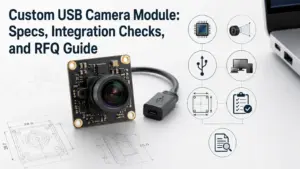
Need a high-speed USB camera module for an OEM device, embedded vision system, inspection tool, robotics project, kiosk, scanner, or smart hardware product? The right choice should not start with the phrase “high speed” alone.
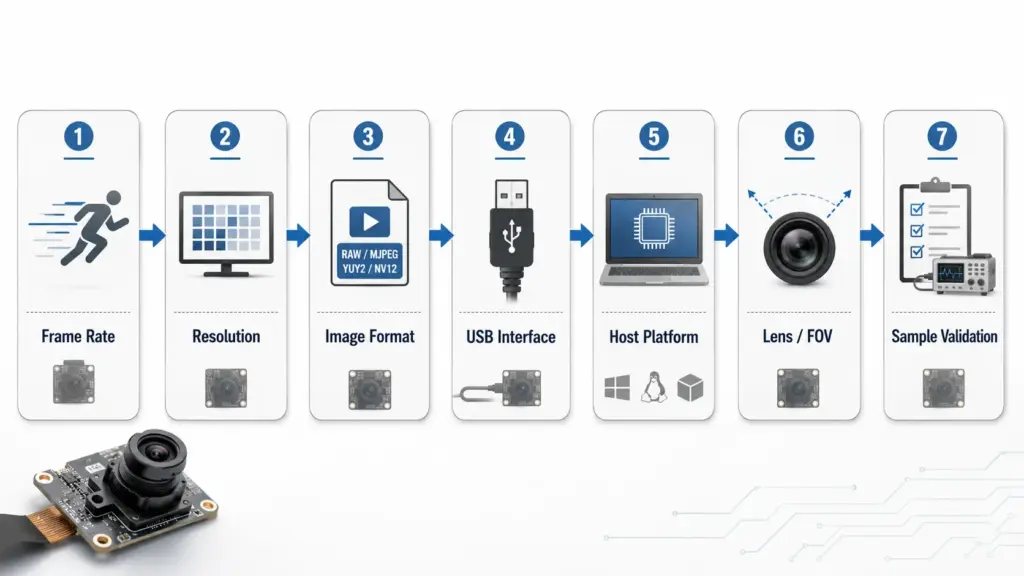
A high-speed USB camera module should be selected by checking the required frame rate, resolution, image format, USB interface, host platform, cable path, lens and field of view, driver or UVC needs, and validation plan.
For high-speed USB camera projects, send your target resolution, frame rate, image format, lens/FOV, host platform, cable or connector requirements, quantity range, and validation needs so the project can be reviewed before sample selection.
Send Your High-Speed USB Camera Module Requirements
How to Choose a High-Speed USB Camera Module Manufacturer
Choose a high-speed USB camera module manufacturer by confirming the target frame rate, resolution, output format, USB interface, host and software environment, lens/FOV, cable path, and sample validation plan. The goal is not just to find the highest fps number. The goal is to choose a module that can meet the motion, image-detail, integration, and production conditions of your device.
| What to Confirm | Why It Matters |
|---|---|
| Target frame rate | “High speed” depends on the actual fps needed for motion capture, scanning, inspection, or tracking. |
| Resolution | Higher resolution can increase bandwidth and processing load. |
| Output format | MJPEG and YUY2 modes may support different frame rates on the same module. |
| USB interface | USB3.0 is often chosen when higher bandwidth is needed, but the final fit depends on the project. |
| Host and software | The target OS, capture software, cable path, and driver/UVC behavior must be checked. |
| Sample validation | Real performance should be tested under the lighting, exposure, cable, host, and mechanical conditions of the final product. |
What “High-Speed” Means in USB Camera Modules
In USB camera module sourcing, “high-speed” usually refers to a camera module selected for higher-frame-rate capture than a standard low-frame-rate module. But frame rate is never the only specification to check.
A module may perform differently depending on resolution, output format, USB interface, host processor and software, exposure and lighting, cable length and connector design, thermal and mechanical conditions, and driver or UVC behavior.
For buyers comparing USB interface options, Supertek also has a broader USB3.0 camera module page and USB camera module page that can support related product review.
Frame Rate, Resolution, and Output Format Trade-Offs
A high-speed USB camera module should be selected by matching the application requirement to the frame-rate mode, not by comparing one headline number across suppliers.
| Selection Factor | What to Ask | Why It Affects the Project |
|---|---|---|
| Motion speed | What is moving, and how fast? | Faster motion may require higher fps, shorter exposure, or a suitable shutter/readout approach. |
| Required detail | Is 720p, 1080p, 2MP, 4K, or another resolution needed? | Higher resolution may increase bandwidth, storage, and host processing load. |
| Output format | Is MJPEG, YUY2, or another format required? | The available frame rate may change by format. |
| Interface | Is USB2.0 enough, or is USB3.0 needed? | Higher data throughput usually requires more careful interface and cable planning. |
| Host platform | What OS, processor, and capture software will be used? | Integration depends on the complete system, not only the camera board. |
| Lens/FOV | What field of view and working distance are required? | Lens choice affects image coverage, focus, and mechanical fit. |
| Validation | How will the sample be tested? | Lab conditions may not match final device conditions. |
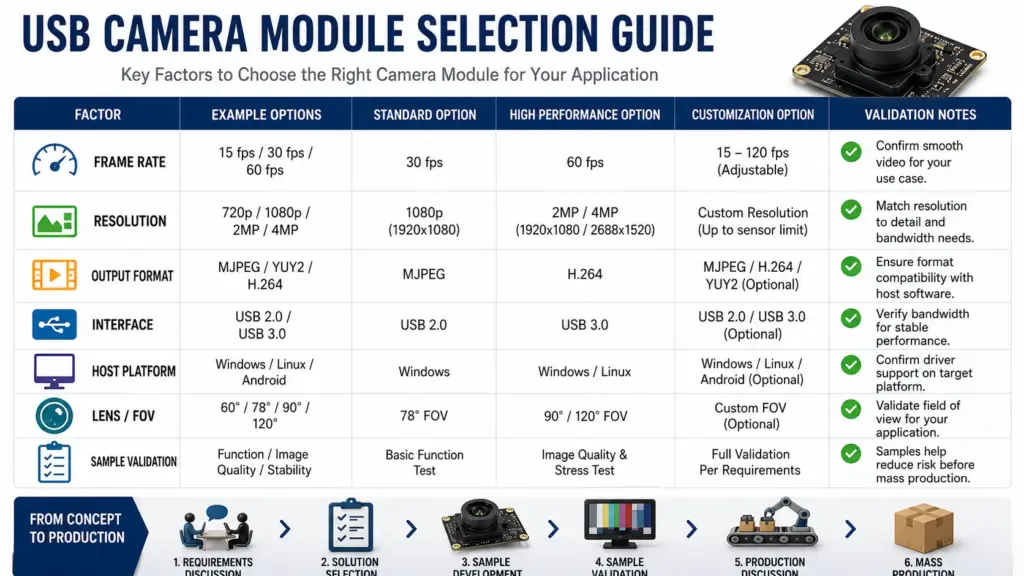
Supertek USB3.0 Product Examples to Review
The examples below should be treated as product-page references, not as a final project recommendation. Confirm the datasheet, exact mode, host platform, lens, cable, and validation conditions before selecting a sample.
| Supertek Product Page Example | Page-Listed Mode / Detail | Use Boundary |
|---|---|---|
| 2.0MP USB3.0 camera module page | The page lists 1920×1080 at 120fps and shows MJPEG/YUY2 information. | Do not rely on the sensor name until Supertek confirms the page inconsistency. Use the page-listed frame-rate modes only as a review starting point. |
| 4K/8.0MP USB3.0 IMX678 camera module page | The page lists 3840×2160 4K at 60fps and references MJPEG/YUY2 formats. | Confirm whether the required 4K mode, format, host, and cable setup fit the final project. |
USB2 vs USB3 vs MIPI: Which Interface Fits?
Many OEM teams start with USB because it can simplify camera integration compared with lower-level embedded camera interfaces. Still, the right interface depends on the product architecture.
| Interface Direction | Often Considered When | What to Confirm |
|---|---|---|
| USB2.0 camera module | Lower bandwidth, simpler imaging, or cost-sensitive use cases | Whether the required resolution and fps fit within the practical system requirement. |
| USB3.0 camera module | Higher resolution, higher frame rate, or higher data throughput is needed | Host support, cable path, connector design, format, heat, and software capture behavior. |
| MIPI camera module | The camera connects directly to an embedded processor or custom board | Processor support, driver work, PCB routing, cable length, and engineering resources. |
USB3.0 is not automatically the correct answer for every project. It is usually worth considering when the required frame rate, resolution, or data path makes USB2.0 unsuitable. MIPI may be better for some deeply embedded designs, but it typically requires more platform-specific integration work.
Custom High-Speed USB Camera Module Review
For OEM projects, standard camera modules may not fit the final product exactly. You may need a different PCB size, lens, cable length, connector, housing, lighting component, filter, or firmware behavior.
Supertek’s camera module customization page lists customization directions across camera module types and interface options. For a high-speed USB camera module project, feasibility should be reviewed against the exact technical requirement.
Send these details for customization review
- target application;
- required resolution and frame rate;
- preferred output format;
- USB2.0 or USB3.0 interface requirement;
- host OS and capture software;
- lens type, FOV, and working distance;
- PCB size or mechanical limits;
- cable length and connector type;
- lighting, filter, or enclosure requirements;
- sample quantity and expected production direction;
- required documents or approval process.
What to Confirm Before Sample Validation
Before moving from supplier comparison to sample testing, define what “pass” means for your project.
| Validation Item | What to Test |
|---|---|
| Frame rate | Can the sample reach the target fps under the required resolution, format, exposure, and host conditions? |
| Image quality | Does the image meet the required sharpness, color, dynamic range, and low-light expectations? |
| Motion behavior | Does the image remain usable when the target object or device is moving? |
| Host integration | Does the module work with the target OS, capture software, and processing pipeline? |
| Cable and connector | Does the chosen cable length and connector remain stable in the device layout? |
| Mechanical fit | Does the PCB, lens, and housing direction fit the product design? |
| Thermal behavior | Does the module remain stable during the intended operating period? |
| Production path | Are the required documents, sample changes, and approval steps clear before mass production planning? |
Do not approve a high-speed USB camera module based only on a product-page fps number. Validate the actual mode and operating conditions that your device will use.
RFQ Checklist for High-Speed USB Camera Module Projects
A clear RFQ helps the engineering and sales team review the right camera module direction faster.
| RFQ Detail | Example of What to Provide |
|---|---|
| Application | Inspection device, robotics, scanner, kiosk, smart device, embedded vision system, etc. |
| Resolution target | 720p, 1080p, 2MP, 4K, or another requirement. |
| Frame-rate target | Required fps and whether it is needed at full resolution. |
| Output format | MJPEG, YUY2, or other required format. |
| Interface | USB2.0, USB3.0, Type-C, or another connection direction. |
| Host platform | Windows, Linux, Android, embedded board, or custom host. |
| Lens and FOV | Fixed focus, autofocus, working distance, field of view, and size limits. |
| Cable and connector | Length, connector type, routing, shielding, or mechanical constraint. |
| Quantity range | Sample quantity and expected production range, if known. |
| Documents needed | Datasheet, drawing, sample report, compliance documents, or other approval documents. |
| Validation conditions | Lighting, exposure, motion, operating time, and test environment. |
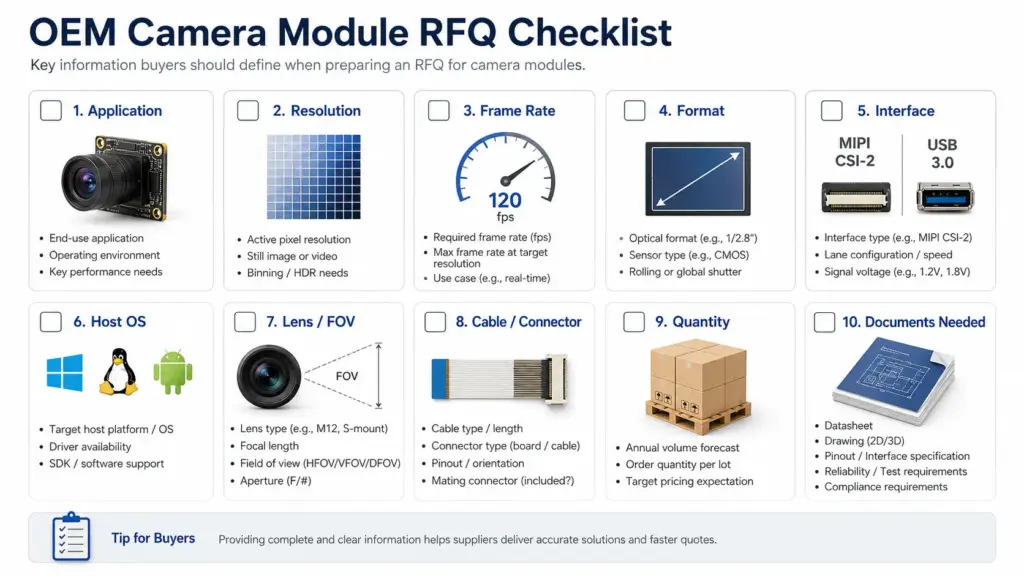
Send Your RFQ Details to Supertek
FAQ
What is a high-speed USB camera module?
A high-speed USB camera module is a USB camera module selected for higher-frame-rate imaging needs. The actual performance should be checked together with resolution, output format, interface, host platform, cable, exposure, and software conditions.
How do I choose a high-speed USB camera module manufacturer?
Start by checking whether the manufacturer can review your target fps, resolution, output format, USB interface, lens/FOV, host platform, cable/connector, and validation requirements. For OEM projects, also check whether customization review is available for the mechanical, optical, hardware, or firmware requirements.
When should I choose USB3 instead of USB2 for a camera module?
Consider USB3.0 when your project needs higher data throughput, higher resolution, or higher-frame-rate capture than USB2.0 can support in the final system. Still, confirm the exact module, format, host, and cable setup before final selection.
How is USB3 different from MIPI for camera modules?
USB3.0 camera modules are often used when the camera needs to connect through a USB host path. MIPI camera modules are often used inside embedded products where the camera connects directly to a processor or custom board. MIPI can be powerful, but it usually requires more platform-specific driver, board, and integration work.
What resolution and frame rate should I choose?
Choose the lowest resolution and frame rate that still meets the application requirement. Higher resolution and higher fps can increase bandwidth, processing load, storage, and validation difficulty. Confirm the required motion detail, field of view, lighting, exposure, and host performance before selecting the module.
Does UVC mean the camera works without a custom driver?
UVC refers to the USB Video Class specification area. USB-IF lists the UVC v1.5 document set, including the class specification and payload documents. UVC behavior should still be confirmed for the exact module, OS, software, and host environment rather than assumed universally. See the USB-IF UVC v1.5 document set for general reference.
What should I send for an RFQ?
Send your application, required resolution, target fps, output format, interface, host OS/software, lens/FOV, cable and connector requirements, mechanical limits, sample quantity, expected production direction, and documents needed.
Ready to Review a High-Speed USB Camera Module Project?
Share your technical requirements with Supertek so the team can review whether an existing USB camera module or a customized direction is a better fit.
- application and device type;
- resolution and frame-rate target;
- output format;
- USB2.0 or USB3.0 requirement;
- host platform and software;
- lens, FOV, and working distance;
- cable, connector, and mechanical constraints;
- sample and production planning details;
- required documents or approval process.
Supertek’s contact page provides an inquiry form for sending project details. Avoid relying on unconfirmed lead time, MOQ, warranty, or certification claims until those items are confirmed for the exact project.
Contact Supertek About Your High-Speed USB Camera Module Project