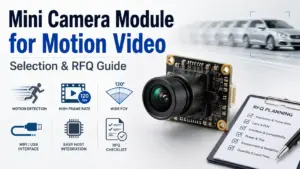
Choosing a mini camera module for motion video is not just a question of board size or megapixels.
For moving objects, moving cameras, trigger-based video, or compact embedded vision devices, the final result depends on several conditions working together: frame rate, exposure, lighting, shutter behavior, lens angle, host system, interface bandwidth, mechanical space, cable routing, and validation testing.
A vague inquiry such as “I need a mini camera module for motion video” is usually not enough for a manufacturer to recommend the right direction. A better RFQ explains what is moving, how fast it moves, where the module will be installed, what host system will process the video, and how the sample will be tested.
This guide explains what buyers, engineers, OEM teams, and procurement teams should confirm before discussing a mini camera module project with a manufacturer.
How to Choose a Mini Camera Module Manufacturer for Motion Video
Choose a mini camera module manufacturer by defining the motion condition first, then matching the module specifications to that use case. Confirm the target frame rate, shutter behavior, exposure and lighting, lens/FOV, interface, host platform, board size, cable/connector, and sample validation plan before requesting a quote or custom review.
Start With the Motion Condition, Not the Megapixels
A higher-resolution camera module is not automatically better for motion video.
Resolution affects image detail, but motion-video performance also depends on how the scene is captured and transferred. A compact module may have enough pixels but still fail the application if the exposure is too long, the interface cannot support the required data rate, the lens is not suitable for the working distance, or the test scene is different from the final product environment.
Before comparing mini camera modules, define the motion condition clearly.
| Motion-video factor | Why it matters | What to confirm | Risk if ignored |
|---|---|---|---|
| Object movement | Faster motion may increase blur or distortion risk | Object speed, direction, distance, and expected movement pattern | Image may look sharp in static tests but fail during motion |
| Camera movement | A moving camera can create different distortion concerns than a fixed camera | Whether the camera, object, or both are moving | Wrong shutter or exposure assumptions |
| Frame rate | Higher frame rate may help capture more moments in motion | Target fps and acceptable resolution at that fps | Selected module may not meet timing needs |
| Exposure and lighting | Motion blur often depends on exposure time and available light | Indoor/outdoor lighting, low-light needs, LED lighting, exposure limits | Motion appears blurred even at acceptable resolution |
| Lens and FOV | Field of view affects object size, distance, and usable detail | Working distance, FOV, focus range, lens type | Object may be too small, distorted, or out of focus |
| Interface and host | Video data must match the host platform and bandwidth | USB, MIPI/DVP, IP/WiFi, host OS, processor, software | Module may be difficult to integrate |
| Mechanical fit | Mini modules often face tight space limits | Board size, mounting, cable path, connector direction | Sample may work electrically but not fit the device |
| Validation scene | Real testing should match real use | Test distance, speed, lighting, host software, and recording method | Sample approval may not predict production behavior |
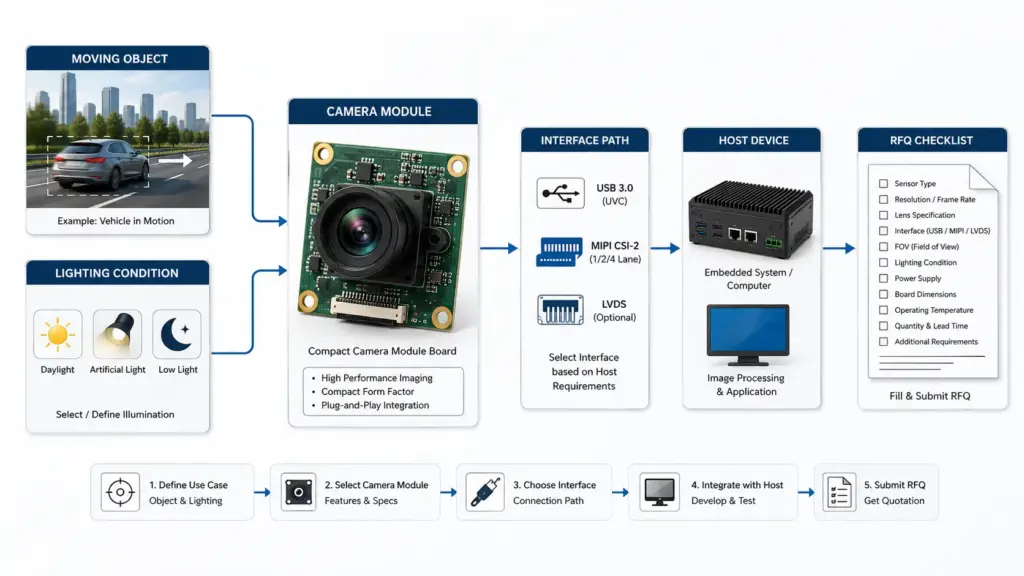
Key Specs to Confirm Before Asking for a Quote
A useful RFQ should not only ask for “small size” or “HD video.” It should give the manufacturer enough information to understand the project conditions.
Frame Rate, Exposure, and Lighting
Frame rate is important, but it should be reviewed together with exposure and lighting.
For example, a project may request high frame rate because the target object moves quickly. But if the scene is dim and exposure time needs to be longer, the image may still show motion blur. In another project, better lighting and a suitable lens may matter as much as frame-rate selection.
When preparing a request, describe:
- Target frame rate.
- Target resolution.
- Scene brightness.
- Indoor or outdoor use.
- Whether the object is moving quickly, slowly, or unpredictably.
- Whether the camera itself moves.
- Whether the video must be recorded, streamed, inspected, or used by software.
This helps the manufacturer or engineering team narrow the right module direction instead of guessing from a single spec.
For USB-based projects where frame rate and validation conditions are important, Supertek’s High-Speed USB Camera Module Manufacturer guide can be used as a related internal reference.
Lens, Field of View, Working Distance, and Board Size
The lens and mechanical layout are just as important as the sensor or interface.
A mini camera module used in a compact device may need a specific board shape, mounting hole position, cable exit direction, connector type, lens height, or FOV. If these details are missing, the first sample may not match the real product design.
Confirm these details early:
- Required field of view.
- Working distance from camera to object.
- Focus type or focus distance.
- Available internal space.
- Board size limit.
- Lens height limit.
- Cable length and routing direction.
- Connector type and orientation.
- Mounting method.
- Any enclosure window or cover glass in front of the lens.
For OEM projects, mechanical fit should be reviewed before mass production planning. A module that works on a lab bench may still need adjustment before it fits the final product housing.
Rolling Shutter vs Global Shutter: What to Ask the Manufacturer
Shutter behavior is one of the most important questions for moving-object video.
A rolling shutter captures the image line by line. In many applications, it can be acceptable. But when objects move quickly, or when the camera itself moves, rolling-shutter distortion may appear in the image.
A global shutter captures the frame more simultaneously, which may help reduce certain motion distortion risks. However, global shutter is not automatically required for every motion-video project. The right choice depends on object speed, exposure, lighting, image-quality expectations, cost, module availability, and integration requirements.
| Motion condition | Possible concern | Question to ask the manufacturer |
|---|---|---|
| Slow or moderate movement | Rolling shutter may be acceptable depending on the scene | Can this module be tested under our actual movement and lighting conditions? |
| Fast-moving object | Distortion or blur may become visible | Should we review global shutter or shorter exposure options? |
| Moving camera | Image geometry may be affected by camera movement | What shutter type and exposure settings should be considered? |
| Low-light motion scene | Longer exposure may increase blur | What lighting or exposure conditions are needed for sample testing? |
| Inspection or measurement use | Distortion may affect software or measurement accuracy | Should the sample be tested with the actual algorithm or inspection method? |
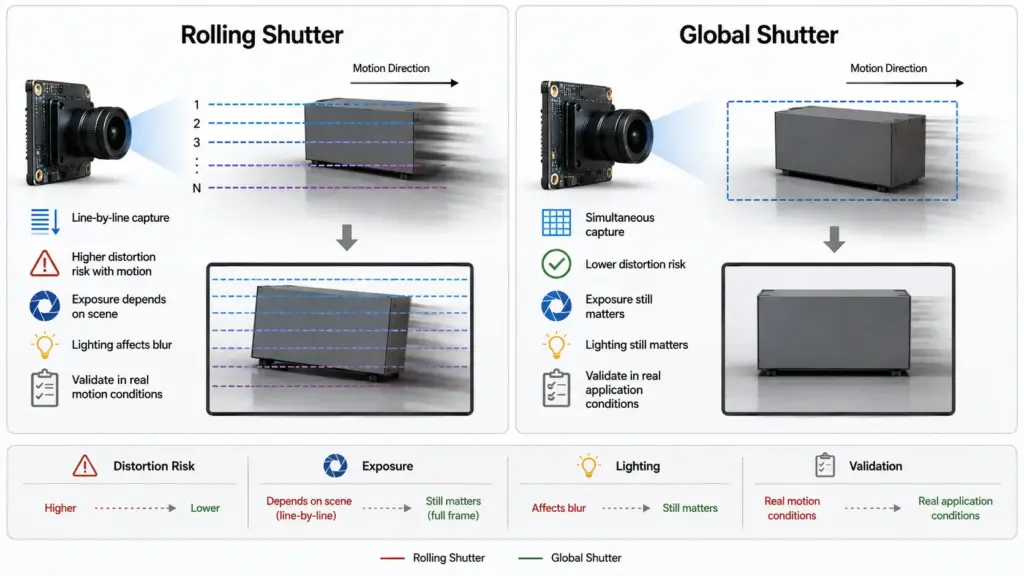
The safest approach is to describe the motion and test condition, then ask the manufacturer which shutter direction should be reviewed. Do not choose shutter type from a single keyword alone.
For related reading, see Supertek’s Custom Global Shutter USB Camera Guide. For a neutral technical reference on shutter behavior, see The Imaging Source’s Global Shutter in Machine Vision glossary.
Interface and Host System: USB, MIPI/DVP, IP/WiFi, or Mixed Requirements
A mini camera module must match the host system, not just the image requirement.
Different interfaces can fit different project needs. The right choice depends on the product architecture, available processing resources, software environment, cable length, space, bandwidth, power, and development schedule.
| Interface direction | Typical fit | Integration concern | What to confirm |
|---|---|---|---|
| USB | Often used when the host supports USB video input and easier connection is needed | Bandwidth, UVC/software support, cable length, connector space | Host OS, USB version, resolution/fps target, cable route |
| MIPI/DVP | Often used in embedded products with direct processor integration | Requires closer hardware/software matching | Processor platform, driver support, pinout, board layout |
| IP/WiFi | May fit networked or remote video use cases | Latency, power, network reliability, enclosure design | Streaming method, network condition, power limit |
| Mixed requirement | Used when the final direction is not yet fixed | Early-stage comparison may be needed | Prototype platform, production platform, validation schedule |
For related internal pages, review Supertek’s Product Catalogue and USB Camera Module page when the project direction is confirmed.
For motion video, interface bandwidth can affect feasible resolution and frame-rate combinations. A high-resolution target may not be practical if the interface, host, or software pipeline cannot support the data flow.
Before asking for a quote, clarify:
- Host processor or platform.
- Operating system.
- Required output format.
- Target resolution and frame rate together.
- Cable length and connector limits.
- Whether plug-and-play behavior is needed.
- Whether driver or software support is required.
- Whether the sample will be tested on the same host as the final product.
OEM Module vs Consumer Mini Camera: Avoid the Wrong Category
Search results for “mini camera” often mix several product types.
A mini camera module for OEM integration is not the same as a finished consumer mini security camera. An OEM module is usually a component that needs integration into another product. It may require host software, power design, mechanical mounting, cable planning, image tuning, and validation.
A consumer mini camera is typically a finished device with enclosure, battery or power design, app, storage, and user-facing functions already built in.
For B2B sourcing, make sure the supplier understands that you need a camera module, not only a finished camera device.
We are developing an OEM device and need a mini camera module for motion-video capture. Please review the interface, board size, lens/FOV, frame rate, shutter direction, cable/connector, and validation requirements below.
This helps avoid mismatched recommendations and saves time during technical review.
RFQ Checklist for a Mini Camera Module for Motion Video
A clear RFQ helps both engineering and procurement teams. It reduces back-and-forth and gives the manufacturer a better starting point for module selection or custom review.
Use this checklist before requesting a quotation.
| RFQ item | Details to provide |
|---|---|
| Application | What product will use the camera module? What is the video used for? |
| Motion condition | What moves: object, camera, or both? How fast? At what distance? |
| Target image output | Required resolution, frame rate, format, and video use |
| Shutter concern | Whether rolling-shutter distortion or motion blur is a concern |
| Lighting | Indoor/outdoor, low light, LED lighting, variable lighting, exposure limits |
| Lens/FOV | Required field of view, focus distance, lens height limit |
| Interface | USB, MIPI/DVP, IP/WiFi, or unsure |
| Host system | Processor, OS, software, driver requirements |
| Mechanical limits | Board size, mounting, connector position, cable direction |
| Cable/connector | Cable length, flexibility, shielding, connector type |
| Quantity stage | Prototype, pilot, or mass-production planning |
| Documents needed | Datasheet, drawing, sample report, compliance documents if required |
| Validation plan | How and where the sample will be tested |
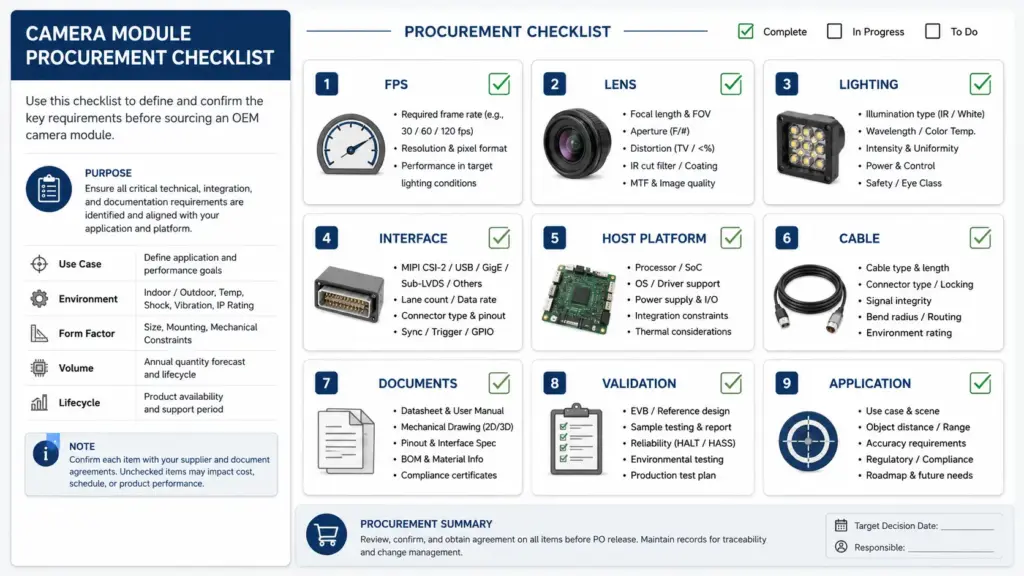
Do not worry if every item is not final. Even partial information is better than only asking for “a mini camera module.” The manufacturer can then identify what still needs engineering confirmation.
Sample Validation Checklist Before Production Approval
A sample that works in a simple desk test may not prove that the module fits the final product.
For motion-video projects, sample validation should be planned around the real application as much as possible.
Before approving a sample direction, review:
- Test the actual moving object or a realistic substitute.
- Use the expected lighting condition.
- Test at the required working distance.
- Record at the target resolution and frame rate.
- Use the intended host platform or a close equivalent.
- Check the cable path and connector position inside the enclosure.
- Review focus, FOV, image angle, and lens height.
- Test the expected software or recording method.
- Check whether exposure settings affect motion blur.
- Review thermal and mechanical conditions if the device runs for long periods.
- Keep sample images or video clips for engineering comparison.
- Record test conditions so results can be repeated.
The goal is not to prove universal performance. The goal is to decide whether the module direction is suitable enough for the next engineering step.
How to Discuss Standard, Modified, or Custom Module Direction With Supertek
When discussing a mini camera module project with Supertek, prepare the application details before asking whether a standard, modified, or custom direction is suitable.
A safe inquiry can include:
- Application and product type.
- Motion condition and video purpose.
- Target frame rate and resolution.
- Shutter concern, if any.
- Interface and host platform.
- Lens/FOV and working distance.
- Board size and mounting limits.
- Cable and connector needs.
- Expected prototype or production stage.
- Documents required for internal review.
- Sample validation plan.
Please review whether a standard, modified, or custom module direction may fit this motion-video project. We can provide drawings, host details, lighting conditions, and sample-test requirements for evaluation.
This wording avoids assuming that every requirement is available as a standard product. It also gives the manufacturer a clearer path to respond.
FAQ
How do I choose a mini camera module manufacturer for motion video?
Start by defining the motion condition, not only the camera size or resolution. Confirm the moving object, speed, lighting, target frame rate, shutter concern, lens/FOV, interface, host platform, mechanical limits, cable/connector, and validation method before asking for a recommendation.
What specs matter most for a mini camera module used with moving objects?
Important specs and conditions include frame rate, exposure, lighting, shutter behavior, lens/FOV, working distance, interface bandwidth, host compatibility, board size, cable/connector, and sample validation conditions. The priority depends on the application.
Is higher resolution always better for motion video?
No. Higher resolution may provide more detail, but motion-video quality also depends on frame rate, exposure, lighting, shutter behavior, interface bandwidth, lens, and host processing. A lower-resolution setup with better motion handling may be more suitable for some projects.
When should I consider global shutter instead of rolling shutter?
Ask about global shutter when fast movement, camera movement, or image distortion could affect the application. Rolling shutter may still be acceptable in some conditions, so the decision should be reviewed with the actual motion, lighting, exposure, and cost requirements.
What should I include in an RFQ for a mini camera module?
Include the application, motion condition, target resolution and frame rate, lighting, shutter concern, lens/FOV, working distance, interface, host system, board-size limit, cable/connector needs, quantity stage, document needs, and sample validation plan.
Can a mini camera module be customized for board size, lens, cable, or connector?
It may be possible depending on the manufacturer’s available module platform, engineering scope, project requirements, and validation plan. Do not assume customization is available for every specification. Send drawings, host details, and mechanical requirements for review.
How should I test samples before mass production?
Test samples under conditions close to the final product use. Check movement speed, lighting, working distance, host platform, frame format, cable routing, enclosure fit, software behavior, and repeated recording conditions. Keep test records so engineering teams can compare results.
Is a mini camera module the same as a consumer mini security camera?
No. A mini camera module is usually a component for integration into another device. A consumer mini security camera is a finished product with enclosure, power, app, storage, and user functions. B2B buyers should make clear that they need a module for OEM integration.
Send Motion-Video Requirements for Technical Review
For a more useful technical discussion, prepare your application details before requesting a quote.
Share your motion condition, target resolution and frame rate, shutter concern, lighting, lens/FOV, interface, host platform, board-size limits, cable/connector needs, document requirements, and sample validation plan.
Send these project details to Supertek for review, so the next discussion can focus on whether a standard, modified, or custom module direction is worth evaluating.