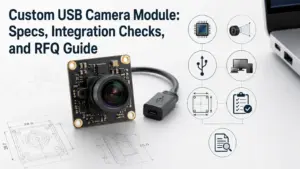
Choosing a 4K USB camera module is not only a resolution decision. A module that looks suitable on paper may still fail in the final device if the lens, field of view, cable, connector, firmware, host system, lighting, or mechanical space does not match the application.
For OEM buyers, engineers, and procurement teams, the safer approach is to define the application first, then review whether a standard module, modified module, or deeper custom development is needed.
What Should You Prepare Before OEM Processing?
Before requesting OEM processing for a 4K USB camera module, prepare your application, host platform, target resolution and frame rate, lens and field-of-view needs, working distance, lighting condition, board size limit, cable and connector requirements, firmware or USB identity needs, quantity expectation, required documents, and sample validation plan. Final feasibility should be confirmed through supplier review.
What OEM Processing Means for a 4K USB Camera Module
OEM processing means adapting a camera module so it can fit a specific device, product design, or application requirement. For a 4K USB camera module, this may include reviewing the image target, optical design, USB interface, mechanical fit, firmware behavior, and production requirements.
Depending on the project and supplier review, OEM processing may involve:
- selecting a suitable 4K USB camera module platform;
- adjusting lens type, field of view, or focus distance;
- reviewing board size, shape, and mounting holes;
- changing cable length, connector type, or cable exit direction;
- confirming USB interface and host-system compatibility;
- reviewing firmware, USB descriptors, or device identity needs;
- checking housing or enclosure fit;
- preparing samples for validation before batch production.
Not every project needs full custom development. Some projects only need a standard module. Others may need minor changes. More complex projects may require deeper engineering review. For customization-related inquiries, review Supertek’s camera module customization page as a related internal page. Final capability wording should still be confirmed before publishing stronger claims.
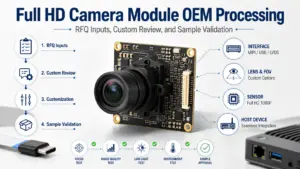
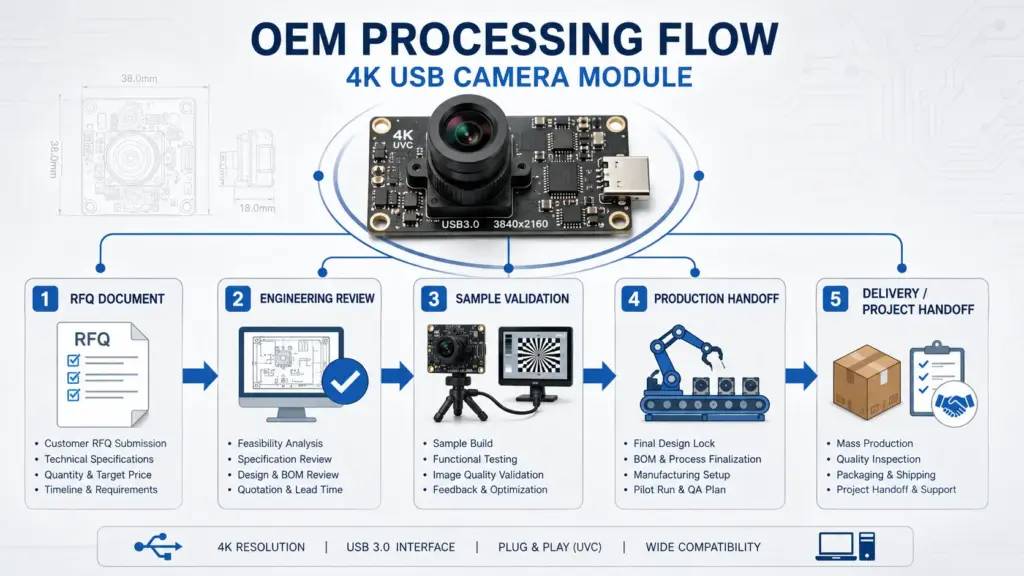
Typical OEM Processing Workflow
- Requirement collection: The buyer shares the application, host device, image target, mechanical limits, quantity expectation, and document needs.
- Module platform review: The supplier or engineering team checks whether an existing 4K USB module platform can meet the basic requirement.
- Customization review: If the standard module does not fit, the team reviews possible changes such as lens, cable, connector, PCB, firmware, or mounting design.
- Sample preparation: A sample is prepared for buyer-side testing. The sample should be tested in the real host device or a close test environment.
- Validation and adjustment: The buyer checks image quality, recognition, stability, cable fit, heat, mounting, lighting, and software behavior.
- Production handoff: After approval, the project moves toward production planning. Commercial terms, documents, delivery schedule, warranty, and compliance requirements should be confirmed before order placement.
Standard Module vs Modified Module vs Full Custom Development
Before asking for a custom 4K USB camera module, decide which level of customization your project actually needs.
| Path | Best Fit | Typical Changes | Buyer Inputs Needed | Validation Focus | Risk to Avoid |
|---|---|---|---|---|---|
| Standard module | The existing module already fits the device and image target. | Usually none, or only normal configuration selection. | Application, host system, expected image quality, quantity. | Host recognition, image quality, mounting fit. | Choosing only by resolution without checking integration. |
| Modified module | The base module fits, but some parts need adjustment. | Lens, FOV, cable, connector, mounting, firmware setting, or label/branding. | Mechanical limits, optical target, cable route, connector type, software needs. | Fit, stability, image result, USB behavior. | Assuming minor changes have no validation risk. |
| Full custom development | Existing platforms cannot meet key design requirements. | PCB layout, sensor/platform selection, optics, mechanical design, firmware, or housing integration. | Detailed drawings, product design, operating conditions, target specs, validation plan. | Engineering feasibility, sample rounds, long-term stability. | Starting development without complete requirements. |
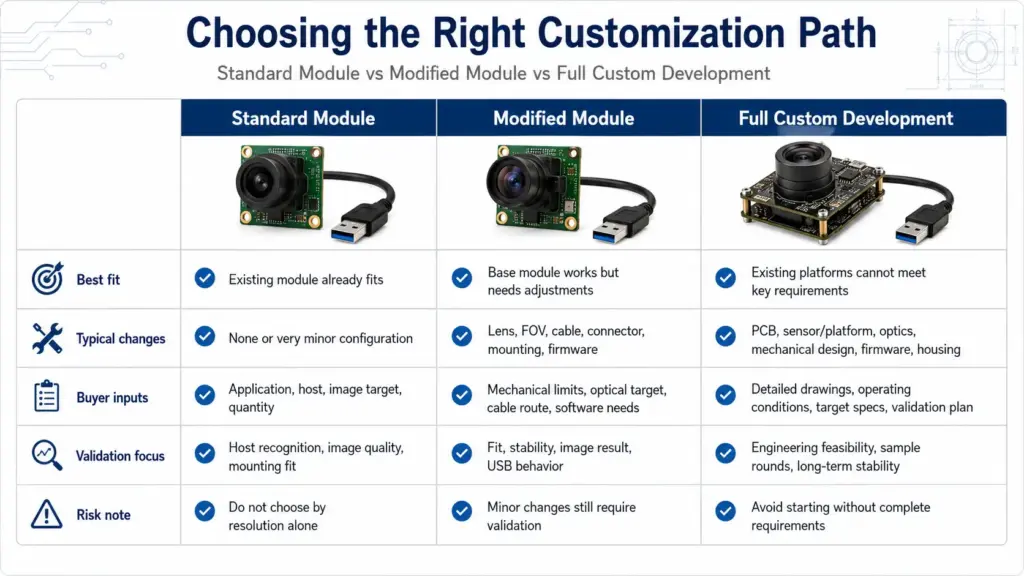
A standard module may be enough when the target device has flexible space, common USB requirements, and no special optical or firmware needs. A modified module may be suitable when the core camera platform works, but the lens, cable, connector, or mounting needs adjustment. Full custom development is usually considered when the product design has strict mechanical, optical, electrical, or firmware requirements.
For related module categories, see USB camera module options, the 4K camera module category, and Supertek’s USB 3.0 camera module page. A specific 4K USB3.0 IMX317 module listing can be used as a product-reference link only after product specs are approved.
4K USB Camera Module Specs That Affect Application Fit
A 4K label tells you the image resolution category, but it does not confirm that the module will work well in your device. The final result depends on several connected factors.
| Factor | Why It Matters | What to Confirm |
|---|---|---|
| Resolution | 4K can capture more detail, but it also increases data and processing demands. | Target image size, real detail requirement, storage or streaming needs. |
| Frame rate | Higher frame rates may be needed for motion, scanning, or real-time monitoring. | Required FPS at the target resolution and format. |
| USB interface | Interface bandwidth affects how image data is transferred to the host. | USB version, host controller, cable quality, and real application format. |
| Compression / image format | Format affects bandwidth, latency, and host processing. | Whether the host software supports the required format. |
| Sensor | Sensor choice affects image behavior, sensitivity, and output options. | Application lighting, exposure needs, and image quality target. |
| Lens and FOV | The lens controls viewing angle, working distance, and image coverage. | Field of view, focus distance, distortion tolerance, and target object size. |
| Focus method | Fixed focus, manual focus, or autofocus may fit different use cases. | Whether the target distance changes during use. |
| Lighting condition | Poor or changing light can affect final image quality. | Indoor/outdoor use, low light, backlight, glare, or IR needs. |
| Mechanical size | Board shape and mounting affect product integration. | PCB size, mounting holes, height limit, enclosure fit. |
| Cable and connector | Cable routing can affect assembly and reliability. | Cable length, connector type, exit direction, and bend space. |
| Firmware / USB identity | Device behavior may affect software recognition and control. | VID/PID, descriptors, UVC behavior, custom controls, or branding needs. |
USB Interface, UVC, and Host-System Compatibility
USB camera modules are often selected because they can be easier to integrate than some parallel or MIPI camera solutions. However, “USB” does not automatically mean every camera module will work with every host, operating system, software stack, or feature requirement.
For UVC-compliant devices, supported systems may provide class-driver behavior. Still, buyers should confirm the exact host platform, operating system, USB controller, firmware behavior, supported image formats, and any advanced controls before approving a module. For general technical context, see the USB-IF UVC v1.5 document set and the Microsoft UVC camera implementation guide.
For 4K projects, also check whether the host device can handle the expected resolution, frame rate, compression format, and cable length. A module can meet a resolution target but still create integration problems if the host system, software, or cable design is not suitable.
Lens, FOV, Focus, Lighting, and Working Distance
The lens and optical setup are often as important as the image sensor. A wide-angle lens may capture more of the scene, but it can increase distortion. A narrow field of view may improve detail on a target area, but it requires correct mounting distance. Autofocus may help when the working distance changes, while fixed focus may be suitable for stable installations.
Before selecting the lens, define:
- target object size;
- working distance;
- required field of view;
- acceptable distortion level;
- lighting condition;
- focus requirement;
- installation angle;
- enclosure window or cover glass impact.
Mechanical Size, Cable, Connector, and Mounting
Mechanical mismatch is a common reason a camera module that looks suitable in a catalog does not fit the final product. Confirm the available space before selecting or customizing a module.
Important details include:
- PCB length, width, and height limit;
- mounting hole position;
- lens height and module stack height;
- cable length and bending space;
- connector direction;
- enclosure opening;
- heat and airflow condition;
- assembly method.
If the camera must fit into a narrow enclosure, handheld device, kiosk, medical device shell, access-control unit, inspection tool, or embedded vision system, send drawings or mechanical constraints as early as possible.
What to Prepare Before Requesting a Quote
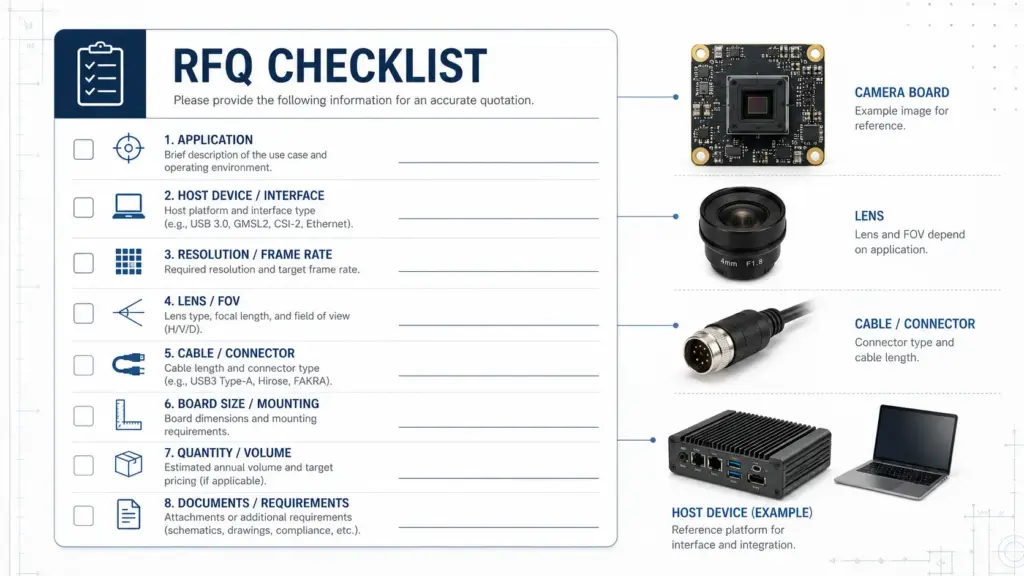
A complete RFQ helps the supplier or engineering team review the project faster and reduces back-and-forth questions. It also helps avoid a quote based on the wrong module platform.
Use this checklist before requesting an OEM 4K USB camera module review.
| RFQ Item | What to Provide | Why It Helps |
|---|---|---|
| Application | What the camera will be used for. | Helps match optical, sensor, and interface needs. |
| Host platform | PC, embedded board, Android device, Linux system, Windows system, or other host. | Helps review USB and software compatibility. |
| Target resolution and frame rate | Required resolution, FPS, and format if known. | Helps check bandwidth and host processing needs. |
| Lens / FOV | Viewing angle, working distance, target object size. | Helps select or customize optics. |
| Lighting condition | Indoor, outdoor, low light, backlight, IR, glare, or controlled lighting. | Helps review image performance risk. |
| Mechanical limits | Board size, height limit, mounting holes, enclosure space. | Helps avoid fit problems. |
| Cable and connector | Cable length, connector type, exit direction. | Helps review assembly and reliability. |
| Firmware needs | UVC, VID/PID, device name, controls, or special behavior. | Helps identify software or firmware review needs. |
| Quantity expectation | Sample quantity and estimated production quantity. | Helps commercial and production planning. |
| Required documents | Datasheet, drawing, test report, compliance document, or other files. | Helps clarify what is available and applicable. |
| Validation plan | What the buyer will test before approval. | Helps align sample review expectations. |
Avoid sending only a short message such as “Need 4K USB camera module price.” That usually does not provide enough information for an accurate technical review.
Sample Validation Before Batch Production
Sample approval should not be based only on whether the camera turns on. The sample should be tested in the real device, or in a test setup that closely matches the final product.
Use this validation checklist before moving toward batch production.
| Validation Item | What to Check |
|---|---|
| Host recognition | Does the host system detect the module correctly? |
| Image output | Does the image meet the required resolution, frame rate, and format? |
| Image quality | Are brightness, sharpness, color, exposure, and distortion acceptable for the application? |
| Lens and FOV | Does the camera capture the target area at the planned working distance? |
| Focus | Is the focus stable for the real use condition? |
| Lighting condition | Does the image remain usable under expected lighting changes? |
| Cable and connector | Does the cable fit the enclosure and remain stable during assembly? |
| Mechanical fit | Does the PCB, lens height, and mounting design fit the product housing? |
| Software behavior | Does the application software access the module and required controls correctly? |
| Stability | Does the module operate consistently during extended use or repeated connection? |
| Heat and enclosure effect | Does the design remain stable when installed in the final structure? |
| Documentation | Are the required drawings, datasheets, or other documents available for the exact project? |
If the project involves regulated markets, special safety requirements, or strict compliance needs, confirm the required documents early. Do not assume that a document applies to every module, every configuration, or every destination market.
Documents and Compliance Questions to Confirm
Procurement teams often ask for certificates, test reports, drawings, or compliance documents. These requests should be handled carefully because document availability may depend on the exact module, configuration, market, and order requirement.
Before approving a supplier or module, ask:
- Is a product datasheet available for the exact module?
- Is a 2D or 3D drawing available for mechanical review?
- Are lens and sensor details available for engineering review?
- Are test reports available for the selected configuration?
- Are compliance documents available, and do they apply to the exact module?
- Are firmware or USB descriptor details available if needed?
- What warranty terms apply to this project?
- What lead time, MOQ, packaging, and shipping terms apply to this inquiry?
The safe approach is to ask what documents are available and whether they apply to your exact module, configuration, and target market. Avoid assuming that one document covers all versions of a product.
FAQ
What does OEM camera module mean?
An OEM camera module is a camera component designed for integration into another company’s device or system. In an OEM project, the buyer may need a module that matches specific optical, mechanical, electrical, software, branding, or documentation requirements.
What is OEM processing of a 4K USB camera module?
OEM processing of a 4K USB camera module means reviewing and adapting a camera module for a specific product or application. Depending on the project, this may involve module selection, lens review, cable or connector changes, mechanical fit review, firmware behavior, sample validation, and production preparation.
When should I choose a custom 4K USB camera module instead of a standard module?
Choose a custom or modified option when a standard module does not meet your lens, field of view, board size, cable, connector, firmware, mounting, image, or document requirements. If an existing module already fits your application and host system, a standard module may be enough.
Which specs matter besides 4K resolution?
Important specs include frame rate, USB interface, image format, sensor, lens, field of view, focus method, lighting condition, board size, cable, connector, firmware behavior, and host-system compatibility. Resolution is only one part of application fit.
What should be tested before sample approval?
Test host recognition, image output, image quality, lens and FOV, focus, lighting condition, cable fit, connector stability, mechanical fit, software behavior, heat condition, and extended operation. The sample should be reviewed in the real device or a close test environment.
Send Your Requirements for Technical Review
For a 4K USB camera module OEM project, prepare your application details before requesting a quote. Include the host platform, target resolution and frame rate, lens and field-of-view requirements, working distance, lighting condition, mechanical size limits, cable and connector needs, firmware requirements, quantity expectation, and required documents.
Send these details for technical review so the project can be checked against standard module, modified module, or deeper OEM development options. Confirm final feasibility, documents, lead time, MOQ, warranty, and commercial terms before ordering.