Choosing an OEM digital camera module is not only a sensor or resolution decision.
For OEM products, embedded systems, inspection devices, kiosks, access-control terminals, robotics, embedded vision systems, and other camera-enabled products, the module has to work inside a real product environment. That means the camera module must match the host platform, available space, optical target, lighting condition, software stack, cable route, validation plan, and sourcing stage.
A vague request such as “we need a 5MP OEM camera module” is usually not enough for a useful technical review. A better RFQ explains what the product needs to see, where the module will be installed, which host platform will process the image, and what mechanical or document requirements must be checked before sampling.
How to Choose an OEM Digital Camera Module
Choose an OEM digital camera module by defining the application first, then comparing sensor, resolution, frame rate, interface, lens/FOV, board size, connector, cable, host compatibility, software output, validation needs, document needs, and quantity stage. A clear RFQ helps the supplier review whether a standard module may fit or whether custom module work should be discussed.
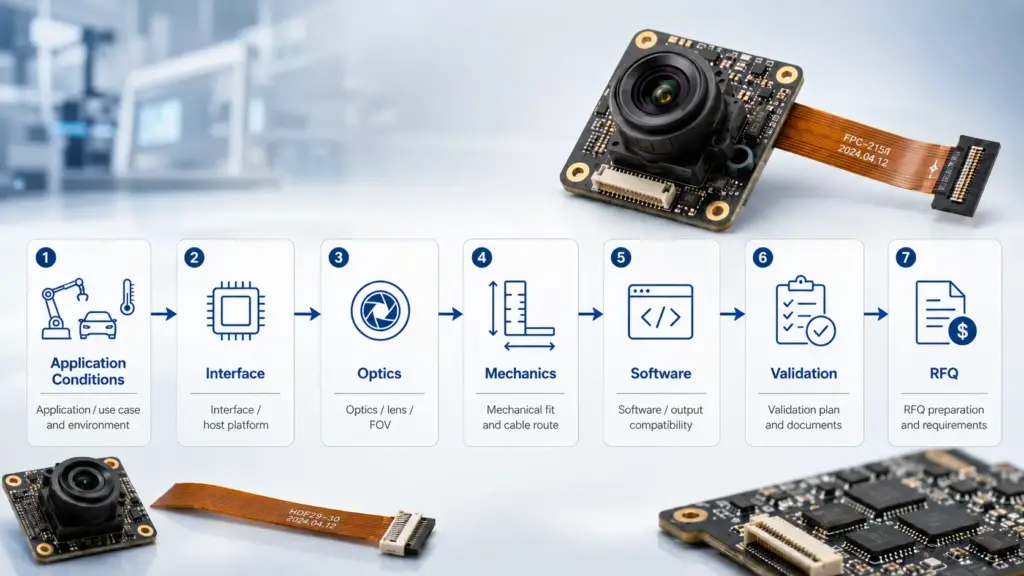
Start With Application Requirements Before Comparing Modules
The first selection question is not “Which module has the highest resolution?”
The better first question is: What does the product need the camera to do?
A camera module for a compact scanner, industrial vision device, access terminal, video conferencing product, robotic system, or embedded AI system may need different trade-offs. Resolution, field of view, low-light behavior, frame rate, interface, cable length, PCB shape, and software support can all affect the result.
Use the requirement brief below before asking for a quote.
| Requirement Area | What to Define | Why It Matters |
|---|---|---|
| Application | Product type, use case, image target, working distance | Helps avoid choosing a module only by resolution or price. |
| Environment | Indoor/outdoor use, lighting, vibration, temperature exposure, installation position | Conditions can affect lens, sensor, cable, housing, and validation needs. |
| Host platform | PC, embedded board, SoC, SBC, custom board, operating system | Interface and driver/software support depend on the host. |
| Interface | USB, MIPI, DVP, GMSL, FPDLink, IP, WiFi, or another path | The interface affects bandwidth, cable routing, integration effort, and software workflow. |
| Image needs | Resolution, frame rate, color/mono, low-light needs, dynamic range expectations | Image quality is not decided by resolution alone. |
| Optics | Lens type, FOV, focus distance, distortion tolerance, IR filter needs | The lens and sensor must match the target scene. |
| Mechanical limits | PCB size, mounting holes, height limit, connector location, cable route | A technically good module may still fail if it does not fit the product. |
| Software/output | UVC, SDK, raw data, image format, control requirements | Software expectations should be checked early. |
| Project stage | Prototype, pilot, redesign, mass-production planning, replacement project | The stage changes the level of documentation and validation needed. |
| Documents | Datasheet, drawing, test data, compliance documents, quality documents if available | Procurement should ask what is available before approval. |
For module browsing after the requirement brief is clear, review the Supertek product catalogue and compare the listed module categories against your host, interface, optical, and mechanical constraints.
This checklist also helps separate two different sourcing paths: choosing a standard module from an existing category, or discussing custom module review.
Compare Interface Options by Host, Bandwidth, Cable, and Software
Interface choice can affect the whole product design. USB, MIPI, DVP, GMSL, FPDLink, IP, and WiFi camera modules are not interchangeable in every system.
The right choice depends on the host platform, image data needs, cable distance, space limits, power design, software environment, and validation plan.
| Interface Path | Often Considered When | Strengths to Check | Limits to Check | RFQ Questions |
|---|---|---|---|---|
| USB camera module | The host is a PC, Linux/Windows system, Android device, or embedded host with USB support | Easier system connection in many host environments; UVC support may simplify software in some projects | Bandwidth, connector/cable design, power, driver behavior, USB version, mechanical fit | Which USB version is needed? Is UVC required? What host OS will be used? |
| MIPI camera module | The product uses an embedded processor or SoC with a camera interface | Compact embedded design path; often used where the image pipeline is close to the processor | Host compatibility, lane count, driver support, connector, cable, tuning, integration resources | Which processor or development board is used? What MIPI lane/configuration is required? |
| DVP camera module | The host supports parallel camera input or legacy embedded camera input | May fit certain embedded designs | Pin count, board routing, bandwidth, host compatibility | Does the host support DVP? What resolution/frame rate is expected? |
| GMSL / FPDLink camera module | The camera must be placed farther from the processor or used in cable-heavy systems | Useful to evaluate for longer cable or distributed camera designs | SerDes compatibility, cable, connector, power, EMC/validation needs | What cable distance and host receiver are planned? |
| IP / WiFi camera module | Network-based video transfer is part of the system design | May fit remote/networked video use cases | Latency, power, network stability, software integration, security review | What network environment and latency tolerance are required? |
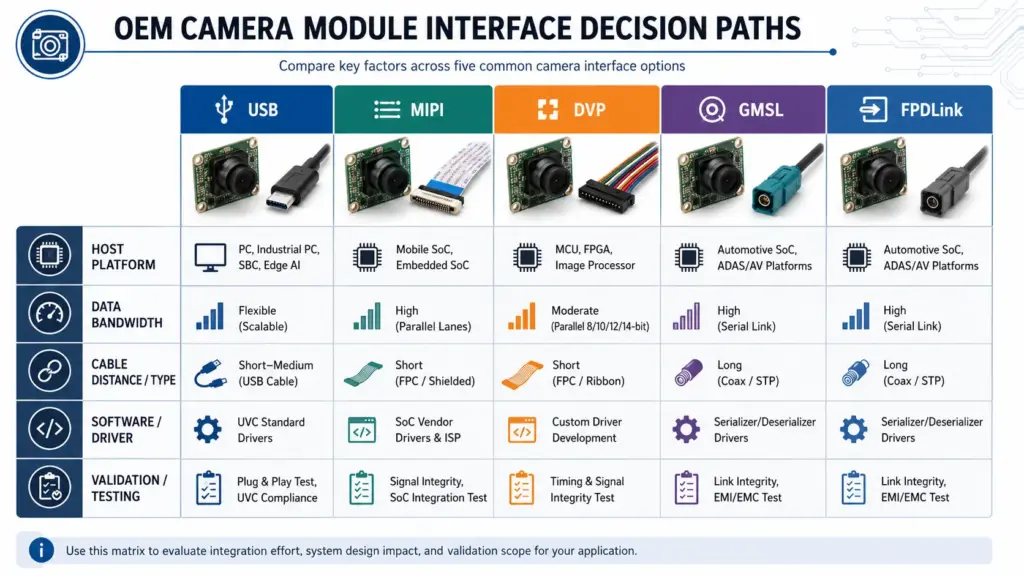
Do not choose the interface by name alone. A USB camera module may be convenient in one product and unsuitable in another. A MIPI module may be a good embedded path when the host and driver support are clear, but it can require deeper integration work. A longer cable system may need a different architecture from a compact board-level design.
Before RFQ, provide the exact host platform or processor, operating system, available connector, expected cable length, resolution/frame rate target, and software requirements.
For standards context, review the MIPI CSI-2 specification page for embedded camera interface background and the USB-IF Video Class v1.5 document set for USB video class reference material.
Match Optical, Mechanical, and Software Requirements
After the interface is narrowed, the next decision is whether the optical, mechanical, and software details match the product.
Optical Requirements
The lens and field of view should match the scene. A wide FOV can capture more area, but it may increase distortion or reduce detail on a small target. A narrower FOV can help focus on a smaller area, but it may miss surrounding context.
Resolution is also only one factor. A higher-resolution module may not solve a problem caused by lens choice, poor lighting, motion blur, insufficient frame rate, or host processing limits.
| Item | What to Ask |
|---|---|
| Field of view | How much area must the camera capture at the working distance? |
| Focus distance | Is the target close, mid-range, or far? |
| Lighting | Is the scene bright, dim, uneven, or changing? |
| IR filter | Does the application need visible-light imaging, IR sensitivity, or controlled filtering? |
| Distortion | Is edge distortion acceptable, or does the image need geometric accuracy? |
| Motion | Is the target static, moving slowly, or moving quickly? |
Mechanical Requirements
Camera modules often fail selection because the image looks acceptable, but the module does not fit the product.
Check board shape, mounting points, lens height, connector direction, cable route, and thermal/mechanical constraints. A sample module should be reviewed inside the actual enclosure or installation space, not only on a desk.
| Mechanical Detail | Why It Matters |
|---|---|
| PCB dimensions | Determines whether the module fits the product enclosure. |
| Mounting holes | Affects assembly and alignment. |
| Lens height | Can conflict with housing, cover glass, or industrial design. |
| Connector position | Affects cable route and assembly process. |
| Cable length/type | Can affect installation and signal reliability. |
| Orientation | Affects image direction and mechanical layout. |
Software and Output Requirements
The camera module also needs to match the software path. For some projects, a standard UVC camera workflow may be useful. For others, the image pipeline may require raw data, SDK support, register control, or host-specific driver work.
Before RFQ, define:
- host operating system
- required image format
- expected frame rate and resolution combination
- whether UVC support is required
- whether the system needs camera control functions
- whether the host board or SoC is already selected
- whether sample testing will use the real product software
Decide Whether a Standard Module or Custom Review Is Needed
A standard module can be the right starting point when the product requirements match an existing module category. Custom review may be needed when the application has mechanical, optical, interface, firmware, cable, or document requirements that a standard module does not meet.
This does not mean every project needs a custom camera module. Custom work can add validation scope, communication steps, and project risk. It should be considered when the requirement is clear enough to review.
| Requirement | Standard Module May Fit When | Custom Review May Be Needed When | What to Prepare |
|---|---|---|---|
| Resolution/frame rate | Existing module meets target image and host limits | The needed combination is unusual or host-specific | Target resolution, frame rate, image format, host platform |
| Lens/FOV | Existing lens captures the target scene | FOV, distortion, focus distance, or filter needs differ | Working distance, sample images, FOV target, lighting condition |
| PCB size | Existing board fits the enclosure | Board shape, mounting holes, or lens height must change | Mechanical drawing or 3D constraint |
| Connector/cable | Existing connector and cable route fit | Connector location, cable length, or cable type must change | Connector preference, cable route, assembly limits |
| Interface | Existing USB/MIPI/DVP/etc. module matches host | Host platform requires a specific interface or configuration | Host board, processor, OS, interface requirement |
| Housing/assembly | Bare module or available structure fits | Housing, bracket, cover glass, or assembly method needs review | Product structure, environment, installation position |
| Firmware/software | Standard output works | Special controls, tuning, or output behavior may be required | Software environment, control needs, sample test plan |
When contacting a camera module supplier, ask whether your project can be reviewed against standard module options or whether the scope requires custom discussion. You can also review Supertek’s camera module customization page as a project-scope reference before sending drawings or specifications. Do not assume a final custom design path before engineers review the details.
Ask for Documents and Validation Before Production Planning
Procurement and engineering teams should ask early about documentation and validation. The safest wording is not “Does this module have every certificate?” but “Which documents are available for this module and project stage?”
Document availability may depend on the module, project scope, market, customer requirement, and whether the item is standard or customized.
| Document / Check | Why to Ask | Safe RFQ Wording |
|---|---|---|
| Datasheet | Confirms key electrical, optical, and mechanical details | Please share the available datasheet for the recommended module. |
| Mechanical drawing | Helps check enclosure and mounting fit | Please confirm whether a drawing is available for size and connector review. |
| Interface information | Helps the engineering team confirm host compatibility | Please provide interface, pin, connector, and output details if available. |
| Sample test data | Helps plan evaluation under real product conditions | Please share what test data is available for the sample stage. |
| Compliance documents | Needed for some procurement or market requirements | Please confirm which compliance documents are available and their scope. |
| Quality/process documents | Helps buyer review supplier process expectations | Please share available quality or process documents if applicable. |
| Change-control questions | Important for long-term sourcing | How are module revisions, sensor changes, or component updates communicated? |
| Sample terms | Helps plan prototype review | Please confirm sample availability, sample configuration, and review process. |
Before moving from sample to production planning, test the module under realistic conditions. Use the actual host platform where possible. Check the real lighting, cable route, mounting position, software workflow, and image target. If the product will be used in a controlled environment, test that condition. If the lighting or distance changes often, include those conditions in the sample evaluation.
Prepare a Better RFQ for an OEM Digital Camera Module
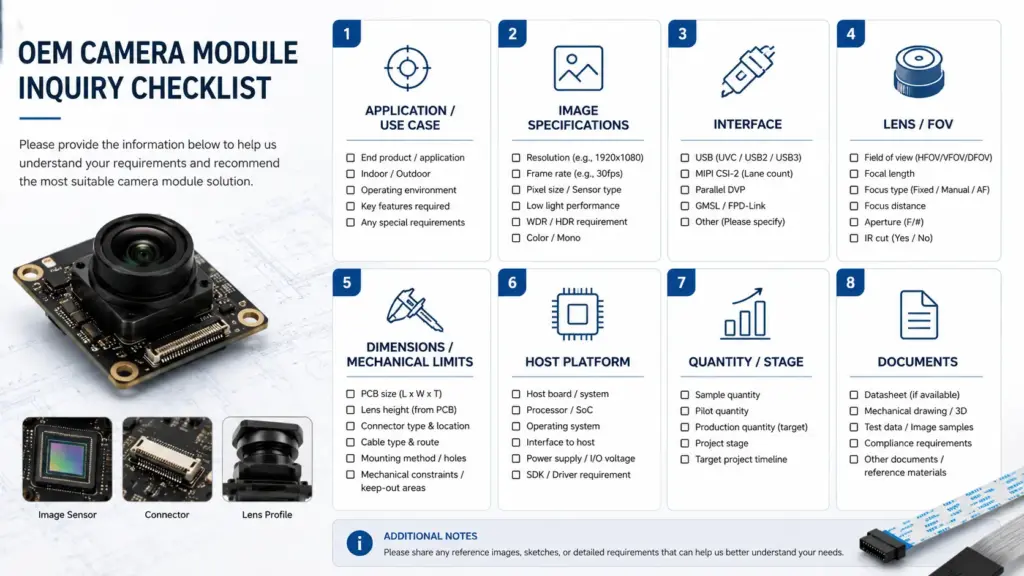
A strong RFQ reduces back-and-forth and helps the supplier understand whether a standard module or custom review is more appropriate.
Use this checklist before sending your inquiry.
| RFQ Item | What to Include |
|---|---|
| Product/application | What device or system will use the camera? |
| Image target | What object, scene, code, face, part, or environment must be captured? |
| Working distance | Distance from camera to target. |
| Lighting condition | Bright, dim, indoor, outdoor, IR, changing, or controlled lighting. |
| Resolution/frame rate target | Required or preferred image size and speed. |
| Interface | USB, MIPI, DVP, GMSL, FPDLink, IP, WiFi, or not yet decided. |
| Host platform | PC, embedded board, SoC, OS, processor, or development board. |
| Lens/FOV | Preferred FOV, focus distance, distortion limit, filter needs. |
| Mechanical limits | PCB size, lens height, connector direction, cable route, mounting needs. |
| Software/output | UVC, raw data, SDK, format, control needs, driver environment. |
| Project stage | Concept, prototype, pilot, redesign, production planning, replacement. |
| Quantity stage | Sample quantity, pilot quantity, estimated production stage if known. |
| Documents needed | Datasheet, drawing, compliance documents, test data, quality documents. |
| Drawing or sample reference | Attach product drawings, module references, or target images if available. |
A short RFQ can still be useful if it includes the most important constraints: application, host platform, interface preference, lens/FOV need, size limit, cable/connector requirement, and project stage.
FAQ: OEM Digital Camera Module Questions
What is an OEM digital camera module?
An OEM digital camera module is a camera component intended for integration into another device or system. It usually includes a sensor, lens or lens mount, PCB, connector, and digital output path. The exact structure depends on the interface, application, and integration requirements.
How do I choose an OEM digital camera module for my product?
Start with the application. Define the image target, working distance, lighting, host platform, interface, lens/FOV, module size, connector, software output, validation needs, and document requirements. Then compare module options against those conditions instead of choosing by resolution alone.
Which specifications matter most before RFQ?
The most useful RFQ specifications are application, resolution/frame rate target, interface, host platform, lens/FOV, working distance, board size, connector/cable, output format, quantity stage, and required documents. If drawings or sample images are available, include them.
USB camera module vs MIPI camera module: which should I choose?
USB and MIPI serve different integration paths. USB may be practical for many host systems that support USB camera input. MIPI is often considered for embedded designs where the camera connects closely to a processor or SoC. The right choice depends on host platform, bandwidth, cable, software, power, and validation needs.
When do I need a custom camera module instead of a standard module?
Custom review may be needed when the standard module does not meet the product’s mechanical, optical, interface, connector, cable, firmware, or housing requirements. A standard module may be enough when the application, host, size, lens, and software needs already match an available option.
What documents should I ask a camera module supplier for?
Ask what documents are available for the specific module and project stage. Common requests include datasheet, mechanical drawing, interface details, sample test data, compliance documents, quality/process documents, and sample terms. Do not assume every document is available for every module.
What should be tested before moving from sample to production planning?
Test the camera module with the real or representative host platform, lighting, working distance, lens/FOV, mounting position, cable route, and software workflow. The goal is to confirm fit under the product’s actual use conditions before making sourcing or production decisions.
Does higher resolution always mean a better camera module?
No. Resolution is only one factor. Lens quality, FOV, sensor behavior, lighting, frame rate, processing, host compatibility, mechanical fit, and validation results can all affect whether the module is suitable for the product.
Need Help Reviewing an OEM Camera Module Requirement?
If you are preparing an OEM digital camera module RFQ, contact Supertek with the application, target image, host platform, preferred interface, lens or FOV needs, module size limits, connector and cable requirements, quantity stage, drawings if available, and document needs.
With those details, the supplier can review whether an existing module category may fit or whether the project should be discussed as a custom module review.