Choosing an autofocus mini USB camera module manufacturer is not only about finding a small camera board with the right resolution. For OEM and embedded vision projects, the better starting point is your application: working distance, field of view, host platform, enclosure space, cable routing, focus behavior, image quality expectations, and validation needs.
A module that works well in one device may create problems in another if the lens height, USB behavior, focus range, connector, or software environment is not checked early. This guide explains what buyers, engineers, and procurement teams should compare before shortlisting a manufacturer or sending an RFQ.
Choosing the Right Manufacturer Starts With Your Application
To choose an autofocus mini USB camera module manufacturer, start with your application requirements, then compare module specs, autofocus needs, USB/UVC behavior, operating system support, lens and board constraints, customization options, and available documents. Before purchasing, ask the supplier to confirm compatibility, validation requirements, warranty terms, MOQ, lead time, and any compliance documents in writing.
What Is an Autofocus Mini USB Camera Module?
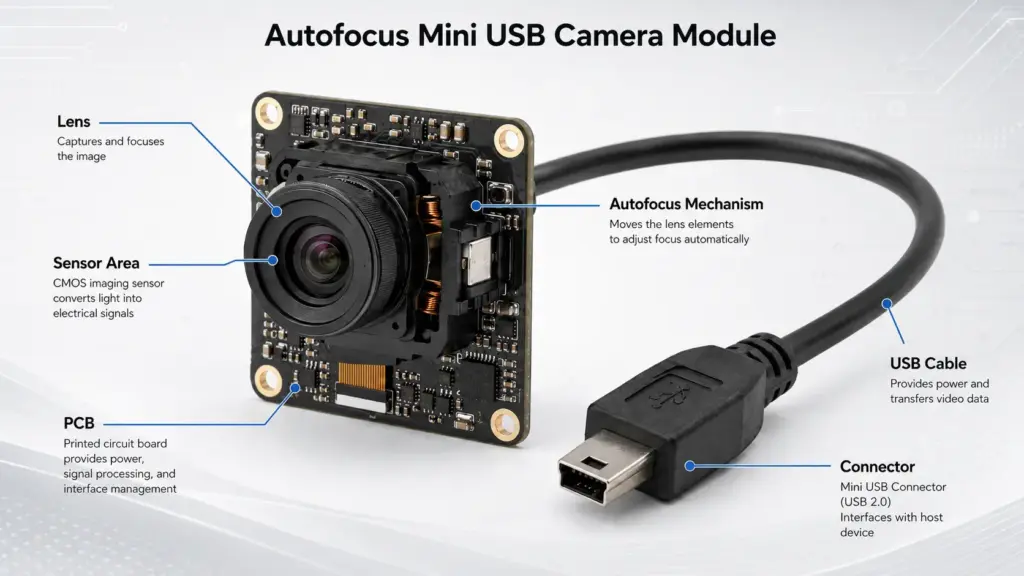
An autofocus mini USB camera module is a compact camera board designed to capture images or video through a USB interface while adjusting focus for changing object distances. It is commonly considered for compact devices where the camera needs to fit inside a limited space and connect to a host system through USB.
The “mini” part usually points to mechanical constraints. Buyers often need to check the board size, lens height, cable direction, connector type, mounting method, and available space inside the final device.
The “autofocus” part points to optical behavior. Autofocus may help when the target distance changes, but it also introduces questions about focus response, control method, software behavior, and validation.
The “USB” part points to integration. A USB camera module may reduce hardware integration complexity, but the final behavior still depends on the module, firmware, host system, operating system, application software, cable, and test conditions.
What to Compare Before Choosing a Manufacturer
A good sourcing process compares more than product names or megapixel counts. For OEM projects, the manufacturer should be evaluated against the full project environment.
| What to Compare | Why It Matters | What to Ask the Manufacturer |
|---|---|---|
| Application and working distance | Focus behavior depends on how the camera will be used. | What focus distance range should be tested for this project? |
| Resolution and sensor options | Higher resolution may help detail capture, but it can affect bandwidth, processing, and cost. | Which sensor options fit the image target and host system? |
| Lens and field of view | FOV affects how much scene area the camera captures. | What lens/FOV options are available for the target distance? |
| USB/UVC behavior | Driver and software integration can affect development time. | Is the module UVC-compliant, and what host platforms have been tested? |
| Board size and lens height | Mini devices often have tight mechanical limits. | Can the PCB, lens height, or connector direction fit the enclosure? |
| Cable and connector | Cable length and routing can affect assembly and reliability. | What cable length, connector, and routing options can be reviewed? |
| Customization support | OEM projects may need changes before mass production. | Which items can be customized, and what validation is needed? |
| Documents and testing | Procurement may need proof before approval. | What datasheets, test data, or compliance documents are available? |
This comparison should be done before relying on price, delivery claims, or broad quality statements. A low-cost module can become expensive if it fails validation, does not fit the enclosure, or needs unexpected firmware or mechanical changes.
Autofocus vs Fixed Focus: Which Fits Your Application?
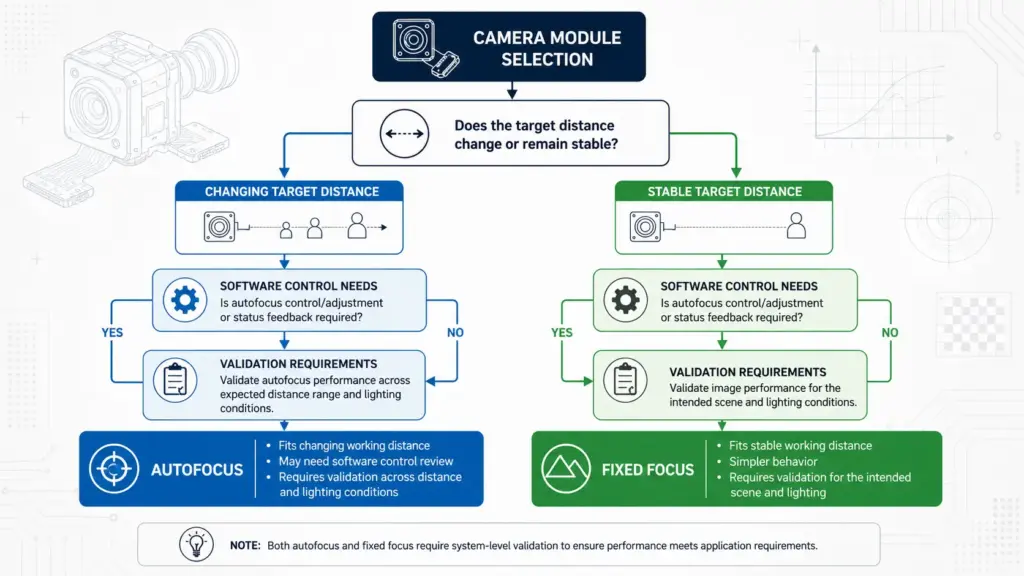
Autofocus is not automatically better than fixed focus. The right choice depends on how the camera will be used.
| Selection Factor | Autofocus May Fit When… | Fixed Focus May Fit When… | What to Confirm |
|---|---|---|---|
| Object distance | The distance between camera and target changes. | The target stays at a stable distance. | Expected working-distance range. |
| User behavior | Users may hold objects at different distances. | The camera is mounted in a controlled position. | Real operating behavior, not only lab setup. |
| Mechanical design | The device can support the autofocus module structure. | Simpler optics and lower mechanical complexity are preferred. | Lens height, module space, and mounting limits. |
| Software control | The system can handle autofocus behavior or controls. | The system needs simple, predictable focus behavior. | Driver, firmware, and application control requirements. |
| Validation scope | The project can test focus performance across conditions. | The project wants fewer variables to validate. | Lighting, distance, target type, and use environment. |
Autofocus is usually worth considering when target distance changes or when the same device must inspect objects at different depths. Fixed focus may be simpler when the distance is known and stable.
The key point is not to choose autofocus because it sounds more advanced. Choose it because the application needs it and because the module can be validated under real use conditions.
Technical Fit: USB/UVC, OS, Lens, Board Size, and Cable Constraints
For engineering teams, the main question is not “Does the module work?” but “Will this module work in our system under our conditions?”
| Technical Item | What to Check | Why It Matters |
|---|---|---|
| USB interface | USB version, bandwidth, cable length, connector, and host port. | A camera may work in a demo but behave differently in the final device. |
| UVC behavior | Whether the camera is UVC-compliant and how the host system handles it. | UVC can reduce driver work on supported platforms, but testing is still required. |
| Operating system | Windows, Linux, Android, or embedded host support. | OS support can vary by driver, kernel, application, and firmware behavior. |
| Output format | MJPEG, YUY2, or other supported formats. | Output format affects bandwidth, image processing, and software compatibility. |
| Resolution and frame rate | Required detail level and frame rate under the chosen output format. | Higher settings may require more bandwidth and processing. |
| Lens and FOV | Target distance, scene size, distortion, lens height, and viewing angle. | Optical fit affects whether the image is usable in the final device. |
| Board dimensions | PCB size, mounting holes, lens position, and enclosure fit. | A small mismatch can require enclosure or board redesign. |
| Cable and connector | Cable length, direction, shielding, connector type, and assembly process. | Cable design can affect installation and long-term reliability. |
| Lighting conditions | Brightness, glare, shadows, and target reflectivity. | Autofocus and image quality should be checked under real lighting. |
A UVC-compliant camera may work with system drivers on supported platforms, but this should not be treated as a universal compatibility guarantee. The safe approach is to test the exact module, host system, software, cable, and use environment before production approval. For external technical context, review the USB-IF UVC document set and the Microsoft USB Video Class driver overview.
Customization Questions for OEM Projects
Many OEM buyers need more than an off-the-shelf module. They may need a different lens, cable, connector, PCB shape, mounting method, housing fit, or firmware behavior.
Instead of asking only “Can you customize it?”, prepare more specific questions:
| Customization Area | Questions to Ask |
|---|---|
| Lens and FOV | Can the lens and field of view be reviewed for our target distance and scene size? |
| PCB size and layout | Can the board dimensions or layout fit our enclosure constraints? |
| Cable and connector | What cable length, connector type, and cable direction can be reviewed? |
| Focus behavior | How should autofocus be tested for our working-distance range? |
| Firmware or image settings | Can exposure, white balance, output format, or other image settings be reviewed? |
| Mechanical assembly | Are mounting holes, lens position, or housing constraints important for the design? |
| Validation | What sample testing should be completed before production? |
For custom projects, avoid assuming that every change is simple. Even a small mechanical change can affect optical alignment, assembly, testing, or delivery schedule. Ask the manufacturer which customization items are available for your project and what validation is required before moving forward.
Related page for editor-confirmed internal linking: camera module customization.
Application Fit: Match the Module to Real Operating Conditions
Autofocus mini USB camera modules may be considered for many embedded vision projects, but application fit depends on the exact environment. Do not rely on broad application lists alone.
| Application Type | Main Concern | What to Confirm |
|---|---|---|
| Kiosk or terminal camera | User distance, enclosure fit, OS support. | FOV, working distance, cable routing, host compatibility. |
| Inspection device | Detail capture, lighting, focus stability. | Resolution, lens, autofocus behavior, lighting, software control. |
| Robotics or automation | Motion, vibration, bandwidth, host processing. | Frame rate, cable stability, host resources, mounting design. |
| Barcode or document capture | Sharpness, distance, distortion, illumination. | Lens choice, focus behavior, target size, lighting setup. |
| Security or monitoring device | Field of view, low-light needs, system integration. | Lens, sensor behavior, enclosure, software support. |
| Medical or automotive-related device | Regulatory, validation, safety, and documentation requirements. | Do not assume suitability; request project-specific compliance and validation review. |
The safest wording for application fit is conditional: the module may be considered if the optical, mechanical, electrical, software, validation, and regulatory requirements can be met. For regulated or safety-sensitive uses, ask for the required documents and confirm the approval path before selecting a module.
Evidence to Request Before Purchasing
Procurement teams should treat broad supplier claims carefully. Claims about quality, warranty, lead time, MOQ, certifications, factory capability, and customer cases should be supported by documents or written confirmation.
Use this checklist before relying on a claim.
| Claim or Requirement | What to Request | Why It Matters |
|---|---|---|
| Product specifications | Datasheet, drawing, or specification sheet. | Confirms what is actually being quoted. |
| Compatibility | Tested OS/platform information or sample validation plan. | Reduces integration risk. |
| Image performance | Sample images, test conditions, or evaluation guidance. | Helps compare real output, not only specs. |
| Customization | Written scope, sample plan, and validation requirements. | Prevents misunderstanding before tooling or production. |
| Compliance | Relevant compliance documents, if required for the project. | Avoids unsupported certification assumptions. |
| Warranty | Written warranty terms. | Prevents relying on marketing text or assumptions. |
| MOQ and lead time | Written quotation terms. | These can vary by module, customization, and schedule. |
| QC or inspection | Inspection criteria or quality documents, if available. | Helps procurement understand how production will be checked. |
| Customer cases | Permission-based references only. | Customer names or logos should not be used without proof and approval. |
This approach does not assume that every supplier can provide every document. It simply helps buyers separate confirmed information from marketing language.
RFQ Checklist for Autofocus Mini USB Camera Modules
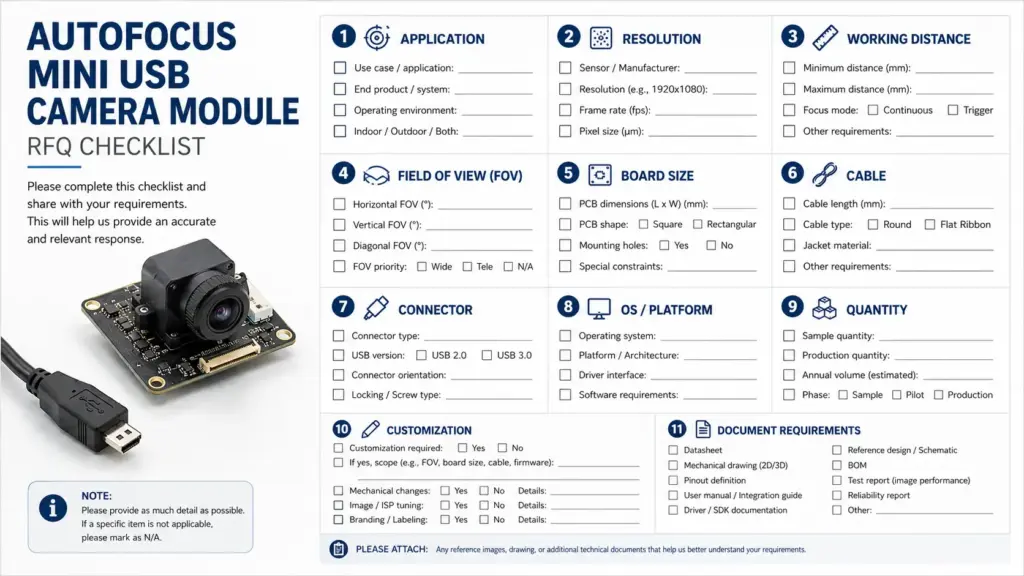
A clear RFQ helps the manufacturer review technical fit before quoting. Send as much practical information as possible.
| RFQ Item | What to Include |
|---|---|
| Application | What device or system will use the camera? |
| Target image result | What should the camera capture, inspect, or recognize? |
| Working distance | Minimum, typical, and maximum distance from camera to target. |
| Field of view | Scene size or viewing angle needed. |
| Resolution and frame rate | Required detail level and video speed. |
| Host system | OS, processor platform, USB port, and software environment. |
| UVC/driver needs | Whether the project requires UVC behavior or custom driver support. |
| Mechanical limits | Board size, lens height, mounting, enclosure space. |
| Cable and connector | Cable length, direction, connector type, and routing needs. |
| Lighting | Expected lighting conditions, glare, shadows, or low-light concerns. |
| Quantity | Sample quantity and estimated production quantity, if known. |
| Customization | Lens, PCB, cable, connector, housing, firmware, or image setting needs. |
| Documents | Datasheet, drawings, test data, compliance documents, or warranty terms needed. |
| Validation plan | Sample testing, pilot run, or approval requirements before production. |
Do not use the RFQ to ask only for a price. Price is easier to review when the manufacturer understands the technical and commercial conditions behind the project.
FAQ
What is an autofocus mini USB camera module?
It is a compact camera board that connects through USB and supports autofocus behavior. It is typically evaluated for embedded systems or compact devices where the camera must fit within limited space and capture images at varying distances.
How do I choose an autofocus mini USB camera module manufacturer?
Start with your application requirements. Compare working distance, resolution, sensor options, lens/FOV, USB/UVC behavior, OS support, board size, cable and connector needs, customization scope, validation requirements, and available documents. Avoid choosing only by product title or price.
When should I choose autofocus instead of fixed focus?
Autofocus is useful when the target distance changes or when the device must capture objects at different depths. Fixed focus may be simpler when the target distance is stable and the system needs predictable focus behavior. The best choice depends on application testing.
Does a USB camera module need a driver?
Some USB camera modules may work with system drivers when they follow supported UVC behavior, but this is not guaranteed for every module, host, OS, or application. Confirm UVC support, operating system compatibility, and software behavior during sample testing.
What specs should I confirm before requesting a quotation?
Confirm the application, resolution, frame rate, sensor preference if any, working distance, FOV, board size, lens height, USB version, output format, cable, connector, OS/platform, quantity, customization needs, and required documents.
Can autofocus USB camera modules be customized?
Customization may involve lens, PCB size, cable, connector, housing, firmware, or image settings, depending on the manufacturer and project. Ask which customization items are available and what sample testing or validation is required.
What documents should I ask a manufacturer for?
Ask for the datasheet, drawings, specification sheet, test information, compliance documents if required, warranty terms, and written quotation details such as MOQ and lead time. Do not rely on unsupported claims without written confirmation.
Send Your Application Requirements for Review
Before selecting an autofocus mini USB camera module, prepare your application conditions and technical requirements. Share your target resolution, working distance, FOV, board-size limit, lens requirements, cable and connector needs, OS/platform, quantity, customization requests, and document requirements.
With those details, the manufacturer can review which module options may fit your project and what should be tested before production.