Choosing a 2MP USB 3.0 camera module manufacturer is not only a question of resolution and interface. For an OEM or embedded vision project, the better question is whether the module, software behavior, mechanical design, documentation, and supplier support fit the application you are building.
A 2MP USB 3.0 camera module may look suitable on a product page, but the real fit depends on details such as sensor type, frame-rate target, shutter behavior, lens and field of view, board size, cable path, host platform, UVC support, sample testing, and RFQ clarity.
To choose a 2MP USB 3.0 camera module manufacturer, compare the module by application fit, not by “2MP” and “USB 3.0” alone. Check imaging requirements, host platform, UVC/software support, lens and mechanical constraints, documentation, customization discussion, sample testing process, and what information the supplier needs before quoting or recommending a module.
Why 2MP + USB 3.0 Is Not Enough to Choose a Module
“2MP USB 3.0 camera module” is a useful starting point, but it does not define the full design requirement.
For buyers comparing available options, Supertek’s USB3.0 camera modules category and related 2MP USB 3.0 camera module product page can be used as internal reference points before sending detailed application requirements for review.
Before choosing a manufacturer, confirm what the camera needs to do in the real product. For example, a module used for still image capture in controlled lighting has different priorities from a module used for moving objects, barcode capture, machine vision, or user-facing video.
A practical manufacturer selection process starts with three questions:
- What image result must the system achieve?
- What constraints does the host device create?
- What evidence or sample testing is needed before production?
If those questions are not answered, the project may move too quickly from product search to quotation, and the buyer may miss key integration risks.
Specs That Affect Application Fit
The most useful product discussion is not a long list of specifications. It is a clear explanation of what each specification affects.
| Spec / Factor | Why It Matters | What to Confirm | Risk If Ignored |
|---|---|---|---|
| Resolution | Affects image detail, file size, processing load, and visual output | Required image detail and capture area | Too little detail or unnecessary data load |
| Frame rate | Affects motion capture and live-view smoothness | Target FPS at the required resolution and format | Motion blur, dropped frames, or unstable preview |
| Sensor and shutter behavior | Affects low-light response, motion handling, and image artifacts | Sensor model, shutter type, exposure behavior | Image distortion or poor performance in target conditions |
| Lens and field of view | Controls viewing angle, working distance, and focus range | FOV, focus type, lens mount, distortion tolerance | Wrong scene coverage or poor focus |
| Board size and mounting | Affects mechanical integration | PCB dimensions, hole position, connector direction | Redesign of enclosure or mounting structure |
| Cable and connector | Affects routing, signal stability, and assembly | Cable length, connector type, orientation, strain relief | Assembly problems or unreliable connection |
| Host platform | Affects driver, bandwidth, and software integration | OS, processor, USB controller, application software | Camera detected but not usable as expected |
| Lighting environment | Affects exposure, noise, and image consistency | Indoor/outdoor, IR, low light, glare, LED flicker | Image quality changes after installation |
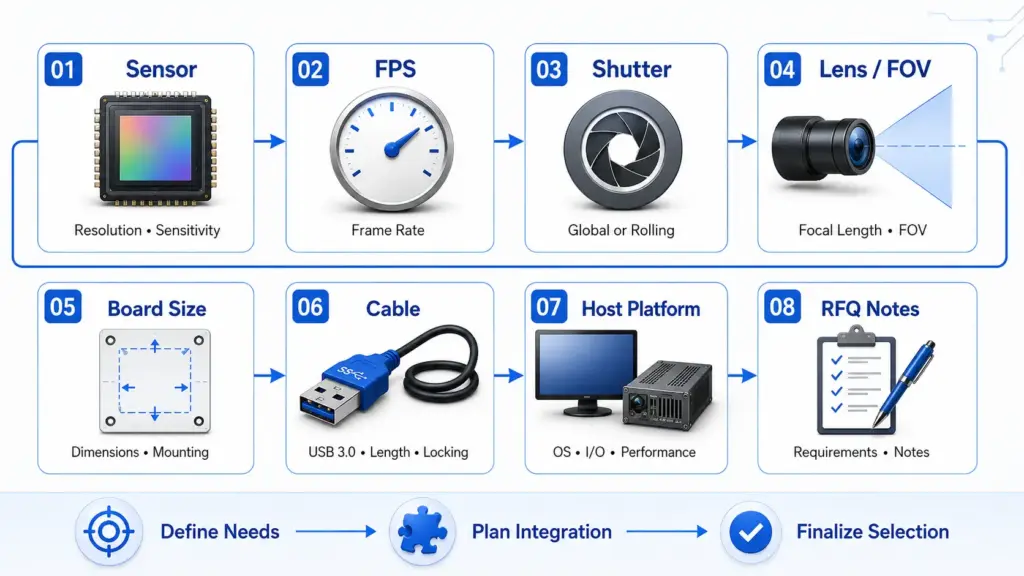
This table should be treated as a project review tool. It does not replace the supplier’s datasheet, sample testing, or engineering confirmation.
USB 3.0 vs USB 2.0 vs MIPI: When Each Interface Makes Sense
USB 3.0 is often considered when a project needs higher data bandwidth than USB 2.0 and a simpler external connection than many board-level interfaces. However, USB 3.0 is not automatically the best interface for every camera module project.
USB-IF’s USB 3.2 specification page notes that USB 3.2 absorbed prior USB 3.x specifications and identifies 5Gbps, 10Gbps, and 20Gbps transfer-rate tiers, so buyers should confirm the actual transfer-rate tier and host support rather than relying only on the phrase “USB 3.0.”
| Interface | Often Useful When | Watch-Outs | Buyer Question |
|---|---|---|---|
| USB 2.0 | Lower bandwidth, simpler video, cost-sensitive projects | May be limiting for higher frame rate or uncompressed data | Is the bandwidth enough for the required resolution and FPS? |
| USB 3.0 / USB 3.x | Higher data transfer needs, plug-in host connection, external or semi-external camera design | Cable quality, host controller, format, and real bandwidth still matter | What actual transfer-rate tier, format, and host platform are supported? |
| MIPI CSI | Compact embedded systems with direct board-level integration | Requires more hardware/software integration work | Does the engineering team control the host board and driver stack? |
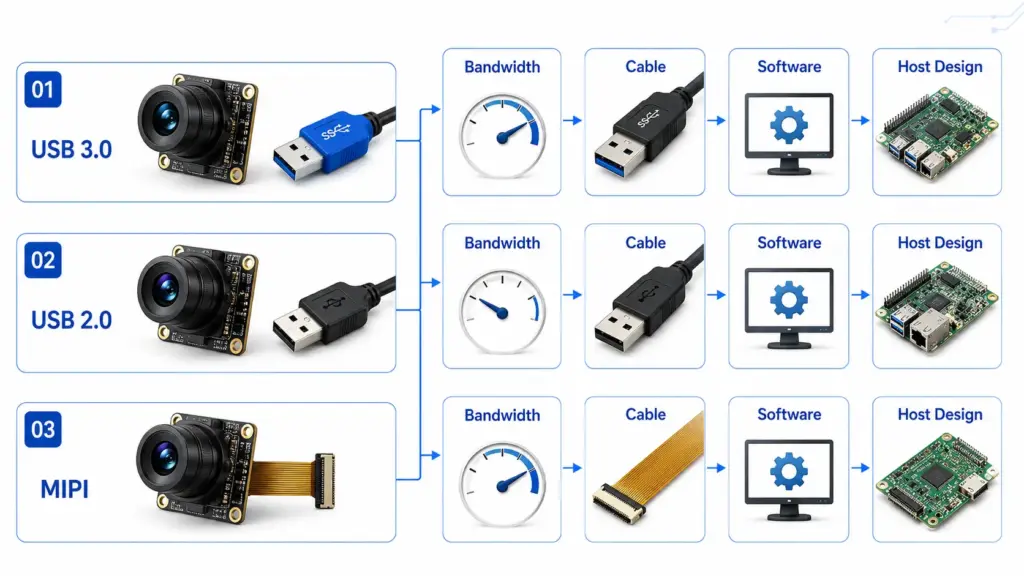
For OEM buyers, the right question is not “Which interface is best?” It is “Which interface fits the product architecture, available engineering resources, cable route, bandwidth requirement, and host platform?”
UVC, Drivers, and Host Platform Readiness
UVC stands for USB Video Class. In many camera module projects, UVC matters because it can reduce basic driver work when the camera and host system support it.
UVC stands for USB Video Class. In many camera module projects, UVC matters because it can reduce basic driver work when the camera and host system support it. The USB-IF Video Class v1.5 document set provides the official UVC specification materials, while Microsoft’s UVC camera implementation guide explains that Windows 10 and later provide an inbox UVC driver for devices compliant with UVC specification versions 1.0 to 1.5.
That does not mean every USB camera module will automatically work with every operating system, application, or advanced feature. A safer review should include:
- target operating system;
- required image format;
- whether the application needs basic video only or advanced controls;
- exposure, gain, white balance, and image adjustment needs;
- whether the host software can access the required camera controls;
- whether firmware or software support is needed for special behavior.
For B2B projects, “UVC compliant” should start a technical conversation, not end it.
How to Evaluate a Camera Module Manufacturer Beyond the Spec Sheet
A product spec sheet tells you what a module may offer. A manufacturer evaluation tells you whether the supplier can support your project from selection to sample review and production planning.
Use this checklist before choosing a 2MP USB 3.0 camera module manufacturer:
| Evaluation Area | What to Ask | Why It Matters |
|---|---|---|
| Application review | Can the supplier review the use case before recommending a module? | Prevents choosing by resolution alone |
| Documentation | What datasheets, drawings, pinouts, and software notes are available? | Helps engineering review before sample testing |
| Sample support | What should be tested during sample evaluation? | Reduces production risk |
| Mechanical fit | Can board size, mounting, cable, and connector needs be reviewed? | Avoids enclosure redesign |
| Lens discussion | Can the supplier help review FOV, focus distance, and distortion limits? | Affects image result more than many buyers expect |
| Software discussion | What host OS, UVC behavior, and control needs should be confirmed? | Prevents driver or application mismatch |
| Quality evidence | What inspection, test, or process documentation can be shared? | Supports procurement and engineering review |
| Communication process | Who reviews technical requirements and RFQ details? | Improves speed and accuracy of early decisions |
Do not rely only on broad claims such as “high quality,” “fast delivery,” or “customized solution.” Ask what can be documented, tested, and confirmed for your actual project.
What to Confirm Before Customization or Sampling
Customization can include many different levels of work. In a camera module project, it may involve lens selection, cable length, connector direction, board layout, firmware settings, image tuning, housing requirements, or packaging.
For broader customization planning, buyers can also review Supertek’s camera module customization guide before preparing drawings, samples, lens requirements, cable details, or software notes.
Useful questions include:
- Do you need a different lens or field of view?
- Is the module size fixed by the enclosure?
- Does the connector need a special orientation?
- Is the cable length limited by the product layout?
- Are there heat, vibration, lighting, or outdoor conditions?
- Does the host platform require specific UVC behavior or image formats?
- Do you need a sample first, or are you already preparing for production review?
- What drawings, files, or sample units can you provide?
A manufacturer can review customization more effectively when the buyer describes the application condition instead of only asking for a “2MP USB 3.0 camera.”
RFQ Checklist for a 2MP USB 3.0 Camera Module Project
A clear RFQ helps the supplier understand whether an existing module may fit or whether engineering review is needed.
Prepare the following before contacting a manufacturer:
| RFQ Item | What to Provide |
|---|---|
| Application | What device or system will use the camera? |
| Image target | What needs to be captured, detected, or displayed? |
| Resolution and FPS target | Required resolution, frame rate, and format if known |
| Host platform | OS, processor, USB port type, software environment |
| Lens/FOV | Working distance, viewing angle, focus range, distortion tolerance |
| Lighting | Indoor, outdoor, low light, IR, glare, flicker, controlled lighting |
| Mechanical limits | Board size, mounting holes, connector direction, cable path |
| Software needs | UVC, image controls, SDK needs, application compatibility |
| Quantity range | Prototype, pilot, or production estimate |
| Documentation needs | Datasheet, drawing, test report, certificate request, packing needs |
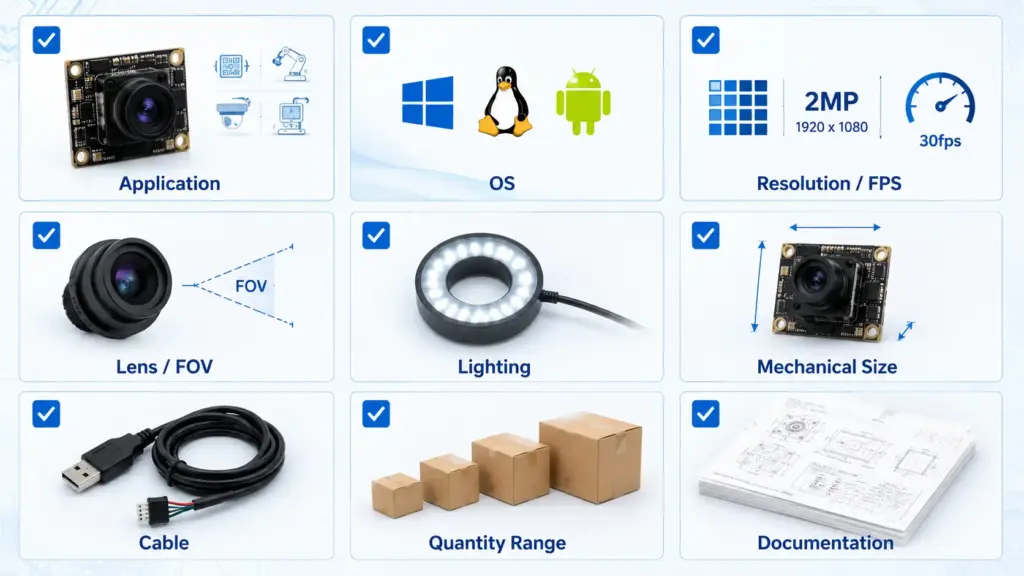
Avoid asking only, “What is the price?” before the supplier understands the application. A low quote for the wrong module does not reduce project risk.
Questions to Ask About Documents, Testing, and Compliance
For procurement and regulated-market projects, documentation can matter as much as the module itself. The safe approach is to ask what documents are available and whether they apply to your target market and use case.
Ask the manufacturer:
- Is a datasheet available for the exact module?
- Is a mechanical drawing available?
- Are sample test records or inspection documents available?
- Are any certificates or compliance documents available for this product or company?
- Do the documents apply to the exact module, material, cable, or assembly?
- Are there application limits that should be reviewed before use?
- Who is responsible for final product-level compliance in the buyer’s market?
Do not assume a camera module is certified for your final product just because a supplier mentions a certificate. Product-level compliance often depends on the full device, market, use case, and final integration.
When to Contact the Manufacturer
After you prepare these details, contact Supertek for technical review. Ask whether an existing 2MP USB 3.0 module fits your project, what sample tests are recommended, and which drawings, documents, or software notes are available for review.
A practical inquiry can say:
“We are looking for a 2MP USB 3.0 camera module for an OEM project. The host platform is [OS/platform], the target image requirement is [resolution/FPS/use case], the working distance is [distance], and the mechanical limit is [board/cable/enclosure constraint]. Please review whether an existing module may fit or what information you need for sample recommendation.”
After you prepare these details, send them to the manufacturer for technical review. Ask whether an existing 2MP USB 3.0 module fits your project, what sample tests are recommended, and which drawings, documents, or software notes are available for review.
FAQ
What should I compare before choosing a 2MP USB 3.0 camera module manufacturer?
Compare application fit, image requirements, interface, host platform, lens, FOV, board size, cable, software behavior, documentation, sample support, and supplier communication. Do not choose by resolution and USB interface alone.
Is USB 3.0 better than USB 2.0 for camera modules?
USB 3.0 may be a better fit when the project needs higher bandwidth, higher frame rate, or more demanding image transfer. USB 2.0 may still fit simpler or lower-bandwidth applications. MIPI may fit compact embedded designs where the engineering team controls the host board and software stack.
What does UVC mean for a USB camera module?
UVC means USB Video Class. For UVC-compliant devices, supported host systems may use class-driver behavior for basic camera operation. On Windows, Microsoft provides an inbox UVC driver for compliant devices, but advanced features still depend on firmware, descriptors, software, and implementation details.
Do USB 3.0 camera modules need custom drivers?
Some UVC-compliant USB camera modules may not need a proprietary driver for basic video operation on supported systems. However, custom software, firmware settings, special image controls, or advanced features may still require engineering review.
Which specs matter most for OEM camera module integration?
The most important specs depend on the application, but common review items include sensor, resolution, frame rate, shutter behavior, lens and FOV, focus distance, board size, connector, cable, image format, host OS, and software control needs.
What information should I send before requesting a quote or sample?
Send the application, host platform, target image result, resolution/FPS target, lens/FOV needs, working distance, lighting condition, mechanical limits, cable/connector requirements, software needs, quantity range, and document requirements.
Can a 2MP USB 3.0 camera module be customized?
It may be possible depending on the manufacturer, module design, quantity, engineering scope, and project requirements. Ask the manufacturer to confirm what can be reviewed, such as lens, cable, connector, board layout, firmware behavior, and documentation.
What certifications should I ask a camera module manufacturer for?
Ask what certificates, test reports, quality documents, or compliance documents are available for the exact module and target market. Do not assume certification applies to your final product without reviewing the document scope.