Choosing a USB 2.0 VGA camera module is not only about finding a supplier that lists the right keyword. For OEM projects, embedded devices, access terminals, inspection tools, or other compact systems, the better question is whether the module fits your resolution need, interface, lens, mechanical space, software environment, and sourcing process.
This guide explains how to evaluate a USB 2.0 VGA camera module manufacturer or supplier before you request samples or a quote. It also shows what information to prepare so the supplier can review your project more clearly and reduce avoidable back-and-forth.
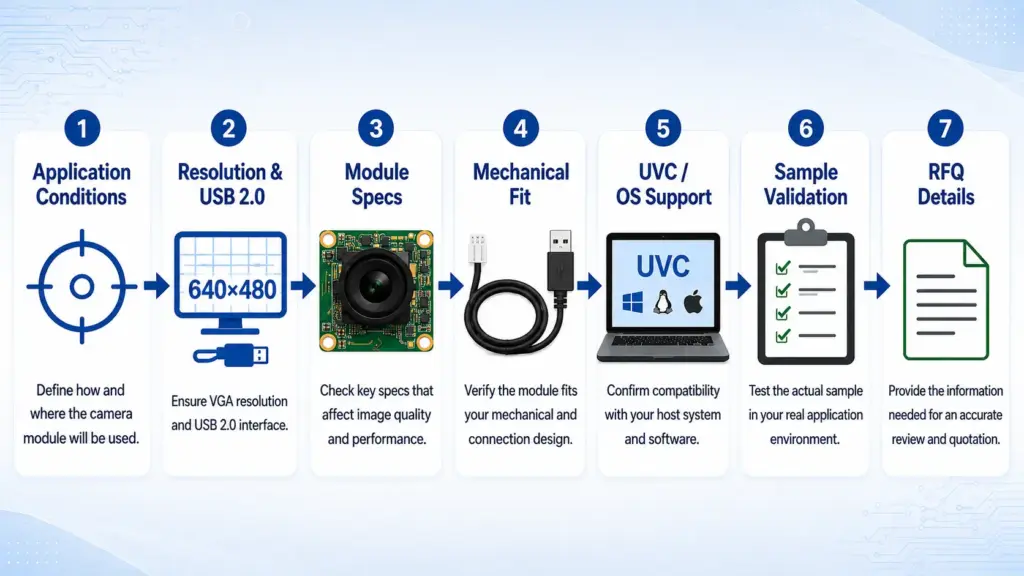
To choose a USB 2.0 VGA camera module manufacturer, first confirm that VGA resolution and USB 2.0 interface fit your application. Then compare sensor, lens and field of view, output format, board size, cable and connector, UVC or OS support, sample validation needs, and available documents. For RFQ, share your application conditions instead of asking only for price.
What Does “USB 2.0 VGA Camera Module” Mean?
A USB 2.0 VGA camera module combines two different ideas:
| Term | What it means | Why it matters |
|---|---|---|
| USB 2.0 | The connection interface between the camera module and host device | Affects compatibility, bandwidth planning, cable design, and system integration |
| VGA | A resolution class, usually 640 × 480 pixels, also known as 0.3MP class | Affects image detail, processing load, data size, and application fit |
| Camera module | A board-level or embedded camera assembly | Affects lens, sensor, PCB size, cable, connector, mounting, and customization needs |
The phrase can be confusing because “2.0” refers to USB 2.0, not 2MP resolution. A VGA module is typically much lower in resolution than a 2MP camera module. That lower resolution can still be useful when the project needs simple image capture, compact size, lower data load, or cost-sensitive integration, but it may not fit applications that require fine detail.
For related category context, see Supertek’s VGA camera module page.
When Is VGA Enough, and When Should You Consider Higher Resolution?
VGA can be a practical option when the camera does not need to capture fine detail. It may also help when the host system has limited processing resources or when image size should stay small.
The right choice depends on what the camera must detect, how much image detail is needed, and how the image will be processed.
| Project need | VGA may fit when | Consider higher resolution when | Note |
|---|---|---|---|
| Basic visual monitoring | The image only needs to show presence, position, or simple status | You need to inspect small features or read fine text | Confirm with real sample images |
| Compact embedded device | Board space and data load are limited | The system can support more bandwidth and processing | Mechanical design still matters |
| Simple recognition task | The target object is large and close enough | The object is small, distant, or partially blocked | Lens and lighting can change results |
| Barcode, QR, or code-related use | Code size, distance, and lighting are controlled | Code density or reading distance increases | Test with actual working conditions |
| Cost-sensitive project | Basic image quality is enough | Image quality is a key product feature | Do not choose by resolution alone |
A higher resolution module is not automatically better. It may increase processing demand, bandwidth use, cost, or integration complexity. VGA is also not automatically enough. The safest approach is to test with real target distance, lighting, field of view, and host-system conditions.
How to Choose a USB 2.0 VGA Camera Module Manufacturer
A good supplier evaluation starts with the project requirements, not with a product title. Before shortlisting options, compare how well each module and supplier can support your technical and sourcing needs.
| Selection factor | Why it matters | What to confirm | Risk if skipped |
|---|---|---|---|
| Resolution | Determines image detail | Confirm whether 640 × 480 is enough for the task | Image may not capture enough detail |
| Sensor | Affects image behavior and available module options | Confirm sensor model and lifecycle expectations | Wrong sensor choice may affect availability or image results |
| Lens and field of view | Controls scene coverage and working distance | Confirm FOV, focus type, target distance, and lighting | Image may be too narrow, too wide, or unclear |
| Output format | Affects host processing and bandwidth | Confirm MJPEG, YUY2/YUV, or other supported formats | Host may not handle the stream as expected |
| Frame rate | Affects motion capture and system load | Confirm frame rate at the required resolution and format | Real performance may differ from expectation |
| PCB size and mounting | Affects mechanical integration | Confirm board dimensions, hole position, and mounting method | Module may not fit the enclosure |
| Cable and connector | Affects assembly and reliability | Confirm cable length, connector type, routing, and strain relief needs | Integration may require redesign |
| UVC and OS support | Affects driver planning | Confirm behavior with the exact module and target system | “Plug and play” assumptions may fail |
| Sample validation | Reduces project risk | Test under real lighting, distance, and host conditions | Production issues may appear late |
| Supplier evidence | Supports sourcing confidence | Ask what datasheets, drawings, and test information are available | Procurement may lack enough review material |
Key Specs to Confirm Before Sample Testing
Before requesting samples, prepare a short technical brief. This helps the supplier understand whether a standard module is enough or whether your project needs adjustment.
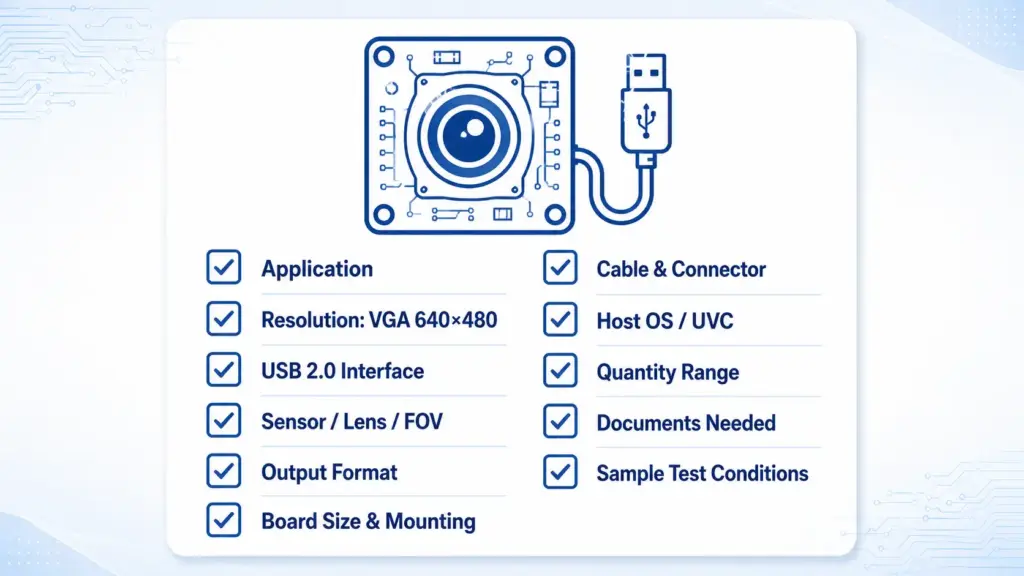
At minimum, confirm these items:
- Application and device type
- Target resolution
- USB interface requirement
- Preferred sensor, if any
- Lens type and field of view
- Working distance and target object size
- Lighting conditions
- Output format, such as MJPEG or YUY2/YUV
- Frame-rate requirement
- PCB size and mounting constraints
- Cable length and connector type
- Host system and operating system
- UVC requirement
- Quantity range for evaluation or production planning
- Required documents, if any
- Sample testing conditions
A product page can show useful starting specifications, but sample validation is still important. The same module may behave differently depending on lighting, enclosure design, host system, and image-processing requirements. For broader interface options, see Supertek’s USB 2.0 camera module options.
Product Example: How to Read VGA USB2.0 Module Specs
Product examples are useful when they are treated as model-specific references. They should not be used as proof that every module has the same sensor, lens, field of view, frame rate, or operating-system behavior.
Supertek’s public product pages list examples such as ST-JX-V01 and ST-OV7725. These examples can help buyers understand what to look for on a VGA USB2.0 camera module page.
| Example model | Listed sensor / type | Listed resolution | Listed output format | Listed field of view | Listed interface | Notes |
|---|---|---|---|---|---|---|
| ST-JX-V01 VGA camera module | JX-V01 listed | 0.3MP / 640H × 480V | MJPEG listed | 108° listed | USB 2.0 / UVC listed | Use as a model-specific example only |
| ST-OV7725 USB2.0 VGA camera module | OV7725 listed | 0.3MP / 640H × 480V | MJPG / YUV2 listed | Default 120° listed | USB 2.0 / UVC listed | Product page also lists frame-rate and module-size details |
When comparing product pages, pay attention to the exact model. A small difference in lens, sensor, board size, cable, or firmware can affect whether the module fits your device.
UVC, OS Support, and Integration Checks
Many USB camera modules use UVC, or USB Video Class, to simplify integration with host systems. For compliant UVC devices, operating systems may provide built-in driver support in some environments.
Still, do not assume every camera module will behave the same way in every system. Before you approve a module, confirm:
- Whether the exact module is UVC-compliant
- Which operating systems are supported
- Whether the required resolution and frame rate work in the target system
- Whether the host software can read the selected output format
- Whether cable length affects stability
- Whether the device needs special configuration
- Whether the final enclosure changes heat, light, or image conditions
For engineers, the safest approach is to test the exact sample with the actual host hardware, software, cable, and lighting conditions. For general UVC context, Microsoft provides a USB Video Class camera implementation guide, and USB-IF maintains a Video Class v1.5 document set.
What to Include in Your RFQ
A clear RFQ helps the supplier review your project more clearly and reduce avoidable back-and-forth. Instead of asking only for “USB 2.0 VGA camera module price,” provide the technical and commercial context.
| RFQ item | What to provide | Why it helps |
|---|---|---|
| Application | Device type and use scenario | Helps judge whether VGA is suitable |
| Resolution | VGA / 640 × 480 or other target | Avoids confusion with 2MP or other resolutions |
| Interface | USB 2.0 requirement | Confirms connection direction |
| Sensor preference | Sensor model if required | Helps check available module options |
| Lens / FOV | Angle, focus type, working distance | Helps match scene coverage |
| Output format | MJPEG, YUY2/YUV, or other | Helps host-system planning |
| Frame rate | Required FPS at target resolution | Helps avoid unrealistic expectations |
| Mechanical limits | PCB size, mounting, enclosure space | Helps check physical fit |
| Cable and connector | Length, connector, routing limits | Helps assembly planning |
| Host system | OS, processor platform, software | Helps check integration risk |
| Quantity range | Sample, pilot, or expected production range | Helps supplier respond with suitable options |
| Documents needed | Datasheet, drawing, test info, compliance-related documents if required and available | Helps procurement review |
| Timeline | Target sample or project schedule | Helps supplier discuss feasibility |
What Evidence Should You Ask a Camera Module Supplier For?
Evidence matters because camera modules often sit inside a larger product. A small mismatch can affect assembly, image quality, software integration, or procurement approval.
Ask what is available for your selected module:
| Document or evidence | Why ask for it | When it matters |
|---|---|---|
| Product datasheet | Confirms key specs | Before engineering review |
| Mechanical drawing | Confirms board size, holes, connector, and cable position | Before enclosure design |
| Sample test information | Helps compare expected and actual performance | Before pilot build |
| Output format details | Confirms host software compatibility | Before software integration |
| OS / UVC support information | Helps driver planning | Before system testing |
| Compliance-related documents, if required and available | Supports regulated or customer-specific procurement needs | When your market or customer requires it |
| Change-control expectations | Helps repeat sourcing | Before production planning |
| Packaging or shipping requirements | Helps procurement planning | Before bulk orders |
This does not mean every supplier will have every document for every module. The point is to ask early, especially if your project has customer approval, compliance, or long-term supply requirements.
Common Mistakes When Sourcing VGA USB Camera Modules
- Confusing USB 2.0 with 2MP resolution. USB 2.0 is the interface. VGA is usually 640 × 480 resolution.
- Choosing by resolution only. Lens, FOV, output format, lighting, board size, and software support can matter just as much.
- Assuming UVC means no integration work. UVC can help, but the exact module and target system still need testing.
- Skipping mechanical checks. A module may have the right image specs but still fail to fit the enclosure.
- Sending an incomplete RFQ. Without application, lens, cable, connector, OS, and quantity details, the supplier may not be able to recommend the right option.
- Accepting broad claims without evidence. Ask what documents, drawings, sample data, or compliance-related information are available for the exact module.
- Ignoring sample validation. Test under real lighting, distance, host-system, cable, and enclosure conditions before moving forward.
FAQ
What does USB 2.0 VGA camera module mean?
It usually means a camera module that uses a USB 2.0 interface and VGA-class resolution, commonly 640 × 480 pixels. USB 2.0 describes the connection. VGA describes the image resolution class.
How do I choose a USB 2.0 VGA camera module manufacturer?
Start with your application requirements. Compare resolution, sensor, lens/FOV, output format, board size, cable, connector, UVC or OS support, sample validation needs, and available documents. Then send a clear RFQ so the supplier can review suitable options.
Is VGA resolution enough for my application?
VGA may be enough when the target object is simple, close enough, and does not require fine detail. Consider higher resolution when you need small-feature inspection, wider field coverage with detail, more recognition accuracy, or post-processing that depends on image detail.
What specs should I confirm before requesting a sample?
Confirm resolution, sensor, lens/FOV, output format, frame rate, board size, cable, connector, operating system, UVC requirement, lighting, working distance, mounting method, and sample test conditions.
Does a UVC USB camera module work without a custom driver?
A UVC-compliant USB camera module may work with built-in driver support in some operating-system environments. However, exact behavior depends on the module, host system, software, output format, and target OS. Always test the exact sample in the final environment.
Can the lens, FOV, cable, or board be customized?
Customization may depend on the module, project requirement, validation scope, and quantity. Before assuming feasibility, share lens, FOV, cable, connector, board size, firmware, and application details for review.
What should I include in an RFQ for a USB camera module?
Include your application, target resolution, interface, lens/FOV, output format, board size, cable, connector, host OS, UVC needs, quantity range, sample test requirements, and any documents needed for engineering or procurement review.
Send Your Requirements for Technical Review
If you are evaluating a USB 2.0 VGA camera module for an OEM or embedded project, prepare your application details before contacting the supplier.
Share your target resolution, lens and field of view, board size, cable and connector needs, output format, host system, UVC or OS requirements, quantity range, sample schedule, and document needs. With those details, the team can review suitable USB 2.0 VGA camera module options and discuss the next step.