Choosing an OEM camera module is not just a resolution comparison.
A module with the right pixel count can still be a poor fit if the interface does not match the host device, the lens does not cover the required field of view, the board cannot fit the enclosure, or the image result changes under real lighting and motion conditions.
For OEM buyers, engineers, and procurement teams, the better starting point is the application. Before asking for price or samples, define how the camera module will be used, what system it must connect to, and what details the supplier needs to review.
This guide explains how to compare OEM camera modules, what to prepare before requesting a quote, and what evidence or documents to ask for before moving toward production.
How Should You Choose an OEM Camera Module?
Choose an OEM camera module by starting with the application, host device, interface, resolution/FPS, lens/FOV, lighting, motion, board size, cable/connector, software needs, and validation plan. Do not choose by resolution alone. Prepare these details before contacting a supplier so they can review whether a standard, modified, or custom module direction may fit the project.
What Is an OEM Camera Module?
An OEM camera module is a camera module intended for integration into another product, system, or device. Instead of being a finished consumer camera, it is usually selected, configured, or reviewed for a larger product design.
A camera module typically includes:
- an image sensor;
- lens or optical components;
- supporting electronics;
- a connector or cable path;
- an interface for sending image data to the host system.
Depending on the design, a module may also involve image processing, firmware behavior, filter choices, board shape, mounting requirements, or software compatibility. These details matter because the same basic camera specification can behave differently in different devices.
For example, a module used in a kiosk, scanner, inspection device, access terminal, robot, or embedded system may require different choices for lens, interface, cable length, board layout, and validation testing.
Start With the Application and Host Device
Before comparing module options, define the real use case. This step helps avoid the common mistake of asking only for a certain resolution or lowest price.
Start with these questions:
- What product or device will the camera module be built into?
- What does the camera need to capture?
- What is the working distance?
- What field of view is required?
- Will the object be still or moving?
- What lighting conditions will the camera face?
- What host processor, board, or system will receive the image data?
- What interface does the host support?
- How much space is available for the module, lens, cable, and connector?
- Does the project need UVC behavior, a specific driver, firmware support, or software integration?
- What documents or validation steps are required before sampling or production decisions?
A clear answer to these questions gives the supplier a better starting point. It also helps the buyer compare supplier responses more fairly.
How to Choose an OEM Camera Module: Selection Factors
A useful OEM camera module discussion should cover more than resolution. Resolution affects image detail, but it does not decide the whole result. Lens, sensor behavior, lighting, motion, interface, software, and mechanical fit also affect whether a module works in the final device.
| Selection Factor | Why It Matters | What to Confirm | Risk If Ignored |
|---|---|---|---|
| Application | The use case defines the real image requirement. | Product type, capture target, environment, working distance. | A technically valid module may still not fit the actual use. |
| Resolution / FPS | Resolution affects detail; FPS affects motion capture and data flow. | Target resolution, frame rate, host bandwidth, storage/processing limits. | Choosing only by resolution can create bandwidth, latency, or image-quality trade-offs. |
| Lens / FOV | The lens controls field of view, working distance, and image coverage. | FOV, focus distance, distortion tolerance, mounting space. | The image may be too narrow, too wide, distorted, or out of focus. |
| Lighting Conditions | Low light, backlight, IR needs, or changing light can affect image results. | Indoor/outdoor use, fixed or changing light, IR needs if applicable. | Sample results may not match real deployment conditions. |
| Motion / Shutter Needs | Moving objects may require closer review of exposure, frame rate, and shutter behavior. | Object speed, motion blur tolerance, capture timing. | Images may blur or miss important details. |
| Interface | Interface must match the host system and data path. | USB, MIPI CSI-2, DVP, GMSL, FPD-Link, SPI, or other interface needs. | The module may not connect correctly or may require extra integration work. |
| Board Size / Mechanical Fit | The module must fit the enclosure and mounting structure. | PCB size, hole position, lens height, cable direction, connector location. | Mechanical redesign may be needed after sampling. |
| Cable / Connector | Cable and connector choices affect assembly and reliability. | Cable length, connector type, routing, bend space, assembly method. | The module may fit electrically but fail the mechanical layout. |
| Software / Host Behavior | Host-side support affects integration and testing. | UVC needs, driver requirements, operating system, SDK or firmware requirements. | The module may capture images but not behave as expected in the final system. |
| Validation Plan | Sampling should test real use conditions. | Sample test plan, host test, optical test, mechanical fit, document review. | Production decisions may be made before project fit is proven. |
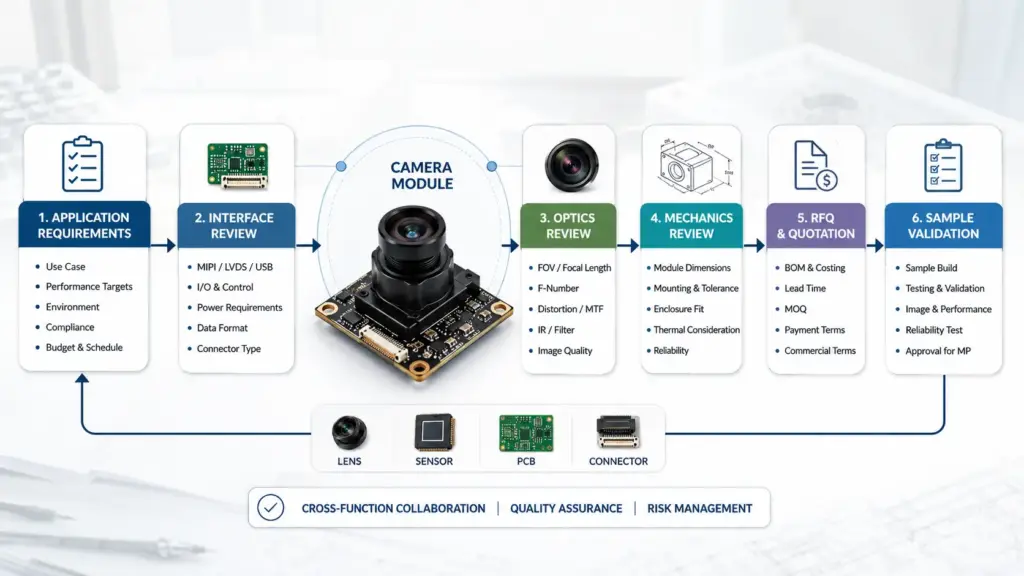
A good selection process narrows the module direction before the quotation stage. It also helps the supplier see whether the project looks like a standard fit, a modified configuration, or a deeper custom review.
Match the Interface to the Host System
Interface choice should follow the host system, not a general “best interface” rule. A module interface that works well for one device may be wrong for another because the host processor, cable length, bandwidth, software stack, and mechanical layout are different.
| Interface Direction | Typical Fit Question | Host-Side Check | Integration Caution |
|---|---|---|---|
| USB camera module | Does the host expect a USB video device? | USB port, USB Video Class behavior if needed, operating system, driver/software behavior. | Confirm host compatibility and cable/mechanical routing. |
| MIPI CSI-2 camera module | Does the processor support camera sensor input through MIPI CSI-2? | Processor camera interface, lane configuration, driver support, board design. | Often needs closer hardware/software integration review. |
| DVP / parallel interface | Does the host board support parallel camera input? | Pin mapping, timing, processor support. | Board-level compatibility should be checked early. |
| GMSL / FPD-Link direction | Does the project need longer cable distance or serializer/deserializer architecture? | Host architecture, cable path, deserializer support, system design. | Avoid assuming fit without system-level review. |
| SPI or other interface | Does the application have lower data needs or special host constraints? | Data rate, processor support, firmware behavior. | May not fit applications requiring higher image throughput. |
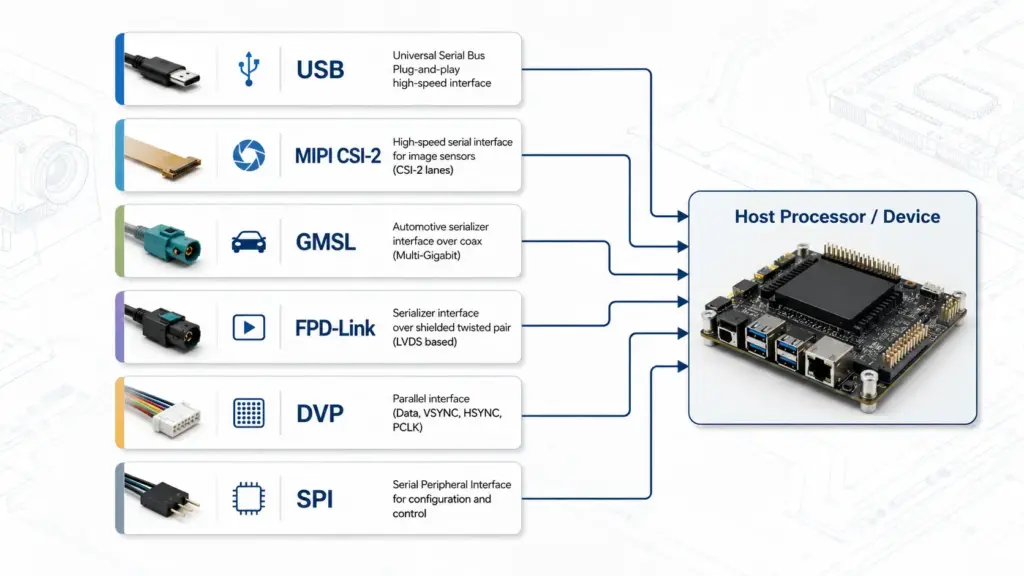
The point is not to rank one interface as always better. The point is to match the interface to the device architecture and test it under real operating conditions.
For a USB camera module, host-side behavior may include USB Video Class expectations, operating system compatibility, and cable routing. For a MIPI CSI-2 module, host processor support and driver integration may matter more. For serialized interfaces, the system design and cable path need careful review.
Standard, Modified, or Custom Camera Module?
Not every OEM project needs a fully custom camera module. Some projects may fit a standard module if the image, interface, lens, mechanical size, cable, and software behavior already match the device. Other projects may need modification or camera module customization review.
| Path | When It May Fit | What to Prepare | Risk Boundary |
|---|---|---|---|
| Standard module | Existing module direction appears to match the application, interface, optics, and mechanics. | Application details, target specs, host system, quantity range, sample test plan. | Do not assume production fit before testing in the final device. |
| Modified configuration | The base module is close, but lens, cable, connector, FOV, board layout, or firmware behavior may need review. | Current module reference, required changes, drawings, target use conditions. | Feasibility depends on supplier review; do not assume cost or timeline. |
| Full custom review | The project has special optical, mechanical, firmware, interface, document, or system-level requirements. | Drawings, host details, integration constraints, validation expectations, document needs. | Custom direction requires scoped review; avoid assuming MOQ, lead time, or production readiness. |
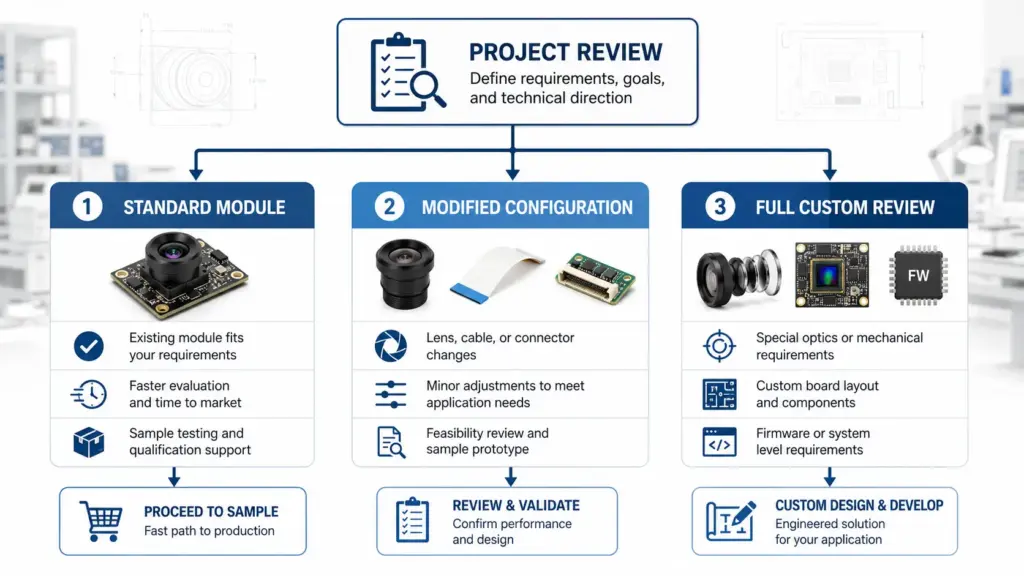
A practical way to decide is to ask: “Which parts of the existing module already fit, and which parts must change?”
If only the lens or cable direction needs review, a modified configuration may be enough. If the board shape, connector, firmware behavior, optics, and documents all differ from a standard module, the project may need a deeper custom discussion.
Application Fit: Match the Module to Real Use Conditions
Application fit is where many sourcing mistakes happen. A buyer may request a high-resolution module, but the real constraint might be low light, motion blur, working distance, field of view, host compatibility, or mechanical space.
| Scenario | Main Constraint | Specs to Check | Validation Note |
|---|---|---|---|
| Kiosk or access device | Face or object capture in fixed installation. | FOV, working distance, lighting, board size, host interface. | Test with the actual mounting angle and user distance. |
| Barcode or document scanner | Sharp capture at defined distance. | Focus distance, lens, resolution, lighting, motion, software behavior. | Test with real labels, documents, or materials. |
| Industrial inspection | Stable image capture under process conditions. | Lighting, shutter behavior, lens, frame rate, interface, mechanical mounting. | Validate under the real operating environment. |
| Robotics or mobile device | Motion, vibration, and limited space. | Frame rate, exposure, cable routing, board size, host interface. | Test movement, cable routing, and host processing behavior. |
| Security or monitoring device | Scene coverage and changing light. | FOV, low-light behavior, IR needs if applicable, interface, enclosure fit. | Test day/night or changing-light conditions where relevant. |
| Embedded product or IoT device | Host, power, size, and software constraints. | Interface, driver behavior, board size, connector, firmware/software needs. | Test with the actual host board and enclosure. |
This table is a starting point, not a suitability guarantee. Projects with safety, legal, compliance, or regulated-use requirements need project-specific documentation and review.
What to Prepare Before Requesting a Quote
A good RFQ helps the supplier understand the project faster and reduces vague back-and-forth. It also helps procurement compare responses from different suppliers.
Prepare the following information before requesting a quote or sample review:
| RFQ Item | What to Include |
|---|---|
| Application | Product type, use case, target object, installation environment. |
| Host platform | Processor, main board, operating system, camera interface support. |
| Interface preference | USB, MIPI CSI-2, DVP, GMSL, FPD-Link, SPI, or other required interface. |
| Resolution and FPS | Target resolution, frame rate, image format if known. |
| Lens and FOV | Required field of view, working distance, focus needs, distortion tolerance. |
| Lighting and motion | Indoor/outdoor, low light, changing light, moving target, exposure concerns. |
| Mechanical limits | Board size, lens height, mounting holes, enclosure constraints. |
| Cable and connector | Cable length, cable direction, connector type, assembly routing. |
| Software needs | UVC behavior, driver, operating system, SDK, firmware or image tuning needs. |
| Quantity range | Sample quantity and estimated order or project quantity range if available. |
| Document needs | Datasheet, drawing, test notes, certificate scope if applicable, packing requirements. |
| Validation plan | How samples will be tested before production decisions. |
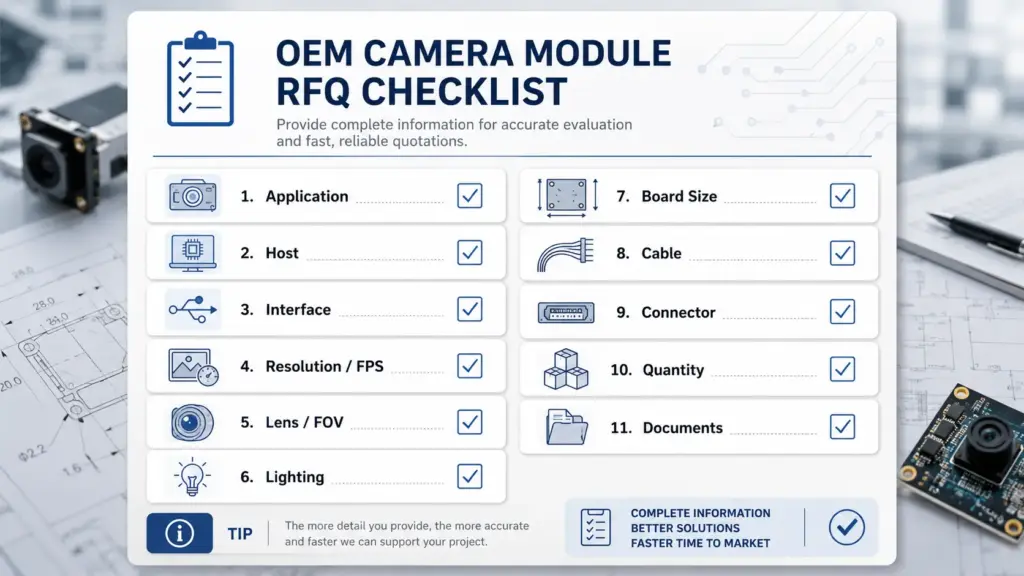
Avoid sending only “price for 5MP camera module” or “quote for OEM camera module.” That is usually not enough for meaningful review. The more complete the RFQ, the easier it is to identify whether the project should start with a standard module, modified configuration, or custom review.
What Documents and Evidence Should Buyers Ask For?
Procurement teams should separate supplier claims from documents and project-specific evidence. A supplier page may describe capabilities, but buyers still need documents that match the exact project, module, and order stage.
Ask about these items when relevant:
| Document or Evidence | Why to Ask | Safe Buyer Note |
|---|---|---|
| Datasheet | Confirms basic electrical, optical, and mechanical information. | Check whether the datasheet matches the proposed module. |
| Mechanical drawing | Supports enclosure and mounting review. | Confirm board size, lens height, hole positions, cable direction, and connector. |
| Sample test notes | Helps compare sample behavior with project requirements. | Test samples under real host, lighting, and mechanical conditions. |
| Interface or software notes | Helps engineering check host integration. | Confirm driver, UVC, firmware, SDK, or host behavior where relevant. |
| Certificate scope, if applicable | Needed for projects with compliance requirements. | Do not assume certification applies unless the exact scope is verified. |
| Packing and shipping documents | Helps procurement prepare receiving and assembly processes. | Confirm document needs before order placement. |
| Warranty or commercial terms | Helps procurement understand responsibility and risk. | Confirm terms directly; do not rely on assumptions. |
This section should be treated as a buyer checklist, not as a claim that any specific supplier has every document available. For compliance-sensitive projects, ask for exact document scope and human review before making production or market-entry decisions.
Sampling and Validation Before Production Decisions
A camera module should be tested in conditions that resemble the final product. A sample that works on a bench may behave differently after it is installed in the actual enclosure, connected to the real host board, and tested under real lighting and motion.
Use a validation checklist before moving forward:
| Validation Area | What to Check |
|---|---|
| Host test | Does the module work with the real processor, board, operating system, and software environment? |
| Optical test | Does the lens/FOV cover the target scene at the required working distance? |
| Lighting test | Does image behavior remain acceptable under expected light conditions? |
| Motion test | Does the image remain usable when the target or device moves? |
| Mechanical fit | Does the board, lens, cable, connector, and mounting structure fit the enclosure? |
| Cable and assembly | Can the cable route safely without stress, interference, or assembly difficulty? |
| Software behavior | Does the host handle image format, frame rate, driver behavior, or UVC requirements as expected? |
| Document review | Do datasheets, drawings, and any required documents match the selected module and project scope? |
| Procurement review | Are quantity, packing, commercial terms, and document needs clear before ordering? |
Validation does not need to be complicated at the first stage, but it should match the real risks of the product. If the project depends on image quality, mechanical fit, host compatibility, or documentation, those items should be checked before production decisions.
FAQ: OEM Camera Module Selection Questions
What does OEM mean in cameras?
In this context, OEM refers to camera modules intended for integration into another company’s product, system, or device. The buyer may use a standard module, request adjustments, or discuss a custom direction depending on application, host, mechanical, optical, and document requirements.
What is a camera module?
A camera module is an imaging component that typically integrates an image sensor, lens or optics, supporting electronics, and an interface for sending image data to a host device. Exact module design can vary by interface, board layout, lens, firmware behavior, and application needs.
Are OEM cameras good?
OEM camera modules can be a good fit when the specifications, host system, lens/FOV, lighting conditions, mechanical design, supplier evidence, and validation plan match the project. They can be risky when selected only by resolution, price, or unsupported supplier claims.
How do I choose an OEM camera module supplier?
Start by checking whether the supplier can discuss the application, host system, interface, lens/FOV, mechanical constraints, cable/connector needs, software behavior, documents, and sample validation. For any capability, certification, lead time, MOQ, warranty, or compliance-related claim, ask for scoped confirmation instead of assuming.
What information should I send before requesting a quote?
Send the application, host platform, preferred interface, resolution/FPS target, lens/FOV or working distance, lighting and motion conditions, board size, cable/connector needs, software or driver needs, quantity range, document needs, and sample validation plan.
Which interface should I choose for an OEM camera module?
Choose the interface based on the host system and integration requirements. USB may be relevant when the host expects USB video behavior or related software support, while MIPI CSI-2 or other interfaces may fit board-level embedded designs. DVP, GMSL, FPD-Link, SPI, or other options depend on host support, cable path, data needs, and system architecture.
Do I need a standard, modified, or custom camera module?
A standard module may fit if the existing design matches the application, interface, lens, mechanical size, cable, and software behavior. A modified or custom direction may be needed when optical, mechanical, firmware, interface, or documentation requirements differ. Final feasibility should be reviewed with project details.
What documents should I ask an OEM camera module supplier for?
Ask for a datasheet, mechanical drawing, interface/software notes, sample test information, packing requirements, and certificate scope if the project requires it. Do not assume certification, compliance, warranty, or test reports apply unless they are confirmed for the exact module and project scope.
Send Your Application Details for Project Review
Before contacting a supplier, prepare the information that affects module selection:
- application and target use case;
- host platform and operating system;
- interface preference;
- resolution and FPS target;
- lens, FOV, and working distance;
- lighting and motion conditions;
- board size, mounting, cable, and connector needs;
- software, driver, UVC, firmware, or SDK requirements;
- sample quantity and estimated order or project quantity range;
- datasheet, drawing, certificate scope, packing, or other document needs.
A clear inquiry helps the supplier use those details to review whether the project may fit a standard module, require a modified configuration, or need a custom camera module discussion. It also gives your engineering and procurement teams a better basis for comparing responses before sampling or production decisions.