A custom camera module project can go wrong before anyone selects a sensor.
The problem usually starts with a vague request: “We need a small high-resolution camera.” That sounds simple, but it leaves too many unanswered questions. What will the camera inspect? How close is the object? Which host platform receives the image? How much space is available? Does the cable need to bend? What output format, driver behavior, lighting condition, and validation target matter?
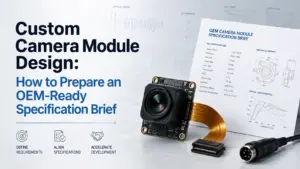
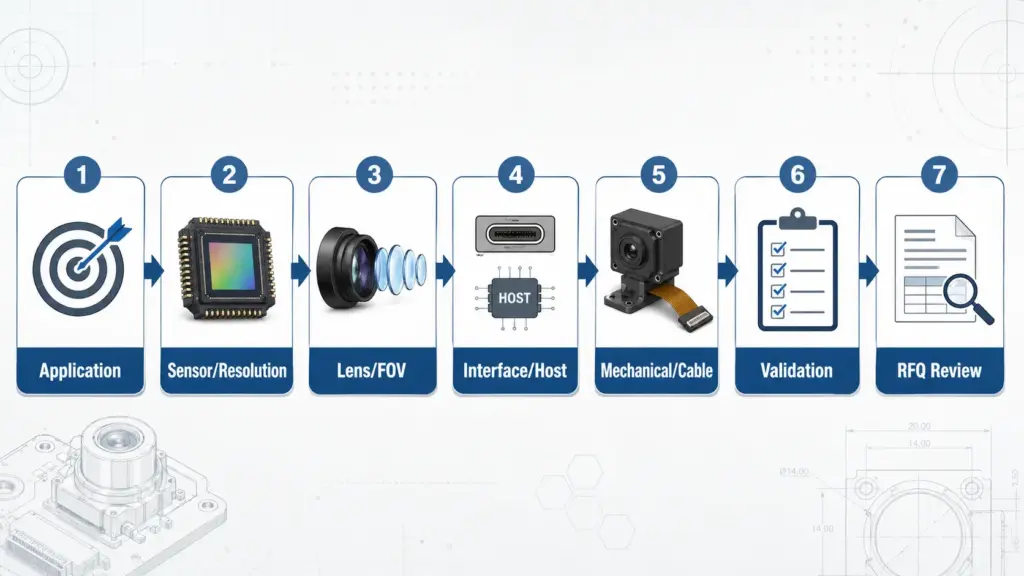
A better starting point is a design brief. Before asking a supplier to review feasibility or quote a custom camera module design, define the application, optical target, host interface, mechanical constraints, cable and connector needs, operating environment, validation expectations, and RFQ stage.
How to Prepare a Custom Camera Module Design
Prepare a custom camera module design by starting with the application, not the part number. Define the image target, sensor or resolution needs, lens and field of view, host interface, PCB/FPC size, cable and connector, operating conditions, firmware or driver needs, validation checks, quantity stage, and documents needed before supplier review.
What Is Custom Camera Module Design?
Custom camera module design means adapting a camera module around a product’s real application and integration constraints. It may involve choices around the image sensor, lens, field of view, interface, PCB or FPC layout, connector, cable, firmware behavior, and mechanical fit.
A typical camera module can include an image sensor, lens, digital signal processing or output electronics, infrared filter, flexible printed circuit or printed circuit board, and connector. Supertek’s educational article on what a camera module is describes the main components of a camera module as lens, infrared filter, image sensor, DSP, and soft board or PCB.
For an OEM project, the question is not only “Which camera module has the right resolution?” A more useful question is: Can the camera module fit the product’s optical, electrical, mechanical, software, and validation requirements at the same time?
That is why a custom design request should be treated as an engineering brief, not just a shopping list.
Start With the Application, Not the Camera Part Number
A camera module is part of a larger system. The same sensor or lens can behave differently depending on object distance, lighting, enclosure design, host platform, processing pipeline, cable route, and operating environment.
Before choosing components, define what the product must capture and where the module must work.
| Design Brief Item | What to Prepare | Why It Matters |
|---|---|---|
| Application | Inspection, scanning, recognition, monitoring, embedded vision, device camera, or another use case | Application affects image target, lens, lighting, interface, and validation |
| Target image result | What the camera must detect, identify, measure, or record | Prevents choosing specs only by resolution |
| Object distance | Typical working distance and acceptable range | Affects lens, focus, field of view, and housing layout |
| Field of view | Width/height or angular view needed at the working distance | Helps match lens and sensor size |
| Lighting | Bright, low light, controlled illumination, IR, or variable light | Affects sensor, lens, filter, exposure, and image tuning questions |
| Host platform | Processor, embedded board, PC, Android/Linux/Windows system, or proprietary system | Affects interface, driver, output format, and integration risk |
| Interface | USB, MIPI, DVP, SPI, GMSL, FPD-Link, Wi-Fi, or another path | Affects bandwidth, cabling, host compatibility, and validation |
| Mechanical limits | PCB/FPC size, module height, mounting space, enclosure, cable route | Affects whether a standard module can fit |
| Connector and cable | Cable length, bend direction, connector type, shielding needs | Affects assembly, reliability, and integration review |
| Operating conditions | Temperature, vibration, light variation, indoor/outdoor exposure, cleaning process | Affects validation scope; do not assume suitability without review |
| Quantity stage | Prototype, pilot, or production planning | Helps frame RFQ and project review without promising MOQ or lead time |
| Documents needed | Datasheet, drawing, sample reference, test expectations, compliance questions | Procurement should ask what is available for the specific project |
A supplier can review a request more clearly when these details are available. It does not guarantee feasibility or a quote result, but it reduces back-and-forth and helps both sides identify the real design constraints.
Standard Camera Module vs Custom Design
A standard module may be enough when the product can accept the existing sensor, lens, board size, interface, cable, and output behavior. A custom design may be worth discussing when one or more of those items does not fit the product.
| Requirement Type | A Standard Module May Fit When… | Custom Design May Be Needed When… | Risk to Confirm |
|---|---|---|---|
| Optical target | Existing FOV, focus, and lens type meet the application | The product needs a specific FOV, focus distance, lens angle, filter, or low-light behavior | Image result may not match the real working distance |
| Host interface | The host already supports the module’s output/interface | The host requires a different interface, connector, driver behavior, or output format | Host compatibility must be validated |
| Mechanical fit | Existing PCB/FPC size, height, and mounting work in the enclosure | The product has strict space, cable, or connector constraints | Mechanical rework can delay sample approval |
| Cable route | Existing cable length and direction work | Cable length, bend, shielding, or connector orientation must change | Cable design can affect assembly and signal behavior |
| Firmware/output | Default output behavior is acceptable | Exposure, color, image orientation, or output behavior needs review | Software and validation scope may increase |
| Procurement | Existing product documentation meets project needs | Drawings, specifications, samples, or project-specific documentation must be reviewed | Do not assume documents or compliance without confirmation |
Custom is not automatically better. It is useful when the standard option cannot meet the product’s real constraints.
Key Design Variables to Define Before Supplier Review
A custom camera module design is usually a set of trade-offs. Changing one variable may affect optics, interface, mechanical design, validation, and procurement.
Sensor and Resolution Target
Resolution is important, but it is not a complete requirement. A higher resolution target may increase data, processing, bandwidth, lens requirements, cost, or validation complexity. A lower resolution may be enough if the product only needs to detect a shape, scan a code, recognize a face, or monitor a scene within a defined area.
Before asking for a sensor, define:
- What must be visible in the image?
- What object size or detail level matters?
- What frame rate is needed?
- Is color required, or is monochrome acceptable?
- Does the application need low-light behavior, global shutter, HDR, autofocus, or fixed focus?
- What host platform will receive and process the image?
Avoid asking only for “the highest resolution.” Ask for the resolution and image behavior that fit the actual task.
Lens, FOV, Focus Distance, and Lighting
Lens choice affects what the module can see and how the image looks. Field of view describes the area imaged by the lens system, and Edmund Optics explains that focal length, sensor size, and working distance are connected to field of view and angular field of view. For a given sensor size, a shorter focal length gives a wider angular field of view.
For a custom camera module brief, define:
- Required horizontal and vertical field of view.
- Working distance from lens to object.
- Acceptable distortion level.
- Focus type: fixed focus, autofocus, or manual focus.
- Lighting condition: visible light, low light, IR, controlled light, or changing light.
- Whether the camera is inside a housing, behind glass, or near reflective surfaces.
Wide field of view may help capture more area, but it can also introduce distortion or edge-quality concerns. A narrow field of view may capture detail but require more precise alignment. The right choice depends on the application, not a universal lens ranking.
Interface and Host Platform
The interface should match the host system, bandwidth needs, cable path, software support, and validation plan.
MIPI describes CSI-2 as a widely adopted, high-speed protocol for transmitting still and video images from image sensors to application processors. USB-IF publishes the USB Video Class v1.5 document set, and Microsoft’s UVC implementation guide notes that Windows provides an inbox UVC driver for devices compliant with USB Video Class specification versions 1.0 to 1.5.
This does not mean one interface is always better. It means the interface should be chosen around the system.
| Interface | Typical Project Consideration | Host / Platform Question | Risk to Validate |
|---|---|---|---|
| USB / UVC | Often discussed when a host needs USB video behavior | Does the host support the required UVC behavior, resolution, frame rate, and driver model? | Driver behavior, bandwidth, cable length, and power |
| MIPI CSI-2 | Common in embedded camera-to-processor designs | Does the processor or embedded platform support the sensor, lanes, clocking, and camera pipeline? | Platform bring-up, signal integrity, software pipeline |
| DVP | May appear in lower-complexity embedded designs | Does the host support the parallel camera interface and timing? | Pin count, layout, data rate, and host compatibility |
| SPI | May fit low-data or special embedded use cases | Is the image size/frame rate low enough for the system? | Bandwidth and latency limitations |
| GMSL / FPD-Link | May be discussed when the project requires a serializer/deserializer-style camera link and matching host support | Does the system require serializer/deserializer architecture and matching host support? | Cable, connector, EMI, power, and validation scope |
| Wi-Fi / IP-style output | May fit networked camera use cases | Is latency, power, security, and network behavior acceptable? | Network stability, software integration, and power budget |
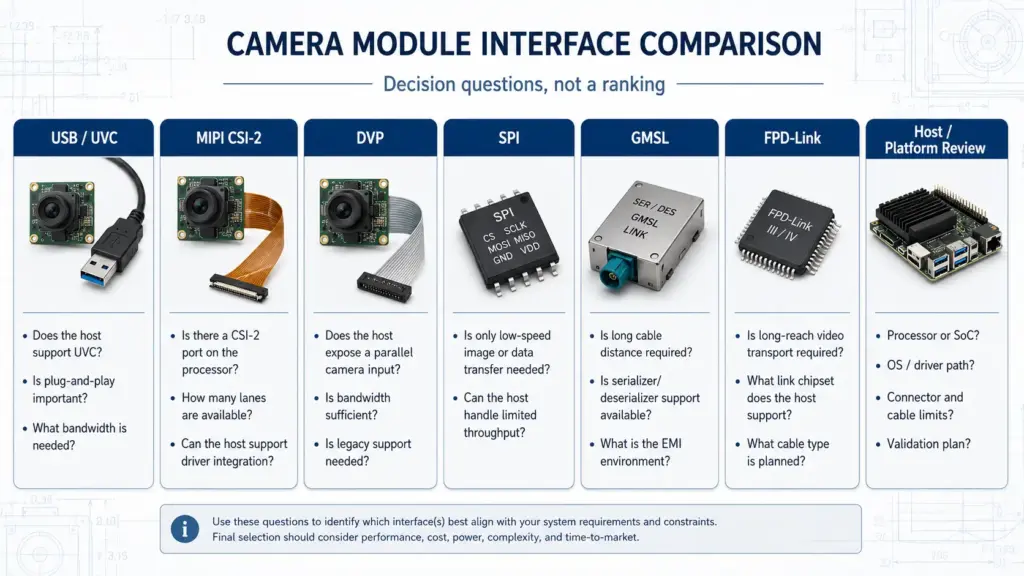
Supertek’s camera module interface navigation includes categories such as USB, SPI, DVP, MIPI, GMSL, FPD-Link, IP, and Web camera modules. Treat those as discussion paths for project review, not as proof that every interface can fit every custom project.
PCB/FPC Size, Cable, Connector, and Mounting
Mechanical fit often decides whether a standard camera module can be used. A sensor and lens may look right on paper, but the module still has to fit into the product.
Prepare:
- Maximum PCB or FPC dimensions.
- Module height limit.
- Lens barrel clearance.
- Mounting-hole requirement.
- Cable length and bend direction.
- Connector type and location.
- Enclosure or housing constraints.
- Assembly limitations.
Supertek’s camera module customization page lists project discussion areas such as module dimensions, hardware modification, lens angle, fixed/auto focus, night vision, audio, and firmware modification. Exact feasibility still needs review against the real brief.
Firmware, Driver, ISP, and Output Behavior
Many camera module issues appear after the first image is displayed. The module may connect, but the image may be rotated, too dark, too noisy, too delayed, or not compatible with the host pipeline.
Include software-related questions in the brief:
- What operating system or embedded platform will receive the image?
- Is the output format fixed?
- Does the product need MJPEG, YUV, RAW, H.264, H.265, or another format?
- Is exposure, white balance, color, brightness, contrast, or orientation important?
- Are there driver constraints?
- Is image tuning required for a controlled environment or variable environment?
Do not assume firmware or ISP tuning is a small change. It may affect validation scope.
Design Variable Trade-Off Matrix
| Design Variable | What to Define | What It Affects | Question to Ask |
|---|---|---|---|
| Sensor / resolution | Resolution target, frame rate, shutter type, color/mono, sensitivity needs | Data rate, lens choice, low-light behavior, host processing, cost | What detail must the camera capture, and at what speed? |
| Lens / FOV | Working distance, horizontal/vertical FOV, focus type, distortion tolerance | Image area, optical quality, module height, enclosure fit | What must be visible at the real working distance? |
| Interface | USB, MIPI, DVP, SPI, GMSL, FPD-Link, Wi-Fi, or other | Host compatibility, cable route, bandwidth, driver behavior | What interface does the host platform actually support? |
| PCB/FPC size | Board size, shape, component placement, mounting | Mechanical fit, thermal layout, assembly process | What is the maximum allowed module envelope? |
| Cable / connector | Length, bend, orientation, shielding, connector type | Assembly, signal behavior, reliability checks | How will the cable route inside the product? |
| Firmware / output | Format, exposure, color, orientation, frame behavior | Host integration, image quality, software validation | What image behavior must be fixed before sample approval? |
| Environment | Lighting, temperature, vibration, enclosure, cleaning, outdoor/indoor conditions | Sensor/lens/filter choice, validation scope, documents needed | What conditions must be checked or validated against the project requirements? |
| Procurement stage | Prototype, pilot, production estimate, document needs | RFQ clarity, project review, supplier questions | What stage is this request, and what must be confirmed before purchase? |
Validation Before Moving From Sample to Production Discussion
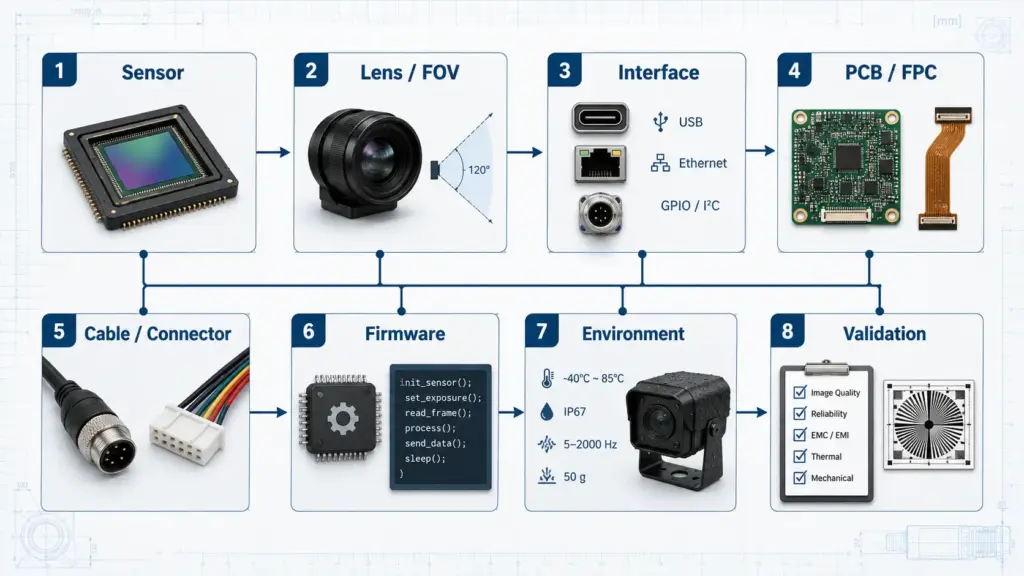
A sample that works on a desk is not the same as a validated design for a product. Before moving from sample review to production discussion, define what must be checked.
| Validation Area | What to Check | Why It Matters |
|---|---|---|
| Optical result | FOV, focus, distortion, image detail, low-light behavior, glare, color, exposure | Confirms the image meets the actual task |
| Host compatibility | Interface connection, driver behavior, output format, resolution, frame rate | Confirms the host can receive and process the stream |
| Mechanical fit | PCB/FPC size, lens height, mounting, connector position, cable route | Confirms the module can fit the enclosure and assembly process |
| Cable and connector | Length, bend, mating, signal behavior, assembly stress | Reduces integration and reliability risk |
| Firmware / image behavior | Orientation, exposure, white balance, brightness, contrast, format | Prevents sample approval based only on a first image |
| Operating conditions | Lighting variation, temperature, vibration, enclosure, cleaning, indoor/outdoor conditions | Defines whether extra validation is needed |
| Documentation | Drawing, datasheet, sample report, compliance question, test request | Procurement should ask what is available for the specific project |
Keep validation language precise. Do not assume a module is compliant, production-ready, or suitable for regulated use unless documents and scope are confirmed.
RFQ Checklist for a Custom Camera Module Project
A useful RFQ is not just a request for price. It should help the supplier understand feasibility, design scope, and what needs to be confirmed.
Prepare the following before sending your inquiry:
| RFQ Input | What to Include |
|---|---|
| Application | Product type, use case, what the camera must capture |
| Image target | Required detail, object size, distance, scene width/height, frame rate |
| Optical needs | FOV, focus distance, lens type, distortion tolerance, lighting condition |
| Sensor target | Resolution, shutter preference, color/mono, low-light or HDR needs if relevant |
| Interface / host | USB, MIPI, DVP, SPI, GMSL, FPD-Link, Wi-Fi, processor/platform, operating system |
| Mechanical constraints | PCB/FPC size, module height, mounting position, enclosure limit |
| Cable / connector | Cable length, connector type, bend direction, shielding or routing concerns |
| Firmware/output | Format, orientation, exposure, color, compression, driver behavior |
| Environment | Temperature, vibration, lighting variation, indoor/outdoor, cleaning or enclosure conditions |
| Quantity stage | Prototype, sample review, pilot, or production planning |
| Documents needed | Drawing, datasheet, sample reference, test questions, compliance-document questions |
| Current reference | Existing module, drawing, sample photo, or competitor/reference part if available |
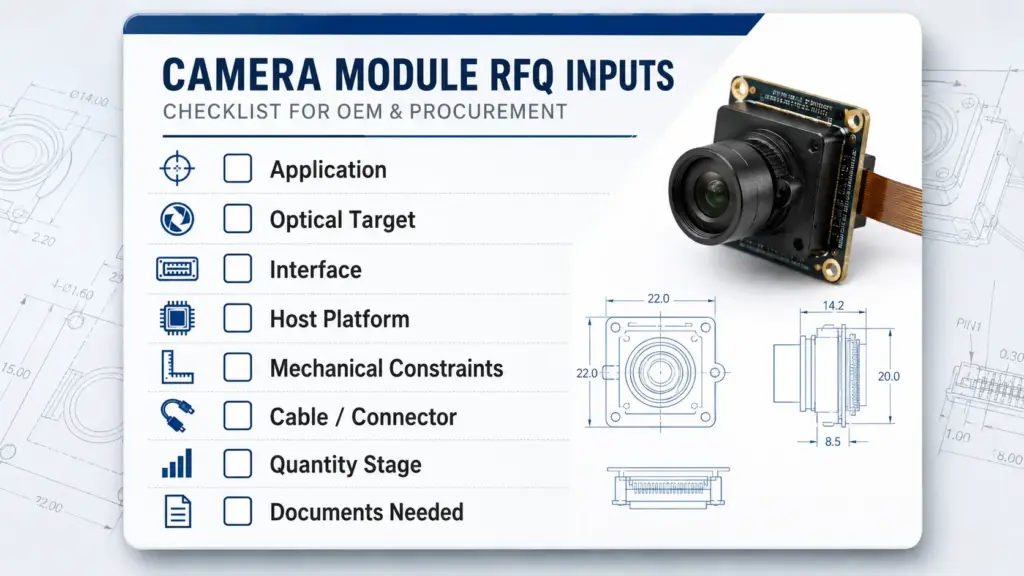
Do not expect exact pricing, MOQ, or lead time from an incomplete request. Those items depend on design scope, component selection, validation needs, and supplier confirmation.
Questions to Ask a Custom Camera Module Supplier
Before choosing a supplier, use questions that test project fit without forcing unsupported claims.
- Which parts of this design need feasibility review?
- Can a standard camera module meet this requirement, or is customization likely needed?
- Which sensor, lens, interface, cable, connector, and mechanical constraints are most critical?
- What drawing, sample, host-platform, or test information should we send?
- What validation should be completed before sample approval?
- What documents are available for this type of project?
- Which requirements could increase cost, complexity, or validation time?
- Which requirements are still unclear or risky?
For Supertek-specific inquiries, use the customization page or contact page only with a clear brief. Exact feasibility, documents, schedule, and commercial terms should be confirmed for the specific project.
FAQ
How do you design a custom camera module?
Start with the application and host system. Define the image target, working distance, FOV, sensor or resolution need, interface, mechanical size, cable and connector, firmware or output behavior, operating conditions, validation checks, and RFQ stage. Then review feasibility with the supplier before treating the design as production-ready.
What information should I prepare before requesting a custom camera module?
Prepare the application, target image result, object distance, FOV, lighting condition, interface, host platform, size limits, cable and connector needs, output format, operating environment, quantity stage, and documents needed. Drawings, photos, sample modules, or reference designs can also help.
What specs matter most in custom camera module design?
The most important specs are the ones that affect integration: sensor or resolution, lens and FOV, focus distance, interface, PCB or FPC size, cable and connector, firmware or output behavior, host platform, lighting, and operating environment. These should be reviewed together because one change can affect several others.
When should I choose a custom camera module instead of a standard module?
Consider customization when a standard module cannot meet the product’s optical, mechanical, interface, cable, firmware, environmental, or documentation needs. A standard module may still be the better option when it already meets the application and integration requirements.
What are the main parts of a camera module?
A camera module commonly includes an image sensor, lens, signal-processing or output electronics, infrared filter, PCB or FPC, and connector. Depending on the design, it may also include cable, LEDs, housing, firmware, or other project-specific elements.
Can an Arduino run a camera?
Some hobbyist camera projects use Arduino-family or similar boards with compatible camera hardware, but that is different from an OEM custom camera module design. For product integration, the host platform, interface, driver behavior, bandwidth, power, and validation requirements should be reviewed carefully.
Can I build my own camera module from scratch?
It is possible to build camera prototypes for learning or experimentation, but an OEM-ready module requires more than connecting a sensor. You need optics, interface design, PCB or FPC layout, connector and cable planning, firmware or driver behavior, mechanical fit, and validation. For product projects, a supplier-ready design brief is usually a better starting point.
What should be validated before moving from sample to production?
Validate optical result, host compatibility, mechanical fit, cable and connector behavior, firmware or output behavior, operating conditions, and required documents. Do not assume production readiness from a working sample until the project’s real conditions have been reviewed.
How long does a custom camera module project take?
Timeline depends on design scope, component availability, customization depth, validation needs, sample feedback, and order stage. Do not rely on a fixed timeline until the supplier reviews the project details.
What certifications or compliance documents should I ask for?
Ask what documents are available for the specific module and application. Do not assume certification, compliance, or regulatory suitability unless the supplier provides the relevant documents and the scope matches your project.
Share Your Project Requirements for Technical Review
A strong custom camera module request starts with clear requirements.
Before contacting Supertek, prepare your application, target image result, drawings or sample reference, interface and host platform, size limits, cable and connector needs, operating conditions, quantity stage, and document questions.
Use those details to request a technical review through Supertek’s camera module customization page or contact page. Avoid relying on a single spec such as resolution or module size. The clearer the design brief, the easier it is to identify the right questions before sample selection or RFQ discussion.