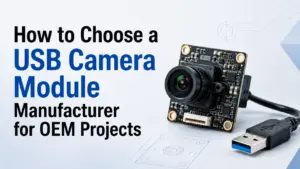
Choosing a USB camera module manufacturer is not only a matter of finding a module with the right resolution. For OEM, embedded vision, kiosk, medical device, access control, inspection, or smart terminal projects, the real question is whether the module can fit your application, host platform, mechanical space, image target, and validation process.
A useful supplier discussion usually starts with your application conditions. Before asking for a price or sample, it helps to define the USB interface, resolution and frame rate, lens and field of view, board size, cable and connector, lighting environment, host operating system, software requirements, and any documents you need for evaluation.
How to Choose a USB Camera Module Manufacturer
Choose a USB camera module manufacturer by matching your application requirements with the supplier’s available module options, technical review process, and documentation support. Compare interface type, resolution, frame rate, sensor, lens, field of view, UVC requirements, host compatibility, board size, cable and connector needs, sample validation process, and RFQ communication. Do not choose by price or megapixels alone.
What a USB Camera Module Manufacturer Should Help You Clarify
A USB camera module is part of a larger system. Even when two modules have the same resolution, they may behave differently because of lens choice, sensor characteristics, output format, lighting, cable length, host platform, software, and mechanical layout.
A manufacturer or supplier should help you clarify the practical selection points before you move to sampling or production discussion.
| Requirement | Why It Matters | What to Ask the Manufacturer | Evidence or Input to Prepare |
|---|---|---|---|
| Application | The image target and environment affect almost every selection choice. | Has this module type been reviewed for similar application conditions? | Use case, working distance, lighting, target object, installation space |
| USB interface | USB2.0 and USB3.0 fit different bandwidth and system needs. | Which USB interface is suitable for the required resolution, frame rate, and host? | Target resolution, FPS, output format, host device |
| Sensor and image quality | Sensor choice affects image behavior, low-light response, exposure, and cost. | Which sensor options should be reviewed for the image target? | Sample image target, lighting condition, image-quality priority |
| Lens and field of view | A suitable lens is often as important as the camera board itself. | What lens/FOV options fit the working distance and target area? | Working distance, target size, desired field of view |
| Board size and structure | Mechanical fit can limit module selection. | Can the board size, lens mount, connector direction, or cable layout fit the enclosure? | Drawings, space limits, cable route, connector requirement |
| Host platform and software | Compatibility depends on device, operating system, drivers, and application software. | What host and software conditions should be tested before approval? | OS, processor/platform, software stack, UVC requirement |
| Documents and validation | Procurement and engineering teams may need data before moving forward. | What documents or test information are available for the exact module? | Datasheet request, drawing request, sample test plan, certificate needs if relevant |
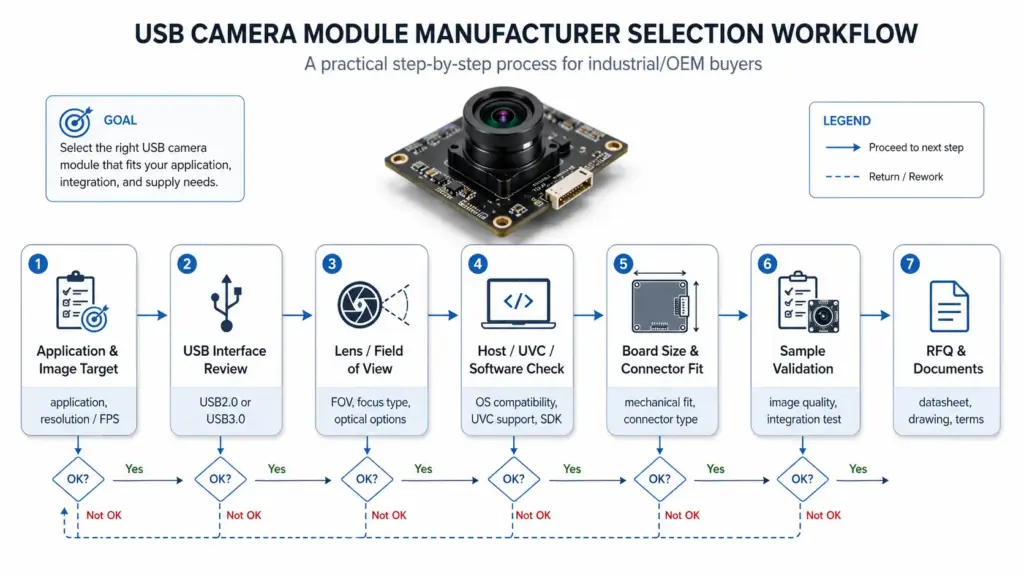
Specification alone does not guarantee application fit. A better early conversation is: “Here is our target image, host platform, space limit, and validation requirement. Which module options should we review?”
USB2.0, USB3.0, UVC, or MIPI: Match the Interface to the Project
Interface choice affects bandwidth, host support, cable design, software integration, cost, and mechanical planning. USB is often considered when the system needs a relatively simple camera connection to a host device, but the exact USB version and device behavior still need confirmation.
USB2.0 may fit lower-bandwidth projects. USB3.0 may be reviewed when higher data throughput is needed. MIPI is often used in embedded systems where the camera connects directly to a processor or board-level platform. None of these options is automatically “best” for every project.
| Interface / Term | Better Fit When | Check Before Choosing | Common Risk |
|---|---|---|---|
| USB2.0 camera module | The application has moderate image data needs and the host supports USB2.0. | Required resolution, frame rate, compression, cable length, host system, software support. | Assuming USB2.0 can support every resolution/FPS target. |
| USB3.0 camera module | The project may need higher bandwidth than USB2.0 can comfortably support. | Host USB3.0 support, cable design, thermal/mechanical layout, software handling. | Choosing USB3.0 without confirming host, cable, and enclosure constraints. |
| UVC-compliant USB camera | The project needs USB Video Class behavior on a supported host. | Whether the exact module is UVC-compliant and whether the host OS/application supports the needed format. | Assuming every USB camera module is automatically plug-and-play. |
| MIPI camera module | The camera is integrated directly into an embedded processor/platform design. | Processor support, driver work, board design, cable length, integration resources. | Choosing MIPI when the team expects simple external USB-style integration. |

A practical selection discussion should not start with “USB3.0 is better than USB2.0.” It should start with the required image data, host platform, software environment, physical structure, and validation plan.
What UVC Means for USB Camera Module Integration
UVC means USB Video Class. In simple terms, it is a USB device class used for video devices. For UVC-compliant camera devices on supported host systems, class-driver behavior may reduce the need for a separate custom driver for basic camera operation.
That does not mean every USB camera module is automatically plug-and-play in every system. The exact module, firmware behavior, output format, host operating system, application software, and device settings still matter.
For source context, see the USB-IF Video Class document set and Microsoft’s USB Video Class driver overview. For implementation-level review, see Microsoft’s UVC camera implementation guide.
When UVC matters to your project, ask these questions early:
- Is the exact camera module UVC-compliant?
- Which output formats and resolutions are supported?
- Which host operating systems or platforms need to be tested?
- Does the application software need specific controls, formats, or frame rates?
- Will the module be used as a standard camera device or inside a custom embedded system?
- Are there any limitations for cable length, power, enclosure, or thermal conditions?
For engineering teams, UVC should be treated as a compatibility topic to confirm, not as a marketing shortcut.
Key Specs to Prepare Before Contacting a Manufacturer
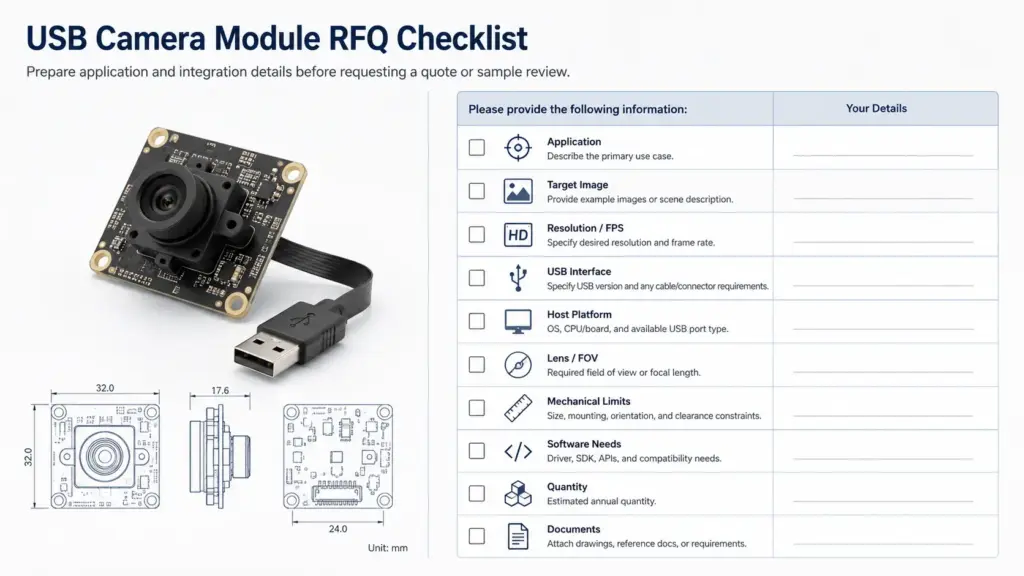
A vague RFQ usually creates vague recommendations. A clear RFQ helps the supplier or engineering team understand whether an existing module can fit, whether a modification may be needed, or whether the requirement needs further review.
Prepare the following information before contacting a USB camera module manufacturer:
| RFQ Item | What to Provide | Why It Helps |
|---|---|---|
| Application | Device type, use case, environment, image target | Helps narrow suitable camera module type |
| Target image | Object size, working distance, lighting, motion condition | Helps review lens, sensor, exposure, frame rate |
| Resolution and FPS | Required resolution and frame rate, not only “HD” or “high resolution” | Prevents mismatch between expectation and interface capability |
| USB requirement | USB2.0, USB3.0, Type-C, UVC need, cable length | Helps confirm bandwidth and host connection |
| Host platform | PC, embedded board, Android/Linux/Windows system, processor platform | Helps identify driver and software questions |
| Lens and FOV | Desired field of view, focal length if known, focus type | Helps match optical requirements |
| Mechanical limits | Board size, lens height, connector location, cable route | Helps avoid enclosure-fit issues |
| Software needs | Capture software, SDK need, control parameters, output format | Helps confirm whether standard behavior is enough |
| Quantity range | Prototype quantity and expected production range if known | Helps the supplier plan review and quotation discussion |
| Documents needed | Datasheet, drawing, test information, certificate request if relevant | Helps procurement prepare validation steps |
You do not need to know every answer before the first discussion. But the more specific your input is, the easier it is to receive a relevant module recommendation.
RFQ Checklist for a USB Camera Module Project
Use this checklist before sending an inquiry:
- What device or system will use the camera module?
- What image target should the camera capture?
- What resolution and frame rate are required?
- Is USB2.0, USB3.0, or another interface preferred?
- Is UVC behavior required?
- What host platform and operating system will be used?
- What software or application will access the camera?
- What lens angle or field of view is needed?
- What is the working distance?
- What is the lighting environment?
- Is autofocus, fixed focus, or manual focus preferred?
- Are there size limits for the board, lens height, cable, or connector?
- Is the enclosure already designed?
- What sample quantity or expected quantity range should be discussed?
- What documents are needed for internal review?
This checklist can also help your internal engineering, sourcing, and procurement teams align before contacting suppliers.
What Documents or Evidence Should You Request?
A USB camera module project may need different documents depending on the application, market, and validation process. Instead of assuming that every document is available, ask what can be provided for the exact module under review.
Common document requests include:
| Document / Evidence Type | Why It May Be Needed | Safe Request Wording |
|---|---|---|
| Datasheet | Confirms key specifications and electrical/mechanical information | “Please share the datasheet for the exact module option.” |
| Mechanical drawing | Helps check enclosure fit and connector/cable direction | “Please provide a drawing or dimensions for mechanical review.” |
| Lens information | Helps evaluate field of view, focus, and working distance | “Please confirm lens options and FOV information.” |
| Sample test information | Helps compare actual behavior against project conditions | “Please clarify what sample test information is available.” |
| Compliance or certificates | May be needed for certain markets or customer requirements | “Please confirm whether relevant documents are available for this module and target market.” |
| Lifecycle or supply notes | Important for long-term production planning | “Please advise if there are lifecycle or replacement considerations.” |
Do not treat document availability as automatic. For regulated, safety-sensitive, medical, automotive, or compliance-driven applications, confirm requirements with the supplier and your internal compliance team before relying on any document.
Common Mistakes When Choosing a USB Camera Module Manufacturer
A manufacturer-selection process can go wrong when the project team focuses on one visible specification and ignores system conditions. These are common mistakes to avoid:
| Mistake | Why It Creates Risk | Better Approach |
|---|---|---|
| Choosing by megapixels only | Resolution does not define lens fit, low-light behavior, FPS, host compatibility, or image quality. | Define image target, working distance, lighting, and host conditions. |
| Assuming USB means plug-and-play | Plug-and-play behavior depends on UVC compliance, host support, software, and format needs. | Confirm exact module behavior and test on the target host. |
| Ignoring lens and FOV | The wrong lens can make a technically good module unsuitable for the application. | Share target size, distance, and field of view needs. |
| Skipping mechanical review | Board, lens, connector, and cable layout may not fit the enclosure. | Provide drawings or space limits early. |
| Asking for a quote without technical inputs | The supplier may not be able to recommend the right module. | Send a structured RFQ checklist. |
| Assuming certificates or reports are available | Document needs vary by module, market, and project. | Ask what documents are available for the exact module. |
| Moving to production without sample validation | Real conditions can differ from datasheet assumptions. | Test sample modules under actual lighting, host, and software conditions. |
Good selection is usually a process, not a single specification match.
When to Ask About Customization
Customization may be relevant when a standard USB camera module does not fully fit the enclosure, optical requirement, cable layout, connector position, software behavior, or document requirement.
Ask about customization when:
- The board size or lens height must fit a fixed enclosure.
- The cable length, connector type, or connector direction matters.
- The lens/FOV must match a specific target area.
- The host platform needs specific output behavior.
- The project needs a private label, mechanical adjustment, or packaging change.
- The available module is close, but not ready for the final design.
Use careful wording in the first discussion. Instead of asking, “Can you customize everything?” ask:
Here are our drawings, host platform, image target, and quantity range. Please review whether an existing module can fit, or whether any modification needs technical evaluation.
Customization can affect validation scope, timeline, cost, and production planning. It should be reviewed with project details, not assumed from a general product description.
Which USB Camera Module Option Should You Review Next?
After you define the application and interface requirement, the next step is to review the most relevant USB camera module category or product option.
Use this routing logic:
- For a broad category overview, review the main USB camera module options.
- For lower-bandwidth or simpler host requirements, review USB2.0 camera module options.
- For higher data-throughput requirements, review USB3.0 camera module options.
- For a specific resolution, lens, low-light, autofocus, global-shutter, or board-size requirement, review the matching product option only after confirming the project conditions.
The goal is not to collect as many product links as possible. The goal is to narrow the next review step based on interface, image target, host platform, mechanical space, and validation needs.
FAQ
How do I choose a USB camera module manufacturer?
Start with your application, not only the module resolution. Compare interface requirements, sensor and lens needs, host platform, UVC or driver expectations, board size, cable and connector layout, sample validation process, and document needs. A good RFQ should give the supplier enough detail to review fit.
What specs should I provide for a USB camera module RFQ?
Provide the application, target image, resolution and frame rate, USB interface requirement, host platform, operating system, software needs, lens/FOV, working distance, lighting, board size, connector and cable requirements, quantity range, and documents needed for review.
What is UVC in a USB camera module?
UVC means USB Video Class. For UVC-compliant camera devices on supported host systems, standard class-driver behavior may support basic camera operation. However, you should confirm the exact module, output format, host system, and software requirements before assuming plug-and-play behavior.
Is USB2.0 or USB3.0 better for a camera module?
Neither is automatically better for every project. USB2.0 may fit lower-bandwidth requirements, while USB3.0 may be reviewed for higher data throughput. The right choice depends on resolution, frame rate, compression, cable design, host support, software, cost, and mechanical constraints.
What documents should I ask a camera module manufacturer for?
Ask what is available for the exact module. Common requests include datasheet, mechanical drawing, lens information, sample test information, lifecycle notes, and relevant compliance or certificate documents if your market or customer requires them.
Are USB camera modules plug-and-play?
Some USB camera modules may support plug-and-play-style behavior when they are UVC-compliant and used on a compatible host system. This should still be tested with the target operating system, software, format, resolution, cable, and application conditions.
Can USB camera modules be customized?
Some USB camera module projects may require review of lens, board size, connector, cable, firmware behavior, or mechanical layout. Customization should be discussed with drawings, host information, image requirements, expected quantity range, and validation needs. Do not assume every change is available without supplier review.
Share Your USB Camera Module Requirements for Review
To prepare a useful discussion, share your application, target resolution and frame rate, USB interface requirement, host platform, lens/FOV, board size, cable and connector needs, quantity range, and document requirements.
A clear RFQ helps the review process focus on suitable camera module options, required testing, and whether an existing module or further technical evaluation is the better next step.