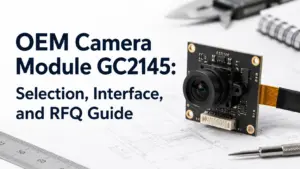
A GC2145 camera module can look simple on a product listing: sensor name, resolution class, interface, lens angle, maybe a board photo. For an OEM project, that is not enough.
The sensor name helps you narrow the discussion, but the finished module still depends on the board design, interface route, connector, cable, lens, output format, host platform, driver support, and validation process. A module that works for one development board or consumer device may not fit your enclosure, software stack, or production plan.
To evaluate an OEM camera module GC2145, confirm the complete module route rather than the sensor name alone. Check the interface, host platform, output format, lens and FOV, module size, connector, cable, driver/library support, document needs, and sample validation plan before requesting a quote or approving the module for production.
What a GC2145 Camera Module Means in an OEM Project
GC2145 refers to the image sensor family, not the complete finished module. A finished camera module may include the sensor, PCB, lens holder, lens, connector, cable, supporting components, and sometimes a bridge or controller depending on the interface route.
A GC2145 datasheet-style reference describes the sensor as a 2-megapixel CMOS image sensor with a 1616 × 1232 active pixel array, on-chip 10-bit ADC, image signal processor, listed output formats, 2-wire serial control, and MIPI-related support. Those details are useful for technical screening, but they do not define every camera module sold or customized with GC2145. The exact module still needs supplier confirmation.
| Sensor-level item | What it can help you understand | What still needs supplier confirmation |
|---|---|---|
| Sensor model | Narrows the sensor family and reference documentation | Whether the supplier’s exact module uses that sensor |
| Active pixel array / resolution class | Helps estimate image capture target | Final output resolution, format, frame behavior, and tuning |
| Output formats | Helps software and host review | Which formats the finished module exposes |
| MIPI / parallel-output references | Helps interface discussion | Whether the module is DVP, MIPI, USB, or another route |
| Control interface | Helps firmware review | Register setup, driver support, and host-side integration |
| ISP-related features | Helps understand sensor-side processing | Image quality behavior in the final module and application |
The practical takeaway: do not approve a GC2145 module only because the sensor name appears in a listing. Ask how the sensor is implemented in the module.
GC2145 OEM Fit Checklist
Before shortlisting a GC2145-based camera module, check whether the module matches the product you are building. This is especially important when the project has space limits, a fixed host processor, a defined cable route, or a target image-processing pipeline.
| Selection point | What to confirm | Why it matters | RFQ note |
|---|---|---|---|
| Application | Device type, viewing distance, lighting, use environment | The same sensor route may behave differently across products | Describe the product and use case clearly |
| Host platform | Processor, development board, embedded system, or USB host | Host support affects interface, driver, and data handling | Provide host chip/board details |
| Interface route | DVP, MIPI, USB, or other module route | Interface changes hardware layout and software work | State the preferred route or ask for review |
| Output format | YUV, RGB, JPEG, RAW, or other expected output | Output affects software and receiving-end processing | Share the required receiving format |
| Lens and FOV | Lens type, field of view, focus distance | Optics affect image coverage and enclosure design | Provide target FOV and working distance |
| Mechanical size | PCB size, lens height, mounting space | A module can be electrically suitable but physically unusable | Share maximum dimensions |
| Connector and cable | Connector type, pin count, cable direction, cable length | Impacts assembly, durability, and board layout | Provide drawing or connector preference |
| Driver/library support | SDK, firmware, register setup, UVC need if USB | Compatibility depends on tested software support | Ask what driver or integration notes are available |
| Sample validation | Bring-up, image test, host test, enclosure fit | Reduces risk before production planning | Define sample quantity and test plan |
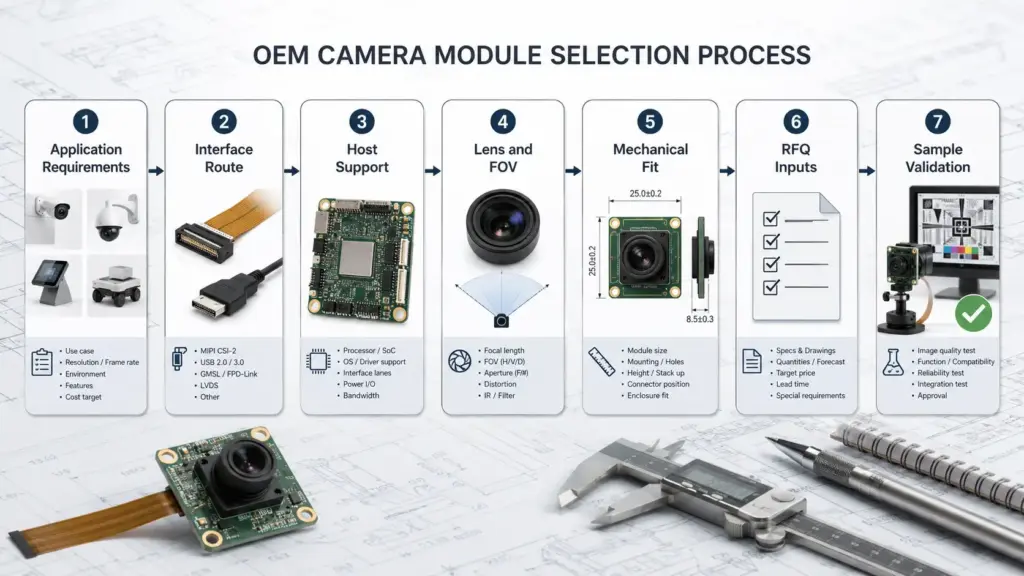
A good supplier review starts with these details. Without them, the discussion can stay stuck at a surface-level question such as “Do you have GC2145?” instead of moving toward a usable module design.
DVP, MIPI, or USB: Which Route Should You Confirm?
Search results and supplier listings often mix DVP, MIPI, and USB camera modules under the same sensor name. For an OEM buyer, the interface route is one of the first details to confirm.
MIPI CSI-2 is widely used for transmitting still and video image data from image sensors to application processors. That makes it relevant for many embedded camera discussions, but it is not the same as saying every GC2145 module is a MIPI module or that MIPI is automatically the right route for every device.
| Module route | What it usually changes | Host review | Software review | Mechanical / RFQ note |
|---|---|---|---|---|
| DVP / parallel route | Data pins, clocking, board routing, host capture support | Confirm the host can receive the parallel camera interface | Check register setup, timing, frame handling, and SDK support | Share pinout expectations and board-space limits |
| MIPI route | Lane connection, CSI receiver support, high-speed layout | Confirm the processor has compatible CSI receiver support | Check sensor configuration, receiver setup, and driver availability | Share host processor model and connector/cable needs |
| USB route | Adds USB camera board/controller behavior | Confirm USB host support and device class expectations | Check UVC or custom driver behavior where applicable | Useful when the end device expects USB camera input |
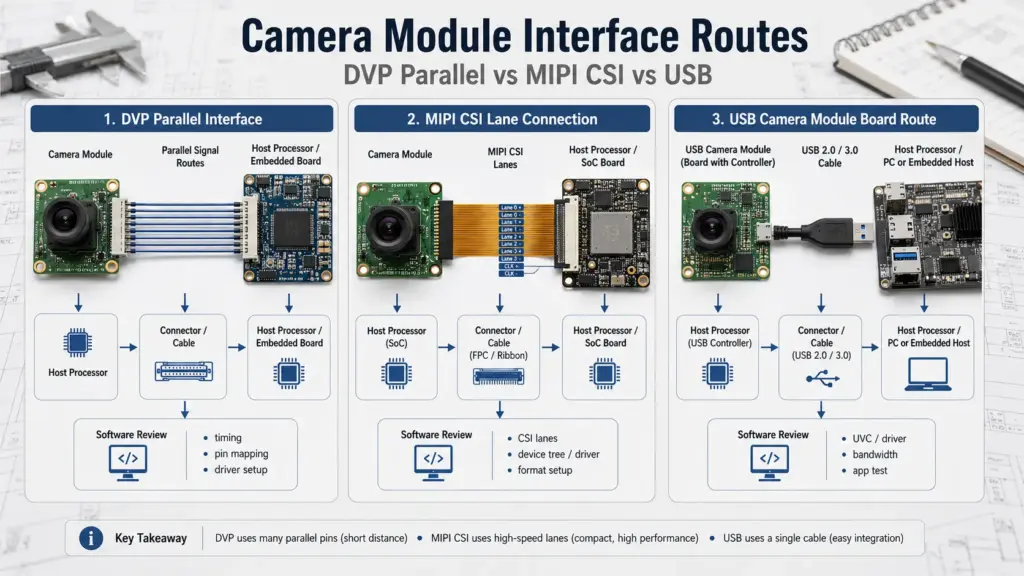
The key question is not “Which interface is best?” The better question is: Which interface can your host platform, enclosure, firmware team, and procurement process support with the least risk?
Host, Driver, and Output Compatibility Checks
Compatibility should not be assumed from the sensor name alone. A GC2145-based module may need the right physical interface, output format, clocking, register configuration, driver/library support, and receiving-end pipeline.
Camera integration documents often highlight practical checks such as whether the output format matches the receiving end and whether signal, timing, and test conditions are understood. For OEM selection, validate the full camera path, not only the sensor model.
| Check | Ask this question | Risk reduced |
|---|---|---|
| Host interface | Does the processor or board support the required camera interface? | Avoids choosing a module the host cannot receive |
| Driver/library | Is there tested driver, SDK, register, or UVC support for the exact module route? | Reduces software bring-up risk |
| Output format | Does the module output the format your system expects? | Prevents receiving-end mismatch |
| Clock and timing | Are clock, sync, and data timing requirements documented? | Reduces unstable capture or frame errors |
| Pinout / connector | Does the pinout match your board or adapter design? | Prevents PCB and cable redesign |
| Test environment | Has the module been tested with a similar host or use case? | Helps estimate validation workload |
For development boards such as ESP32, Arduino, STM32, or other platforms, use conditional language internally: the module may be suitable only when the exact interface, driver, output format, and tested configuration match the project.
Lens, FOV, Mechanical, Cable, and Connector Inputs
OEM camera module selection is not only an electrical decision. Mechanical and optical details often decide whether a module can actually be used in the product.
A module may meet the sensor and interface requirement but still fail the project because the lens is too tall, the cable exits in the wrong direction, the connector does not match the main board, or the FOV does not cover the target scene.
| Input | What to define | Why it matters |
|---|---|---|
| Field of view | Narrow, standard, wide-angle, or custom target | Affects scene coverage and image distortion |
| Focus distance | Fixed focus distance or close-range need | Affects lens choice and image usability |
| Lens height | Maximum allowed height above PCB | Impacts enclosure fit |
| Board dimensions | Maximum PCB width, length, and shape limits | Helps supplier check module feasibility |
| Connector type | Board-to-board, FPC, USB connector, or custom preference | Affects assembly and main-board compatibility |
| Cable length/direction | Length, exit direction, shielding need if relevant | Affects routing and reliability inside the product |
| Mounting method | Screw holes, adhesive, bracket, or enclosure support | Affects production assembly |
| Operating conditions | Temperature, lighting, vibration, or indoor/outdoor exposure if relevant | Helps decide whether extra validation is needed |
Do not treat these as minor details to solve later. In many OEM projects, the earlier these inputs are shared, the easier it is to avoid sample redesign.
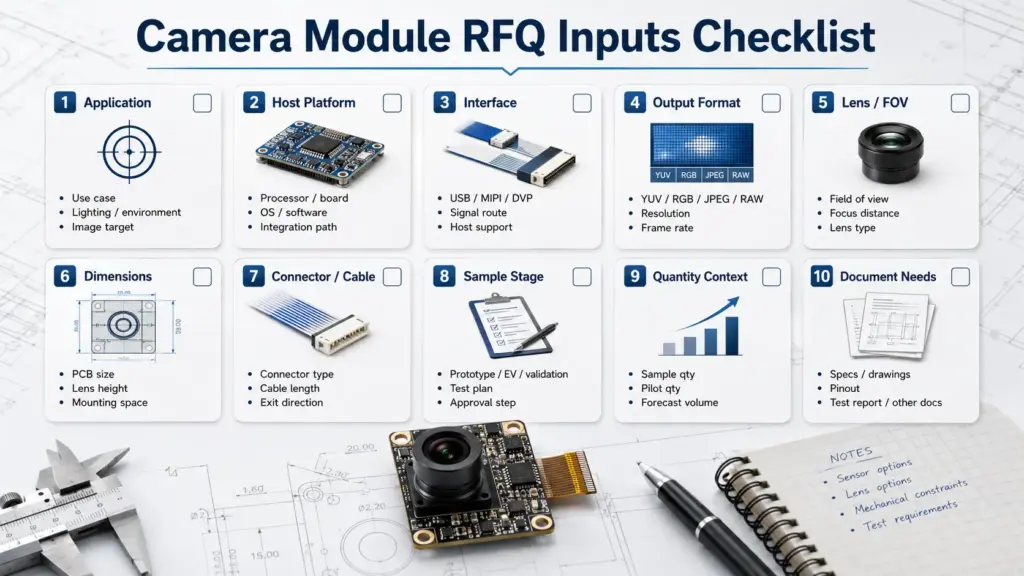
What to Prepare Before Requesting a GC2145 OEM Camera Module Quote
A useful RFQ should let the supplier or engineering team understand the project, not only the sensor name. Even when the final module is not confirmed yet, a structured request helps both sides identify the right path.
| Information to provide | Example of useful input | Why the supplier needs it |
|---|---|---|
| Application | Smart device, access terminal, scanner, IoT device, industrial device, toy, handheld product | Helps evaluate image, size, and integration priorities |
| Host platform | Processor, development board, chipset, or USB host | Determines interface and driver review |
| Preferred interface | DVP, MIPI, USB, or “not sure” | Helps route the module discussion |
| Output requirement | YUV, RGB, JPEG, RAW, or UVC if the selected route is USB | Helps check software compatibility |
| Lens / FOV target | Working distance, FOV target, fixed focus need | Helps choose or review optics |
| Mechanical limits | PCB size, lens height, mounting space | Helps prevent enclosure mismatch |
| Cable / connector | Connector type, cable length, direction, pinout need | Helps check assembly and main-board fit |
| Sample stage | Prototype, EVT, DVT, pilot, or production review | Helps align validation expectations |
| Quantity context | Sample quantity and rough project stage | Helps frame commercial review without assuming MOQ |
| Document needs | Datasheet, drawing, pinout, lens details, test or compliance documents if applicable | Helps procurement and quality teams review risk |
A quote without enough technical detail can lead to the wrong sample, unclear validation scope, or a second round of redesign.
For broader interface context, review related camera module categories such as DVP camera modules, MIPI camera modules, USB camera modules, or the product catalogue.
Sample Validation Before Production
A GC2145-based module should be validated in the real system before production decisions. The goal is not to prove that every possible use case works. The goal is to confirm that the selected module route works for your device, host, optics, enclosure, and software.
| Validation step | What to check | Risk reduced |
|---|---|---|
| Electrical bring-up | Power, clock, reset, interface signals, stable connection | Basic hardware mismatch |
| Image output test | Expected image format and capture behavior | Output-format mismatch |
| Host driver test | SDK, driver, register setup, UVC behavior if USB | Software integration delay |
| Lens / FOV review | Scene coverage, focus distance, distortion tolerance | Poor image usability |
| Mechanical fit | PCB, lens height, connector, cable routing | Enclosure redesign |
| Thermal / use-condition check | Relevant operating conditions for the device | Application-specific failure |
| Sample approval | Compare sample results against project requirements | Unclear production readiness |
| Document review | Drawings, pinout, lens details, and available reports | Procurement and quality risk |
Keep validation language realistic. A passed sample in one setup does not mean the module is suitable for every application. A failed sample also does not always mean the sensor is wrong; it may point to the interface route, lens, firmware, layout, or configuration.
Documents to Ask For
Procurement and engineering teams often need documents before approving a camera module. The safest wording is to ask which documents are available for the exact module and order, rather than assuming every document exists.
| Document | When to ask | Boundary |
|---|---|---|
| Sensor or module datasheet | Early technical screening | Confirm whether it applies to the exact module |
| Module drawing | Mechanical review | Check dimensions, lens height, and mounting details |
| Pinout / connector definition | Board and cable review | Confirm exact connector and signal mapping |
| Lens information | Optics review | Confirm FOV, focus distance, and lens type |
| Driver or integration notes | Host/software review | Ask whether notes apply to your platform |
| UVC notes, if USB | USB camera route review | Confirm operating system or host expectations |
| Test report, if available | Quality review | Do not assume availability |
| Compliance documents, if applicable | Procurement or regulated-market review | Ask what applies to the exact product and order |
Avoid publishing claims such as “certified,” “compliant,” or “documents included” unless the exact document has been reviewed and approved for use.
FAQ
What is a GC2145 camera module used for in OEM projects?
A GC2145 camera module may be considered when an OEM project needs a camera module based on this sensor and the engineering team wants to evaluate GC2145 as the sensor route. The final fit depends on the complete module design, including interface, lens, connector, board size, host support, and validation results.
How do I choose the right GC2145 camera module?
Start with the application and host platform. Then confirm the interface route, output format, lens/FOV, mechanical size, connector/cable, driver or library support, document needs, and sample validation plan. Do not choose only by sensor name or listing title.
Is GC2145 compatible with ESP32, Arduino, STM32, or other boards?
It depends on the exact module interface, host camera support, driver/library availability, output format, clocking, pinout, and tested configuration. Treat platform compatibility as a validation question, not as a universal claim.
What is the difference between GC2145 DVP, MIPI, and USB camera modules?
DVP, MIPI, and USB refer to different module routes. DVP and MIPI usually require closer host-interface and driver review. USB modules may add a controller or UVC-style behavior depending on design. The right route depends on the host system, software stack, mechanical design, and validation plan.
What information should I provide for a GC2145 OEM camera module RFQ?
Provide your application, host platform, preferred interface, output format, lens/FOV target, board-size limits, connector/cable needs, sample stage, quantity context, and document requirements. Include drawings or system details when available.
Can a GC2145 camera module be customized?
Customization may be reviewed in an OEM project, but the exact options depend on the supplier’s capability and the module design. Typical discussion points include lens, FOV, connector, cable, PCB size, and host integration needs. Do not assume GC2145-specific customization until the supplier confirms it.
What should be validated before mass production?
Validate electrical bring-up, image output, driver or UVC behavior, host compatibility, lens/FOV, mechanical fit, cable/connector routing, and required documents. The validation plan should match the actual product and use environment.
Does a GC2145 camera module come with certifications or compliance documents?
Do not assume that certifications or compliance documents are included. Ask the supplier which documents are available and whether they apply to the exact module, configuration, order, and target market.
Send Requirements for Engineering Review
For a GC2145-based camera module project, prepare the details that affect fit before requesting a quote or sample.
Share your application, host platform, preferred interface, output format, lens/FOV target, mechanical limits, connector and cable requirements, sample stage, quantity context, and document needs. That information helps the module route be reviewed before you invest time in samples, board layout, or production planning.