Are you looking for the perfect USB camera to elevate your business meetings and online presentations? A reliable USB camera can make all the difference, helping you look professional and stay connected with clients and teams.
As a Remote IT Support Specialist, I’ve researched the top options to help you choose the best USB cameras available, especially if you’re a business owner seeking quality and reliability.
Here are the first 2 USB cameras for laptops, widely trusted by professionals across various fields:
- Logitech C920
- Logitech HD Webcam C310
In this guide, we will introduce the other top cameras on the list, covering their features, advantages, and practical advice for choosing the right USB camera for your laptop needs.
So let’s get started!
1. Quick Comparison Chart
When choosing a USB camera, it’s helpful to have a quick overview of the key features each model offers. Below is a glance at the top 10 USB cameras, so you can quickly see which one might fit your business needs before diving into the more detailed information about each option.
| Camera Model | Resolution | Frame Rate | Field of View | Microphone | Special Features | Ideal For |
| Logitech C920 | 1080p Full HD | 30 fps | 78 degrees | Dual stereo mics | Clear video quality, easy setup | Professionals needing reliable, everyday video |
| Logitech HD C310 | 720p HD | 30 fps | 60 degrees | Mono microphone | Compact design, basic functionality | Budget-friendly option for simple video calls |
| Obsbot Tiny 2 | 1080p Full HD | 30 fps | 90 degrees | Dual noise-canceling mics | AI tracking, gesture control | Active presenters who move during calls |
| Razer Kiyo Pro Ultra | 1080p Full HD | 60 fps | Adjustable | Omnidirectional microphone | Low-light performance, customizable FOV | Versatile uses in different lighting setups |
| Elgato Facecam Pro | 1080p Full HD | 60 fps | 82 degrees | None | Heat management, high clarity | High-quality video with external audio setup |
| Logitech StreamCam | 1080p Full HD | 60 fps | 78 degrees | Dual omnidirectional mics | Portrait/landscape modes, autofocus | Professionals needing flexible video modes |
| Obsbot Meet 4K | 4K Ultra HD | 30 fps | 86 degrees | Dual noise-canceling mics | Ultra-HD clarity, auto-framing | Presenters needing sharp image quality |
| Razer Kiyo Pro | 1080p Full HD | 60 fps | Adjustable | Omnidirectional microphone | Low-light performance, high frame rate | Adaptable for various meeting types |
| Elgato Facecam | 1080p Full HD | 60 fps | 82 degrees | None | Simple setup, consistent quality | Reliable option for frequent video calls |
| Insta360 Link | 4K Ultra HD | 30 fps | 80 degrees | Dual noise-canceling mics | AI tracking, gesture controls | Interactive and high-resolution presentations |
2. Logitech C920
The Logitech C920 is a popular USB camera, known for delivering high-quality video that makes virtual meetings and presentations look professional. With easy setup and impressive clarity, it’s a go-to choice for businesses that need reliable, consistent video quality.
Specifications:
- Resolution: 1080p Full HD
- Frame Rate: 30 fps
- Field of View: 78 degrees
- Built-in Microphone: Dual stereo mics
- Connectivity: USB 2.0
- Compatibility: Windows, Mac, and Chrome OS
Key Features:
- Clear and Vibrant Video Quality: The Logitech C920 provides Full HD video with vibrant colors and sharp detail. This makes it ideal for professional settings where clear visuals are essential.
- Dual Microphone Setup: With dual stereo microphones, the C920 captures natural-sounding audio, even in environments with background noise. This feature helps to enhance communication clarity in online meetings.
- Versatile Compatibility: The C920 works seamlessly across multiple operating systems, including Windows, Mac, and Chrome OS. This flexibility lets users switch between devices with ease, making it a practical choice for business use.
Takeaway Note: The Logitech C920 is ideal for professionals who need consistent, clear video quality in their online communications. However, its fixed field of view may not suit those looking for adjustable framing options.

3. Logitech HD Webcam C310
The Logitech HD Webcam C310 is a straightforward, reliable USB camera that delivers clear video quality for online meetings and presentations. It’s compact and easy to set up, making it a great choice for businesses that need an affordable, dependable camera. Let’s look at more details about the Logitech HD Webcam C310:
Specifications:
- Resolution: 720p HD
- Frame Rate: 30 fps
- Field of View: 60 degrees
- Built-in Microphone: Mono microphone
- Connectivity: USB 2.0
- Compatibility: Windows and Chrome OS
Key Features:
- Reliable HD Video Quality: The Logitech C310 provides 720p HD video, offering good clarity for everyday virtual meetings. This is ideal for professionals looking for a straightforward camera that gets the job done.
- Compact Design: Its small, lightweight design makes the C310 easy to transport and set up on different devices. This portability is especially helpful for those working remotely or in varied locations.
- Automatic Light Correction: The C310 adjusts to lighting conditions automatically, providing clear video even in low-light environments. This feature helps maintain visibility in varying workspaces, ensuring you’re seen clearly.
Takeaway Note: The Logitech HD Webcam C310 is ideal for business users who need a budget-friendly, reliable USB camera. However, it may lack advanced features and high resolution some users need for presentations with detailed visuals.

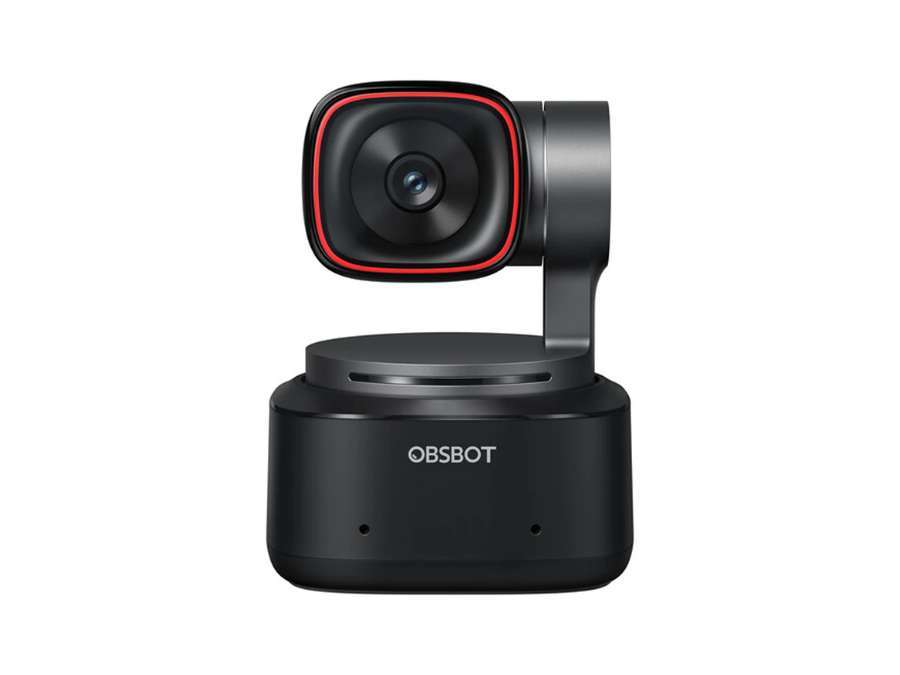
4. Obsbot Tiny 2
The Obsbot Tiny 2 is a smart USB camera that offers AI-powered tracking, keeping you centered in the frame during video calls or presentations. This compact camera is perfect for businesses that want enhanced video capabilities without complicated setup. Here’s a closer look at what the Obsbot Tiny 2 has to offer:
Specifications:
- Resolution: 1080p Full HD
- Frame Rate: 30 fps
- Field of View: 90 degrees
- Built-in Microphone: Dual noise-canceling mics
- Connectivity: USB-C
- Compatibility: Windows, Mac, and Chrome OS
Key Features:
- AI-Powered Subject Tracking: The Obsbot Tiny 2 uses AI to automatically follow your movements, keeping you centered on-screen. This makes it ideal for professionals who move around during presentations or demonstrations.
- Gesture Control: With gesture-based control, you can control the camera’s functions hands-free, such as starting or stopping tracking. This feature adds convenience, especially during busy or dynamic meetings.
- Wide-Angle Lens: Equipped with a 90-degree field of view, the Tiny 2 captures more of the surrounding area, making it useful for group calls or spacious workspaces. This wide angle helps show more context without compromising video quality.
Takeaway Note: The Obsbot Tiny 2 is ideal for business users looking for dynamic tracking and hands-free controls in their video calls. However, its AI features may be unnecessary for those who prefer a more straightforward, fixed camera setup.
5. Razer Kiyo Pro Ultra
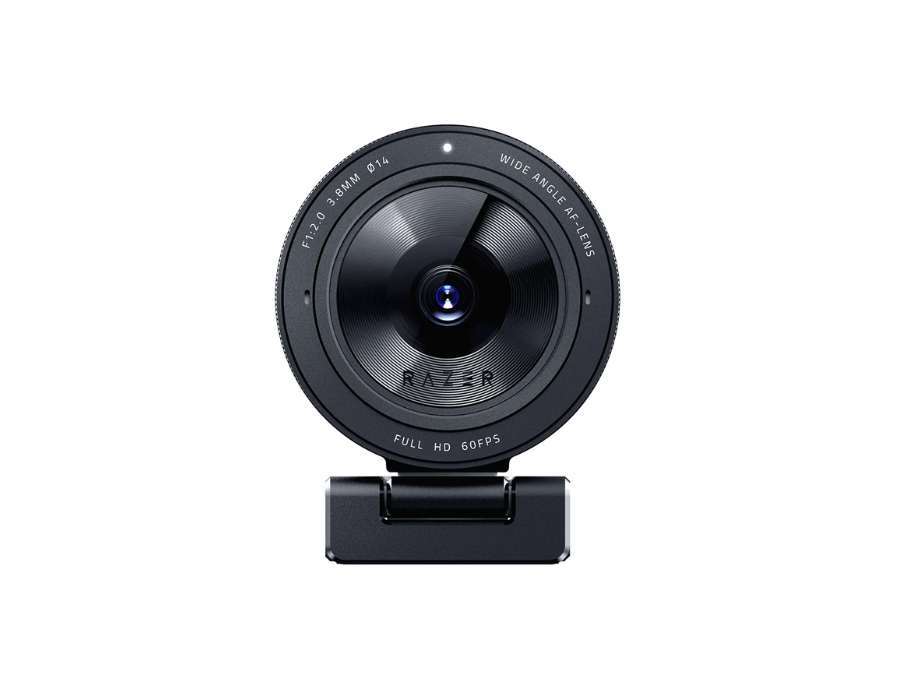
The Razer Kiyo Pro Ultra is a premium USB camera designed for outstanding video quality, especially in low-light conditions. Ideal for professional settings, it combines advanced features with ease of use. Below are more details about the Razer Kiyo Pro Ultra:
Specifications:
- Resolution: 1080p Full HD
- Frame Rate: 60 fps
- Field of View: Adjustable (Wide, Medium, Narrow)
- Built-in Microphone: Omnidirectional microphone
- Connectivity: USB 3.0
- Compatibility: Windows and Mac
Key Features:
- High-Performance Low-Light Capture: The Kiyo Pro Ultra is engineered for low-light environments, making it ideal for office spaces with varied lighting. This feature allows it to adapt to dim conditions while maintaining clarity and sharpness.
- Adjustable Field of View: With customizable viewing angles, the Kiyo Pro Ultra can switch between wide, medium, and narrow fields of view. This flexibility lets users choose how much of their background or surroundings to show, depending on their needs.
- Smooth 60 FPS Video: The high frame rate of 60 fps makes video movements appear smoother and more natural. This feature is useful for business presentations that involve quick movements or visual demonstrations.
Takeaway Note: The Razer Kiyo Pro Ultra is ideal for professionals who need exceptional video quality and adaptability in various lighting conditions. However, it may be a higher investment compared to simpler cameras if you don’t need specialized features.

6. Elgato Facecam Pro
The Elgato Facecam Pro is a high-quality USB camera tailored for crisp, clear video, making it a great option for professional video calls and presentations. It’s designed to provide reliable performance for business users who want a polished look on screen. Here’s a breakdown of what the Elgato Facecam Pro offers:
Specifications:
- Resolution: 1080p Full HD
- Frame Rate: 60 fps
- Field of View: 82 degrees
- Built-in Microphone: No (external microphone recommended)
- Connectivity: USB 3.0
- Compatibility: Windows and Mac
Key Features:
- High-Definition Clarity: The Facecam Pro delivers Full HD video at 60 fps, ensuring a sharp, professional look. This level of clarity is ideal for business presentations that require precise detail.
- Heat Management Design: With an integrated heat management system, the Facecam Pro maintains performance even during long calls. This feature is particularly useful for extended meetings or presentations where stability is essential.
- No Built-In Microphone: Designed specifically for users who prefer external mics, the Facecam Pro encourages pairing with professional audio setups. This allows users to fully customize their audio quality for a more tailored experience.
Takeaway Note: The Elgato Facecam Pro is ideal for professionals seeking excellent video quality and customization options for audio. However, it lacks a built-in microphone, so users need to have or invest in an external mic for full functionality.

7. Logitech StreamCam
The Logitech StreamCam is a versatile USB camera that offers smooth, high-quality video, designed to make online presentations and meetings look polished. Its features cater to business users looking for reliable video performance in various settings. Below are some key details about the Logitech StreamCam:
Specifications:
- Resolution: 1080p Full HD
- Frame Rate: 60 fps
- Field of View: 78 degrees
- Built-in Microphone: Dual omnidirectional mics
- Connectivity: USB-C
- Compatibility: Windows and Mac
Key Features:
- Portrait and Landscape Modes: The StreamCam can switch between portrait and landscape modes, allowing you to choose the best view for different meeting formats. This flexibility makes it ideal for professionals who want to adapt their video presentation style easily.
- Smooth Autofocus: With smooth autofocus, the StreamCam keeps your image sharp even if you move around slightly. This feature helps maintain a polished appearance, which is helpful for active speakers or presentations involving some movement.
- Smart Exposure Adjustment: The StreamCam automatically adjusts exposure to match lighting conditions, giving you consistent video quality. This feature is particularly beneficial for business users working in offices with varying light levels.
Takeaway Note: The Logitech StreamCam is ideal for users who want flexibility in video orientation and reliable exposure control. However, the need for a USB-C port may limit compatibility with older devices that lack this connection.

8. Obsbot Meet 4K
The Obsbot Meet 4K is a high-resolution USB camera, offering ultra-clear video that elevates the quality of virtual meetings and presentations. Designed with smart technology, it’s an excellent choice for business users who need reliable and dynamic video performance. Here’s an overview of the Obsbot Meet 4K’s main details:
Specifications:
- Resolution: 4K Ultra HD
- Frame Rate: 30 fps
- Field of View: 86 degrees
- Built-in Microphone: Dual noise-canceling mics
- Connectivity: USB-C
- Compatibility: Windows, Mac, and Chrome OS
Key Features:
- Ultra-HD 4K Resolution: The Obsbot Meet 4K delivers incredibly sharp video quality, making it ideal for presentations where details matter. This feature is especially beneficial for business users who prioritize visual clarity in their online communications.
- Auto-Framing Technology: With auto-framing, the camera intelligently adjusts the frame to keep you centered. This helps maintain a professional look and is great for users who move around while speaking.
- Background Noise Reduction: Equipped with noise-canceling microphones, the Obsbot Meet 4K reduces background sound, allowing your voice to come through clearly. This feature is useful for professionals working in busy or shared environments.
Takeaway Note: The Obsbot Meet 4K is ideal for business professionals looking for high-resolution video and smart framing features. However, the higher 4K resolution may require more bandwidth, which could be a drawback for those with limited internet speed.

9. Razer Kiyo Pro
The Razer Kiyo Pro is a high-performance USB camera designed to deliver clear video even in challenging lighting. Its versatile features make it a solid choice for businesses that need reliable, adaptable video quality. Take a look at the main details of the Razer Kiyo Pro:
Specifications:
- Resolution: 1080p Full HD
- Frame Rate: 60 fps
- Field of View: Adjustable (Wide, Medium, Narrow)
- Built-in Microphone: Omnidirectional microphone
- Connectivity: USB 3.0
- Compatibility: Windows and Mac
Key Features:
- Superior Low-Light Performance: The Razer Kiyo Pro is built to handle low-light environments effectively, delivering clear images even in dim settings. This feature is helpful for professionals who work in varying lighting conditions, such as home offices.
- Adaptive Field of View: With options to adjust the field of view, the Kiyo Pro allows you to customize how much of the background appears. This flexibility is ideal for different meeting types, whether one-on-one or larger group calls.
- High Frame Rate for Smooth Video: At 60 fps, the Kiyo Pro provides smooth and natural-looking video, even with quick movements. This makes it suitable for interactive presentations or dynamic business calls.
Takeaway Note: The Razer Kiyo Pro is ideal for users who need a camera that performs well in diverse lighting and offers flexible framing options. However, it may be a more costly choice for those who only need a basic setup for standard calls.
10. Elgato Facecam
The Elgato Facecam is a solid USB camera that delivers high-quality video with easy plug-and-play setup, designed for professionals looking to improve their online presence. It’s tailored to provide consistent clarity, making it a practical choice for business meetings and presentations. Here’s a quick look at the Elgato Facecam’s features:
Specifications:
- Resolution: 1080p Full HD
- Frame Rate: 60 fps
- Field of View: 82 degrees
- Built-in Microphone: No (external microphone recommended)
- Connectivity: USB 3.0
- Compatibility: Windows and Mac
Key Features:
- Consistent Image Quality: The Elgato Facecam delivers stable 1080p Full HD video with clear detail, making it great for professional video calls. This consistency in image quality helps users maintain a polished appearance across meetings.
- Plug-and-Play Simplicity: With straightforward USB connectivity, the Facecam offers a simple plug-and-play setup. This feature is especially useful for busy professionals who want minimal hassle when preparing for video calls.
- Advanced Heat Dissipation: The Facecam includes a heat management design that keeps it performing smoothly even during extended use. This is beneficial for long business meetings or presentations where stability is crucial.
Takeaway Note: The Elgato Facecam is ideal for business users who prioritize straightforward setup and dependable video quality. However, it lacks a built-in microphone, so users need an external mic to complete their setup.

11. Insta360 Link
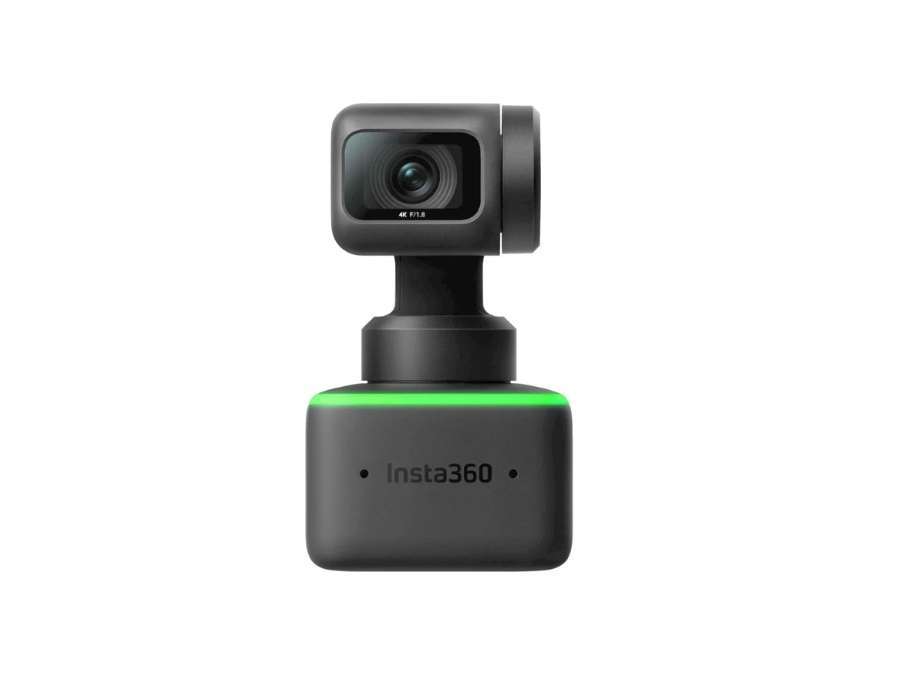
The Insta360 Link is an advanced USB camera equipped with AI tracking and 4K resolution, making it a great choice for high-quality virtual meetings. It combines cutting-edge features with ease of use, catering to professionals who need a top-tier camera experience. Let’s dive into some key details of the Insta360 Link:
Specifications:
- Resolution: 4K Ultra HD
- Frame Rate: 30 fps
- Field of View: 80 degrees
- Built-in Microphone: Dual noise-canceling mics
- Connectivity: USB-C
- Compatibility: Windows and Mac
Key Features:
- Intelligent AI Tracking: The Insta360 Link’s AI tracking keeps you centered on screen as you move, creating a dynamic presentation style. This feature is especially useful for professionals who prefer to engage more actively in video meetings.
- 4K Ultra HD Resolution: With 4K Ultra HD, the Insta360 Link offers extremely clear and detailed visuals. This level of quality enhances presentations, making it perfect for situations where image precision is key.
- Gesture Controls for Hands-Free Operation: The camera supports gesture controls, allowing you to activate functions without touching any buttons. This feature adds convenience and allows users to manage the camera effortlessly during presentations.
Takeaway Note: The Insta360 Link is ideal for business users seeking a high-quality, interactive camera experience with advanced tracking. However, its 4K capabilities may require stronger network support, which could be challenging in areas with limited bandwidth.
3 Factors to Consider When Buying a USB Camera for Laptop
Selecting the right USB camera involves focusing on features that improve video quality, privacy, and usability. The following factors highlight essential elements to keep in mind for business applications:
- Automatic Light Correction: A USB camera with automatic light correction enhances video quality by adjusting brightness and clarity in real-time, making it suitable for dimly lit offices or late-night meetings. According to Precedence Research, as businesses rely more on webcams for virtual communication, the market is projected to grow at an annual rate of 7.32%, reaching $17.18 billion by 2034.
- Built-in Shutters: Built-in shutters provide physical protection for the camera lens when not in use, adding an extra level of security and privacy. This feature is especially important in shared workspaces where accidental activation of the camera could occur. For instance, some models include easy-to-use shutters that slide or flip over the lens, offering immediate peace of mind.
- Adjustable Mounting Options: Adjustable mounting options allow a camera to be positioned at various angles to suit different setups. Cameras with clips, tripod compatibility, or flexible mounts offer greater adaptability for monitors, desks, or laptops. For example, an adjustable clip can secure the camera on a large monitor, while a tripod mount is helpful for presentations or remote workstations.
Looking for a Flexible Laptop Camera Solution?
If you’ve been exploring USB cameras for your laptop but still haven’t found the right fit, it may be time to consider a USB Camera Module. Unlike standard webcams, USB Camera Modules offer customization and adaptability, allowing integration into complex setups and meeting specific technical needs across various applications.
Consider trying the Supertek ST10-CS415 USB Camera Module for Laptops. This module delivers 4K resolution with a 5-50mm varifocal lens, combining high-quality visuals with precise focus control. Supertek offers not only advanced performance but also reliable engineering support and documentation, ideal for projects that demand precision and flexibility.
Discover how a tailored camera solution can meet the unique demands of your projects.
Conclusion
USB cameras have become essential tools for professionals, providing the clarity and reliability needed for virtual meetings and presentations. This guide offers a breakdown of the top 10 USB cameras for laptops, each with unique features to meet different business needs.
We hope this guide helps you identify the best USB camera for your laptop setup. If you’ve faced high prices when sourcing USB cameras, Supertek can offer a solution with competitive pricing tailored to meet your specific requirements. Contact us today to learn more.
Check Out These Additional Resources
If you need more options, take a look at our full range of products. You might find just what you need:
We’ve gathered a few more articles that could help you out. Check them out for more great advice:
Still haven’t found what you’re looking for? Don’t hesitate to contact us. We’re available around the clock to assist you.