
Ever wondered how businesses equip their fleets with reliable in-car cameras? Installing a camera inside a vehicle is a straightforward process that boosts safety and accountability.
As a professional in automotive technology with extensive experience in vehicle systems, my expertise guarantees that each step is optimized for functionality and durability.
Installing an in-car camera involves choosing the right tools, positioning, and ensuring proper cable management. These steps are crucial for a clean installation and effective camera performance.
In this guide, you’ll learn everything from gathering tools to testing and finalizing the setup. Each section breaks down the process into easy-to-follow steps.
Keep reading to learn more!
Quick Process Summary
Understanding the process at a glance can simplify the installation of a camera inside a vehicle. The table below provides a concise summary of the key steps involved.
| Step | Process | Description |
| Step#1 | Gather Necessary Tools and Materials | Collect the camera kit, mounting accessories, basic tools, cable management items, and a memory card. |
| Step#2 | Determine Camera Positioning | Select an optimal location on the windshield or inside the vehicle for maximum coverage and safety. |
| Step#3 | Attach the Camera Mount | Secure the mount firmly on a clean surface and adjust it for the desired angle. |
| Step#4 | Route the Power Cable | Plan and neatly route the cable along the headliner, A-pillar, and dashboard. |
| Step#5 | Connect the Power Cable | Plug the cable into the camera and vehicle’s power source, ensuring a reliable connection. |
| Step#6 | Insert and Configure the Memory Card | Insert a compatible memory card, format it, and verify its storage capacity. |
| Step#7 | Adjust Camera Settings | Optimize settings like resolution, loop recording, and time stamping for effective recording. |
| Step#8 | Test the Camera | Power on the camera and verify its functionality with test footage and feature checks. |
| Step#9 | Secure and Conceal Remaining Cables | Bundle and tuck away loose cables for a clean and organized interior. |
| Step#10 | Final Checking | Inspect the entire setup, test all features, and review the camera’s performance. |
Following this table allows for a structured approach to the installation process. By adhering to these steps, a well-functioning and neatly installed camera setup can be achieved effortlessly.
Step#1 Gather Necessary Tools and Materials
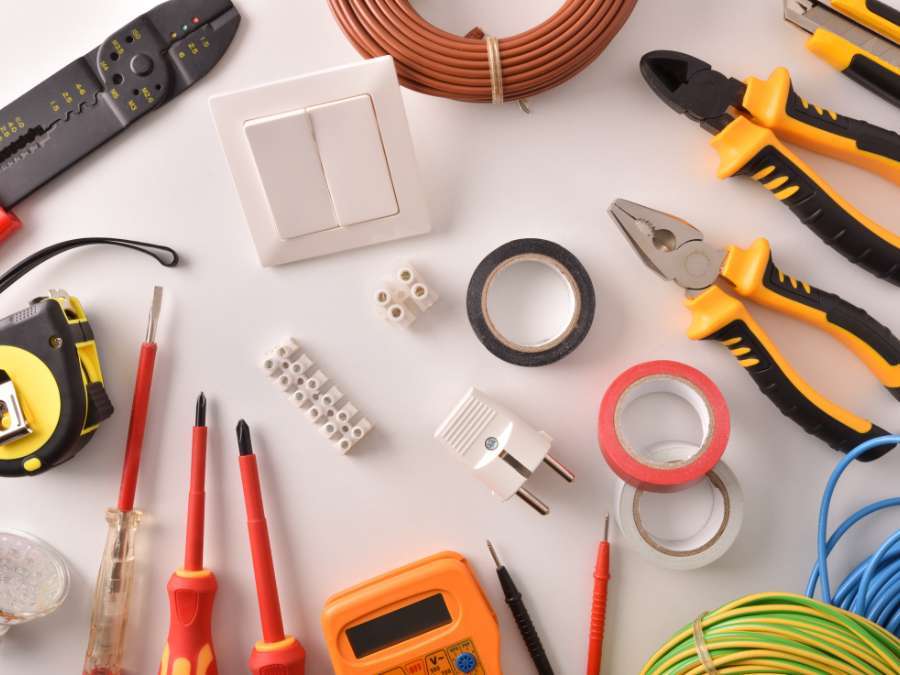
Having the right tools and materials is crucial to streamline the installation process. Here are the items needed to prepare for a smooth setup:
- Camera Kit: The kit includes the camera, mount, and power cable, which are all necessary for installation. Each component plays a vital role in the setup process. Confirm the kit is complete before beginning.
- Mounting Accessories: A suction cup or adhesive mount secures the camera to the windshield. These accessories keep the camera stable while driving. Proper mounting reduces vibrations and improves video quality.
- Basic Tools: A screwdriver and cleaning cloth are used for preparing the surface and attaching the mount. The screwdriver tightens the installation, while the cloth removes dirt for better adhesion. Both are simple yet essential tools.
- Cable Management Items: Clips or zip ties help organize and secure the power cable. They prevent cables from interfering with driving and keep the interior neat. Effective cable management enhances the installation’s appearance.
- Memory Card: A compatible memory card stores all recorded footage. It must be formatted and inserted correctly to function properly. Sufficient storage capacity is crucial for continuous recording.
Step#2 Determine Camera Positioning
Choosing the right position for the camera allows clear footage and maintains driver safety. Here are the key considerations for optimal placement:
- Optimal Location: Place the camera near the center of the windshield, just below the rear-view mirror. This spot provides a balanced view of the road ahead. It also keeps the camera discreet and unobtrusive.
- Driver’s View: The camera must be positioned so it does not obstruct the driver’s visibility. Clear visibility is vital for safe driving. Proper placement also maximizes the camera’s coverage of the road.
- Field of Vision: Adjust the camera’s angle to cover the road and surroundings comprehensively. This avoids blind spots in the footage. Proper alignment maximizes recording effectiveness.
- Interior Recording: For interior recording, select a position that captures the cabin effectively. For instance, this helps monitor passenger activities and promotes safety. The camera should blend with the interior for a seamless look.

Step#3 Attach the Camera Mount
Securing the camera mount correctly provides stability and clear footage. Follow these steps to attach the mount properly:
- Clean the Surface: Use a cleaning cloth to remove dust and debris from the mounting area. A clean surface promotes better adhesion of the mount. This step prevents the mount from loosening over time.
- Attach Firmly: Press the mount onto the windshield or dashboard firmly for a few seconds. Holding it in place allows the adhesive to bond properly. A stable mount minimizes camera shake during driving.
- Check Stability: Gently test the mount by applying light pressure to confirm it is firmly attached. A secure mount prevents the camera from shifting or falling. Regular checks help maintain stability.
- Adjust for Alignment: Align the camera properly to capture the desired view. Fine-tuning the angle guarantees the best footage. Correct alignment is key for effective recording.

Step#4 Route the Power Cable
Proper cable routing keeps the installation tidy and prevents interference. Follow these steps for efficient cable management:
- Plan the Path: Route the cable along the headliner, down the A-pillar, and under the dashboard. This pathway hides the cable and keeps it organized. Planning the route prevents tangling or obstruction.
- Secure with Clips: Use cable clips or adhesive holders to fasten the cable in place. Securing the cable keeps it from hanging loosely or interfering with controls. Clips also improve the installation’s neatness.
- Avoid Interference: Make sure the cable routing does not block airbags or other critical vehicle functions. For instance, safe routing maintains the functionality of safety features. This step protects both safety and interior cleanliness.
Step#5 Connect the Power Cable
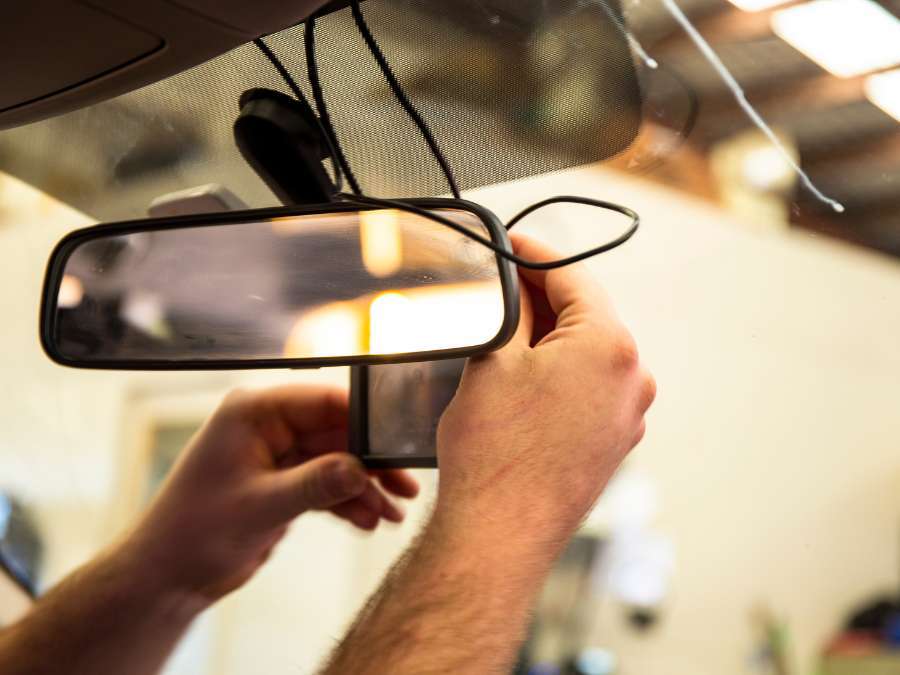
Connecting the power cable correctly is crucial for the camera’s operation. Here are the steps to establish a reliable connection:
- Insert into Camera: Plug the cable securely into the camera’s power port. A stable connection supports consistent power flow. Loose connections can cause the camera to malfunction.
- Connect to Power Source: Attach the other end to the vehicle’s power outlet or USB port. This supplies the necessary power for continuous operation. A reliable connection is vital for uninterrupted recording.
- Test Power Flow: Start the vehicle to verify that the camera powers up correctly. This confirms the connection and readiness of the system. Testing verifies the camera’s functionality.

Step#6 Insert and Configure the Memory Card
A properly configured memory card is essential for recording and storing footage. Follow these steps to set up the card effectively:
- Insert the Card: Place the memory card into the designated slot until it clicks into place. Proper insertion allows the card to be recognized by the camera. A secure fit prevents data loss during recording.
- Format the Card: Use the camera’s settings menu to format the card. Formatting prepares the card for optimal use and prevents errors. This step readies the card for smooth operation.
- Verify Capacity: Confirm that the card has enough storage to handle the required recording duration. Adequate capacity prevents interruptions during long drives. High-capacity cards are recommended for continuous use.
- Confirm Compatibility: Make sure the memory card meets the camera’s specifications. Using a compatible card avoids operational issues. It also establishes smooth recording and playback.
Step#7 Adjust Camera Settings
Adjusting the camera settings optimizes performance and recording quality. Here are the steps to configure the camera for best results:
- Access the Menu: Open the camera’s settings menu to adjust key parameters. This menu allows customization based on recording needs. Proper access facilitates smooth camera operation.
- Select Resolution: Choose a high-resolution setting for clear and detailed footage. High resolution captures finer details and enhances playback quality. Adjust according to storage capacity and usage requirements.
- Enable Loop Recording: Activate loop recording to continuously overwrite old footage. This feature keeps the camera ready to capture new events. Continuous recording is crucial for extended trips.
- Adjust Time Stamp: Set the correct date and time for accurate video logging. Accurate timestamps are important for reviewing footage later. This feature is especially useful for legal or insurance purposes.

Step#8 Test the Camera
Testing the camera confirms that the setup is complete and functional. Follow these steps to make sure everything is working correctly:
- Power On the Camera: Start the vehicle to see if the camera turns on automatically. Automatic power-on indicates a successful installation. This also shows the system is ready for immediate use.
- Record Test Footage: Capture a short video to check the camera’s angle and clarity. This footage helps assess the quality of the setup. Testing guarantees the camera covers the necessary field of view.
- Review the Footage: Playback the recorded video to make sure it is clear and stable. Reviewing verifies the camera’s functionality and performance. It also allows for necessary adjustments.
- Test Additional Features: Check functionalities like motion detection and night vision to confirm they operate properly. These features enhance the camera’s utility. Proper operation of these features is essential for full performance.
Step#9 Secure and Conceal Remaining Cables
Securing and concealing cables keeps the installation neat and professional-looking. Here are the steps to manage the remaining cables effectively:
- Bundle Excess Cable: Use cable ties or clips to bundle and secure any loose cables. Bundling prevents cables from dangling and causing distractions. It also contributes to a clean interior look.
- Tuck Under Panels: Conceal the bundled cables under the dashboard or along the interior trim. Tucking cables keeps them out of sight and protects them from damage. Proper concealment enhances the overall installation.
- Check for Obstructions: Make sure the cables do not interfere with vehicle controls or safety features. Clear routing prevents operational issues. This step helps maintain both safety and interior organization.
- Leave Some Slack: Maintain a small amount of slack for future adjustments. Slack allows flexibility in repositioning without rerouting. This makes sure that the cables remain functional over time.
Step#10 Final Checking
A thorough final check confirms that all aspects of the installation are complete. Follow these steps to confirm that the setup is ready for use:
- Inspect the Mount: Verify that the camera mount is stable and secure. A stable mount provides clear and consistent footage during drives. Regular inspections help maintain the mount’s integrity.
- Test All Functions: Confirm that all camera features, including recording and playback, are working correctly. Functional features enhance the camera’s utility. Testing enhances readiness for real-world usage.
- Check Cable Management: Review all cable management to confirm that cables are secured and concealed properly. Well-managed cables prevent distractions and enhance the interior look. Proper management also prolongs cable life.
- Review Footage Clarity: Playback a final test recording to confirm the camera captures clear and stable footage. Clear footage validates the quality of the installation. This step confirms the camera is ready for daily use.
Conclusion
Installing a camera inside your vehicle is crucial for enhancing safety and monitoring, providing clear insights during unexpected situations. Understanding the correct steps for installation, from gathering tools to final testing, ensures a seamless setup that maximizes the camera’s performance.
We hope this guide equipped you with the essential knowledge to install a car camera effectively. If concerns about high prices have held you back, Supertek provides competitively priced options without compromising on quality. Contact us today to discover how our extensive customization experience and competitive pricing can meet your needs.
Dive Deeper Into Our Resources
Looking for more diverse service options? Browse through our handpicked selections:
Still haven’t found what you’re looking for? Don’t hesitate to contact us. We’re available around the clock to assist you.


