
Looking for an affordable, easy way to upgrade your business video calls without sacrificing quality? A reliable 720p webcam can be a smart solution for professionals.
As a video technology specialist focused on affordable webcam solutions, I’ve reviewed the best models to guide your choice.
Let’s start with a look at 2 popular options:
- Logitech C270
- Microsoft LifeCam HD-3000
In this guide, you’ll discover 8 top-rated 720p webcams, exploring features, benefits, and what to consider for the right choice.
So let’s get down to it!
1. Quick Comparison Chart
When choosing the right webcam, it’s important to consider features like resolution, ease of use, and additional functionalities. This detailed comparison highlights 8 popular models, each catering to different professional and personal requirements:
| Webcam Model | Video Quality | Key Features | Ideal For |
| Logitech C270 | 720p HD | Noise-reduction microphone, automatic light correction | Budget-friendly professional calls |
| Microsoft LifeCam HD-3000 | 720p HD Widescreen | Widescreen 16:9 format, flexible mounting clip, plug-and-play setup | Business professionals needing simplicity |
| Creative Live! Cam Chat HD | 720p HD | USB plug-and-play, compatible with macOS and popular platforms | Professionals using multiple platforms |
| Ausdom AW615 | 1080p Full HD | Adjustable focus, LED activity indicator | Professionals prioritizing clarity |
| Genius WideCam F100 | 1080p Wide-Angle | 120° wide-angle lens, tripod mounting, 360° swivel rotation | Group meetings and collaborative setups |
| Wansview 101JD | 1080p Full HD | Motion detection, multi-layer coated glass lens, adjustable tilt and swivel | Remote monitoring and flexible setups |
| Anivia W8 Webcam | 1080p Full HD | Auto-focus, privacy shutter, low-light correction | Security-conscious professionals |
| Aukey PC-LM1E | 1080p Full HD | Dual microphones, anti-slip base, 75° field of view | Simple, no-fuss professional communication |
2. Logitech C270
The Logitech C270 is a well-known option for those seeking a quality 720p webcam without a high price tag. It is valued for delivering reliable video and audio performance, making it an excellent choice for small businesses and remote professionals. Here are some key features that make the Logitech C270 a standout option:
Key Features:
- 720p HD Video: The C270 captures sharp, detailed 720p HD video, providing users enjoy clarity on video calls. Its resolution is well-suited for standard virtual meetings, balancing quality with smooth streaming.
- Noise-reduction Microphone: Equipped with a noise-reduction microphone, the C270 filters out background noise. This allows for clear audio transmission, even in busier environments.
- Automatic Light Correction: Logitech’s automatic light correction adjusts to changing lighting, enhancing video quality in different settings. It’s especially useful in low-light conditions where extra lighting may not be available.
Takeaway Note:
The Logitech C270 offers clear video quality and easy setup at a budget-friendly price, making it ideal for straightforward business calls. However, it focuses on basic essentials over advanced features.

3. Microsoft LifeCam HD-3000
The Microsoft LifeCam HD-3000 is a popular choice for businesses and remote professionals who need a reliable and affordable webcam. It’s designed to deliver smooth HD video and sound quality, making it a great fit for everyday use. Here are some of its standout key features:
Key Features:
- Widescreen 16:9 Format: The LifeCam HD-3000 records in a widescreen 16:9 format, offering a broad view that’s perfect for video calls. This feature provides a more immersive and professional look on screen.
- Flexible Mounting Clip: The LifeCam HD-3000 includes a flexible clip that attaches easily to laptops or monitors. This clip offers stability and allows you to adjust the webcam’s angle to find your best view.
- Plug-and-Play Setup: The LifeCam HD-3000 is designed for easy plug-and-play functionality, making setup a breeze. This allows users to start video calls quickly, which is especially convenient for busy work schedules.
Takeaway Note:
The Microsoft LifeCam HD-3000 is an affordable, user-friendly option with clear video and sound, ideal for business calls. However, it emphasizes simplicity over advanced features, catering to users focused on basics.

4. Ausdom AW615
The Ausdom AW615 provides high-definition clarity and easy functionality, making it a reliable choice for business professionals and remote teams. Key features that enhance its performance and make it a standout option include:
Key Features:
- Full 1080p HD Video: The AW615 captures sharp 1080p HD video, delivering clear visuals for professional calls. This quality offers an enhanced viewing experience compared to standard 720p webcams.
- LED Activity Indicator: An LED light indicates when the webcam is active, providing a clear visual cue for privacy. This feature is useful in office settings, as it lets users know when the camera is on.
- Adjustable Focus: The AW615 includes adjustable focus, allowing you to maintain optimal clarity based on your needs. This feature keeps the video sharp, even if you move around within the frame.
Takeaway Note:
The Ausdom AW615 delivers high-definition video and a wide-angle view, enhancing visual clarity for professional calls. However, it’s designed for users prioritizing core features over specialized adjustments.

5. Creative Live! Cam Chat HD
The Creative Live! Cam Chat HD is designed for simple, effective video calls, catering to professionals who want quality visuals and sound without complex setup. It’s a practical choice for everyday business needs, with features that ensure reliable communication. Below are some of the key features that make it a solid option:
Key Features:
- USB Plug-and-Play Installation: The Creative Live! Cam Chat HD offers easy USB plug-and-play installation, so users can connect and start using it immediately. This setup is ideal for professionals who value quick, effortless setup.
- macOS, Zoom, Skype, Google Meet: This webcam works seamlessly with both Windows and macOS operating systems, supporting the growing demand for video conferencing as the market is projected to reach $22.5 billion by 2026, according to VLink. Compatible with popular platforms like Zoom, Skype, and Google Meet, it provides flexibility for diverse communication needs across industries.
- Clip-On Design: With a lightweight clip-on design, this webcam easily attaches to most laptop screens and monitors. It’s compact and portable, perfect for users who work in multiple locations or need easy storage.
Takeaway Note:
The Creative Live! Cam Chat HD is a solid option for 720p video and noise-reduction audio, perfect for standard business calls. However, it focuses on simplicity, ideal for straightforward communication.

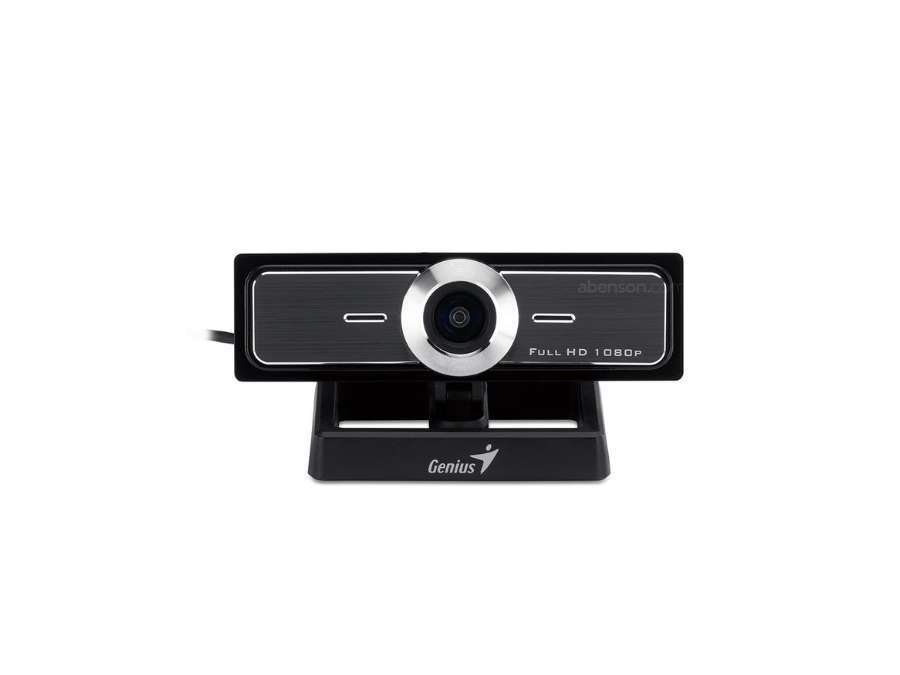
6. Genius WideCam F100
The Genius WideCam F100 is a versatile webcam designed to enhance video conferencing experiences, especially in group settings. Its wide-angle lens and high-definition capabilities make it suitable for business meetings and collaborative environments. Here’s a look at the key features that make the WideCam F100 a valuable choice:
Key Features:
- 120-Degree Wide-Angle Lens: The WideCam F100 features a 120-degree wide-angle lens, providing an extended view that captures more participants without the need to reposition the camera.
- Tripod Mounting: The WideCam F100 includes a standard tripod mounting hole, offering flexibility in positioning and added stability during extended calls or recordings.
- 360-Degree Swivel Rotation: The webcam’s 360-degree swivel feature allows users to easily adjust the angle for optimal framing. This flexibility is ideal for capturing different views or accommodating multiple people in the shot.
Takeaway Note:
The Genius WideCam F100 offers a wide-angle view and 1080p quality, ideal for group calls. However, it prioritizes essential features, perfect for users seeking straightforward, reliable functionality.
7. Wansview 101JD
The Wansview 101JD is a practical webcam option designed with security features and high-definition video, making it suitable for business communication and remote monitoring. Its combination of video quality and ease of use makes it a solid choice for professionals. Below are the key features that make the Wansview 101JD stand out:
Key Features
- Motion Detection: Equipped with motion detection capabilities, this webcam alerts users to any movement in the frame. This feature is valuable for remote monitoring or additional security during off-hours.
- Adjustable Tilt and Swivel: The Wansview 101JD offers adjustable tilt and swivel options, allowing users to find the best angle for their setup. This flexibility is particularly useful for users who frequently adjust their workspace.
- Multi-Layer Coated Glass: The Wansview 101JD uses multi-layer coated glass for its lens, which reduces glare and enhances video clarity. This high-quality lens material provides sharper images and greater scratch resistance.
Takeaway Note:
The Wansview 101JD is a practical, user-friendly webcam designed for professionals seeking clear video communication. However, it focuses on essential features, making it ideal for straightforward, flexible use.

8. Anivia W8 Webcam
The Anivia W8 Webcam offers straightforward functionality and clear HD video, making it a reliable choice for everyday business communication. With features aimed at delivering ease of use and consistent quality, this webcam is well-suited for virtual meetings and professional calls. Here’s a breakdown of the key features:
Key Features:
- Auto-Focus Function: This webcam includes auto-focus, which automatically adjusts to keep the image sharp. It’s helpful for users who move around slightly during calls, maintaining consistent clarity.
- Privacy Shutter: The W8 Webcam includes a privacy shutter that can be slid over the lens when the camera is not in use. For example, this feature is especially useful for preventing unauthorized access and providing users with an added sense of security and privacy.
- Low-Light Correction: With automatic low-light correction, the Anivia W8 adjusts to dim lighting to maintain visibility. This feature provides clear visuals even in low-light settings, reducing the need for additional lighting equipment.
Takeaway Note:
The Anivia W8 Webcam is a straightforward, portable option offering clear video and simple setup. However, it emphasizes basic features, ideal for users focused on reliable, no-frills communication.

9. Aukey PC-LM1E
The Aukey PC-LM1E is a user-friendly webcam designed for professionals seeking clear video quality and easy setup. With its practical features, it’s well-suited for everyday business calls and online meetings. Let’s take a look at the key features that make the Aukey PC-LM1E a valuable choice:
Key Features:
- Dual Microphone: The PC-LM1E has 2 microphones that work together to capture sound in stereo. This means the audio sounds clear and natural, like real life. It’s especially useful for video calls, so you can talk without needing an extra microphone.
- Anti-Slip Base: The webcam has a special base that keeps it steady on laptops or monitors. It won’t slip or move around, and it also prevents scratches on your devices. This makes it sturdy and safe to use.
- 75-Degree Field of View: With a 75-degree field of view, the webcam captures a comfortable angle suitable for individual calls or small groups. This feature provides a wide enough view to include more background while avoiding lens distortion.
Takeaway Note:
The Aukey PC-LM1E offers clear 1080p video and stereo audio, ideal for professional calls. However, it focuses on straightforward features, making it perfect for reliable, no-fuss communication.

3 Tips to Consider When Choosing a 720p Webcam
A 720p webcam is an affordable option that delivers good video quality for most everyday needs. Whether you’re using it for work, online classes, or casual video calls, picking the right one can make a big difference. Here are some practical tips to help you choose wisely:
#1 90° FOV
Consider the field of view that best fits your needs. A 90° FOV, for example, is ideal for capturing a broader area, making it great for group meetings or presentations. A wider field of view can also be useful for showcasing more of your surroundings or including multiple people in the frame.
#2 Plug-and-Play Compatibility
Choose a plug-and-play webcam for easy setup without additional software. This is perfect for users who need a hassle-free installation process and convenience. It also minimizes troubleshooting, making it ideal for beginners, quick setups, or shared office use.
#3 H.264
Look for webcams that support video compression formats like H.264. This feature provides high-quality video while consuming less internet bandwidth. Efficient compression also helps during live streaming or video conferencing with limited data speeds.
Need a Reliable Camera Module for Your Webcams?
If the list of 720p webcams above doesn’t fully match your requirements, consider exploring camera modules as an alternative. These modules provide video quality comparable to 720p webcams while offering advantages like a compact design and easier integration for customized setups. They are ideal for projects that demand flexibility and tailored solutions.
Supertek’s SC201CS camera module is perfect for those seeking the functionality of a 720p webcam in a more customizable format. It provides excellent image quality and versatility, making it a great choice for both personal and professional projects. By choosing Supertek, you gain access to dependable products tailored to fit diverse applications.
Discover the difference a custom camera module can make in achieving your perfect 720p webcam setup!
Conclusion
The 8 webcams featured in this blog offer a range of options for users who need reliable video quality for business calls and meetings. Each model brings unique features, from HD resolution to noise-reducing microphones, to fit different professional needs.
We hope this guide has helped you find the right webcam for your requirements. If you’re looking for a camera module for your webcam and are tired of dealing with camera optimization issues, Supertek offer a dependable solution. We stand out with high-quality raw materials for long-lasting performance in every module. For further assistance, contact us to learn more.
Dive Deeper Into Our Resources
Looking for more diverse service options? Browse through our handpicked selections:
Still haven’t found what you’re looking for? Don’t hesitate to contact us. We’re available around the clock to assist you.


